
What You’ll Learn
- Creating custom email templates for Pro Reports
- Replacing dynamic logo code with a static URL
- Uploading templates to the correct directory
- Selecting custom email templates in reports
Extension Add-on - This add-on provides standalone functionality within MainWP Dashboard. No third-party plugins required.
1
Locate the default email template file
Locate one of the default email templates in the
/mainwp-pro-reports-extension/templates/emails/ path. NOTE: You can download the MainWP Pro Reports Extension from your MainWP Account, or you can navigate to this path using FTP client.2
Copy the PHP file of one of the templates (in this example we will be using pro-report-email-modern.php) and rename it to a new desired filename
Copy the PHP file of one of the templates (in this example we will be using
pro-report-email-modern.php) and rename it to a new desired filename3
Open the new PHP file in your favorite code editor
Open the new PHP file in your favorite code editor
- Locate these three lines

- And replace them with just one line with a hardcoded URL from your MainWP Dashboard that contains the desired logo

4
Once you are finished with the customization and the template is ready, upload the PHP file the /wp-content/uploads/mainwp/report-email-templates/ directory on your Dashboard site
Once you are finished with the customization and the template is ready, upload the PHP file the
/wp-content/uploads/mainwp/report-email-templates/ directory on your Dashboard site5
Once uploaded, the template will be available in the Email template dropdown
Once uploaded, the template will be available in the Email template dropdown 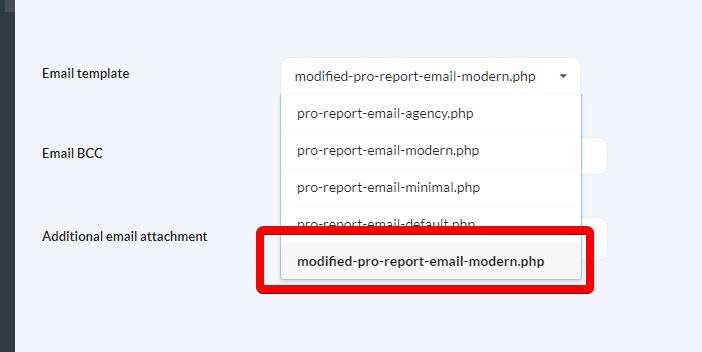
Related Resources
- Create Custom Report Templates - Build custom PHP templates
- Pro Reports Extension - Main Pro Reports documentation
- Available Pro Reports Tokens - Complete token reference