
What You’ll Learn
- Copying a built-in Pro Reports email template
- Renaming and editing the template file
- Customizing the email HTML and footer content
- Uploading and selecting a custom email template
Extension Add-on - This add-on provides standalone functionality within MainWP Dashboard. No third-party plugins required.
/mainwp-pro-reports-extension/templates/emails/ directory. Custom email templates are loaded from /wp-content/uploads/mainwp/report-email-templates/ and become available in the Email template dropdown when you edit a report.
Examples of built-in email templates include pro-report-email-default.php, pro-report-email-minimal.php, pro-report-email-modern.php, and pro-report-email-agency.php.
Create a custom email template
1
Download a copy of the MainWP Pro Reports Extension
Download the extension ZIP file from your MainWP Account so you can access the built-in email template files.
2
Locate a built-in email template
Open the
/mainwp-pro-reports-extension/templates/emails/ directory and choose one of the existing email templates as your starting point.3
Copy and rename the template file
Copy the selected PHP file and rename it to a unique filename for your custom template.
4
Edit the copied PHP file
Open the copied file in your code editor and update the HTML and PHP markup as needed. If you want to change the footer contact details, edit the footer section near the end of the template file.
5
Upload the custom template to your Dashboard site
Upload the finished PHP file to the
/wp-content/uploads/mainwp/report-email-templates/ directory on your MainWP Dashboard site.6
Select the custom template in the report
Open or edit your Pro Report, choose the uploaded file from the Email template dropdown, and save the report. The custom template will now be used for that report’s email output.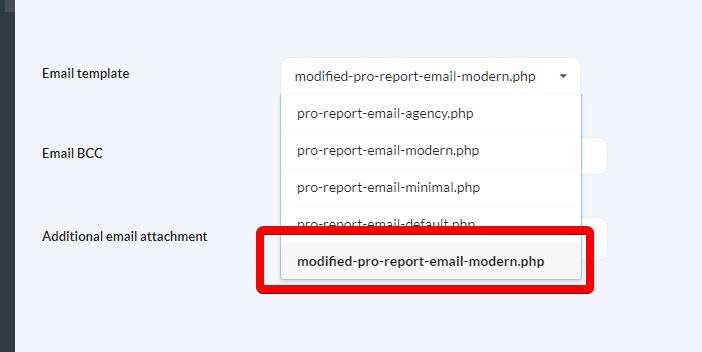
Related Resources
- Pro Reports - Main Pro Reports documentation
- Create Custom Report Templates - Build custom PHP templates
- How to use a different logo for the Pro Reports email only - Customize email-only branding