
What You’ll Learn
- Installing the SEOPress for MainWP plugin on MainWP Dashboard
- Managing SEO settings on individual child sites
- Applying global SEO settings across multiple sites
- Exporting and importing configurations between sites
SEOPress for MainWP is a free add-on that allows you to manage the SEO parameters of all connected Child Sites on which you have installed the SEOPress plugin. SEOPress Free must be installed and activated on your MainWP Dashboard site and at least one Child Site. SEOPress PRO is optional, but if you use it, it must also be installed and activated on the Dashboard site and at least one Child Site. The minimum supported versions are:
- SEOPress Free on the MainWP Dashboard and at least one Child Site (5.9+)
- SEOPress PRO on the MainWP Dashboard and at least one Child Site (5.9+, optional)
- MainWP Dashboard (4.2.7+)
- MainWP Child on at least one Child Site (4.2.6+)
Install SEOPress for MainWP on MainWP Dashboard
The SEOPress for MainWP plugin is available in the WordPress plugin directory. Installing it is just like installing a regular plugin.- From inside the wp-admin of your MainWP Dashboard, navigate to Plugins -> Add New.
- Search for “SEOPress for MainWP”.
- Install and Activate the plugin.
- Get into your MainWP Dashboard, navigate to Add-ons -> Posts/Pages -> SEOPress, and start using it.
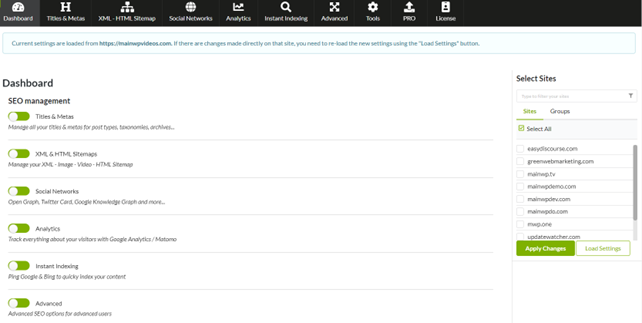
Manage Settings on One Child Site
From the MainWP Dashboard, navigate to Add-ons -> Posts/Pages -> SEOPress.1
Select exactly one Child Site and click Load Settings.
Select exactly one Child Site in the site selector and click Load Settings.
2
The selected Child Site's SEOPress settings will be loaded.
3
Navigate through the SEOPress tabs and adjust the settings as needed.
4
Click Apply Changes to send the updated settings to the selected Child Site.
Manage SEOPress Global Settings on Selected Child Sites
From the MainWP Dashboard, navigate to Add-ons -> Posts/Pages -> SEOPress.1
Navigate through the SEOPress tabs and adjust the settings you want to apply.
2
Select the Child Sites that should receive the new settings.
3
Click Apply Changes.
Export a Configuration from One Child Site and Import It to Selected Child Sites
From the MainWP Dashboard, navigate to Add-ons -> Posts/Pages -> SEOPress -> Tools.1
Click Export.
2
Select a Child Site and click Export Settings.
3
Copy the JSON-formatted settings from the export panel.
4
Click Import.
5
Paste the exported settings, select one or more Child Sites, and click Import Settings.
Related Resources
- Yoast SEO Extension - Alternative SEO management add-on
- Posts/Pages Add-ons - Browse content management add-ons