
What You’ll Learn
- Saving post and page drafts on your Dashboard
- Publishing and editing saved drafts
- Randomizing authors, categories, and dates
- Using the Post Plus randomizer options
- Ability to save post and page drafts on your MainWP Dashboard
- Ability to set random metadata for your posts and pages
Drafts
Extending your MainWP Dashboard with this tool gives you the ability to save drafts while creating new posts and pages. A quick one-button click will save your work in progress without worrying about losing your current work.Post Plus Randomizer
This addition to your Add New Post/Page screen is the Post Plus meta box. This will allow you to randomize metadata for your content giving the appearance of multiple active bloggers. Simply selecting options to randomize, you can have random authors for your posts or pages, assign posts to random categories, and have randomly picked publishing dates. You can also narrow the randomized data to specific user roles and a date range.Save Draft
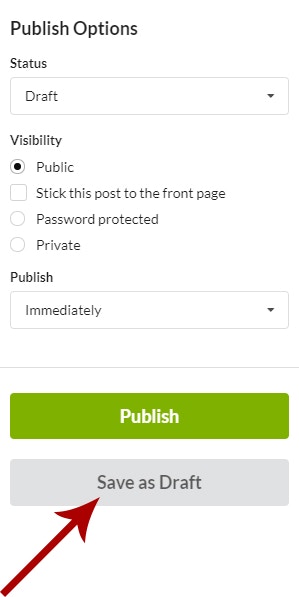
Save Post Draft
Log in to your MainWP Dashboard
Go to the Sites > Content Operations > Add New page for posts
Start creating a new post
Click the Save as Draft button when you want to save your current progress
Save Page Draft
Log in to your MainWP Dashboard
Go to the Sites > Content Operations > Add New page for pages
Start creating a new page
Click the Save as Draft button when you want to save your current progress
Publish Draft
Drafts can be published in 2 ways.- Directly from the Drafts page
- From the Draft Edit mode
Publish Post Draft from the Drafts page
Log in to your MainWP Dashboard
Go to the Sites > Content Operations > Manage Posts > Drafts page
Locate the draft that you want to publish
Click the Publish action
Publish Page Draft from the Drafts page
Log in to your MainWP Dashboard
Go to the Sites > Content Operations > Manage Pages > Drafts page
Locate the draft that you want to publish
Click the Publish action
Publish Post Draft from the edit mode
Log in to your MainWP Dashboard
Go to the Sites > Content Operations > Manage Posts > Drafts page
Locate the draft that you want to publish
Click the Edit action
If needed, edit wanted fields
Click the Publish button in the Publish section
Publish Page Draft from the edit mode
Log in to your MainWP Dashboard
Go to the Sites > Content Operations > Manage Pages > Drafts page
Locate the draft that you want to publish
Click the Edit action
If needed, edit wanted fields
Click the Publish button in the Publish section
Edit Draft
Edit Post Draft
Log in to your MainWP Dashboard
Go to the Sites > Content Operations > Manage Posts > Drafts page
Locate the draft that you want to edit
Click the Edit action
Edit wanted fields
- If you want to save draft updates, click the Save as Draft button
- if you want to publish the post, click the Publish button
Edit Page Draft
Log in to your MainWP Dashboard
Go to the Sites > Content Operations > Manage Pages > Drafts page
Locate the draft that you want to edit
Click the Edit action
Edit wanted fields
- If you want to save draft updates, click the Save as Draft button
- if you want to publish the page, click the Publish button
Delete Draft
Delete Post Draft
Log in to your MainWP Dashboard
Go to the Sites > Content Operations > Manage Posts > Drafts page
Locate the draft that you want to delete
Click the Delete action
Delete Page Draft
Log in to your MainWP Dashboard
Go to the Sites > Content Operations > Manage Pages > Drafts page
Locate the draft that you want to delete
Click the Delete action
Set Random Metadata
If you want to use a random Author or Publishing date for your Posts or Pages, you can do it by using the options in the Post Plus section. Random Category is available for posts. The Extension adds this section to both:
- Sites > Content Operations > Add New page for posts
- Sites > Content Operations > Add New page for pages
Set Random Author
If you want to assign a random author for a post or page,Select the Set random author with privilege option
Select roles
 The Post Plus Extension will set random (existing) users from the selected role(s) from your child site and assign the post. As a result, the article will have a different author on each of your child sites.
Set Random Category
If you want to set a random category, select the Set random category option. The Extension will pick one of the existing categories from your child site and assign the post.
Set Random Publishing Date
To set a random publishing date,Check the Set random publishing date in date range checkbox
Optionally set a date range
 If you set a specific date range, the Extension will pick a random date from the range. If you leave the range blank, the Extension will pick a random date between now and seven days from now. As a result, the article will have different publishing dates on each of your child sites.
Related Resources
- Posts/Pages Add-ons - Browse all content tools
- Manage Posts - Post management guide
- Boilerplate Extension - Reusable content templates