
openssl.cnf file contains OpenSSL configuration settings used by PHP for cryptographic operations. You may need to locate this file when troubleshooting SSL-related errors or configuring MainWP’s encryption features.
What You’ll Learn
- How to find the openssl.cnf file path using phpinfo()
- Common file locations for local development environments
- How to locate the file on web hosts
Using phpinfo() (Recommended)
The most reliable way to find the openssl.cnf file is through PHP’s info page.1
Access phpinfo
Create a PHP file with
<?php phpinfo(); ?> or use your hosting control panel’s PHP info tool.2
Find OpenSSL section
Search or scroll to the OpenSSL settings section.
3
Locate the config path
Find the Openssl default config row. The file path is listed there.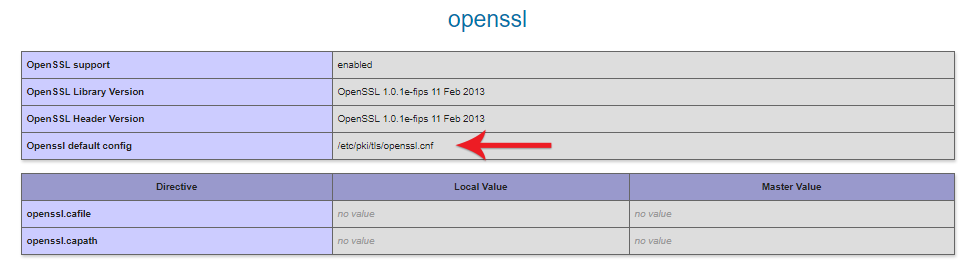
Common Paths on Local Development Environments
XAMPP (Windows)
WAMP (Windows)
MAMP (Windows/macOS)
Local by Flywheel
- Click the i icon beside the site’s PHP version to open the PHP info page
- Scroll to the openssl section
- Check the value of Openssl default config
Laragon (Windows)
The Apache version number in the path (
httpd-2.4.47-win64-VS16) varies with updates.Web Hosting Environments
On web hosts, use the phpinfo() method described above to find the exact path. If you cannot locate the file through phpinfo(), contact your hosting provider’s support team. They can provide the exact path to the openssl.cnf file on their server configuration.Self-Check Checklist
- Created phpinfo() file or accessed hosting control panel PHP info
- Located OpenSSL section in phpinfo output
- Found the Openssl default config path
- Verified the file exists at the listed path
Related Resources
- OpenSSL Key Encryption - Private key encryption in MainWP
- Custom Signature Algorithm - PHPSecLib alternative to OpenSSL