
Install in Claude Desktop
Use these steps in the Claude Desktop chat app. The MainWP extension connects Desktop chats to your MainWP Dashboard. The Claude Code CLI instructions follow below. You need Claude Desktop for macOS or Windows, an HTTPS MainWP Dashboard, and a WordPress Application Password for a Dashboard user with themanage_options capability. See the Dashboard requirements and Application Password instructions.
1
Download the MainWP extension
Download mainwp-mcp.mcpb from the official MainWP release. Save the file on the computer that runs Claude Desktop.
2
Open the extension installer
Open Claude Desktop’s Settings. On macOS, choose Claude → Settings… from the menu bar. Go to Extensions → Advanced settings → Install extension.Select
mainwp-mcp.mcpb. In the macOS file picker, click Preview to open the extension details.3
Install MainWP
Check that the extension is named MainWP and shows All requirements met. Review the extension notice, click Install, and confirm Install in the next dialog. If MainWP is already installed, the first button is Update.
4
Save your Dashboard connection
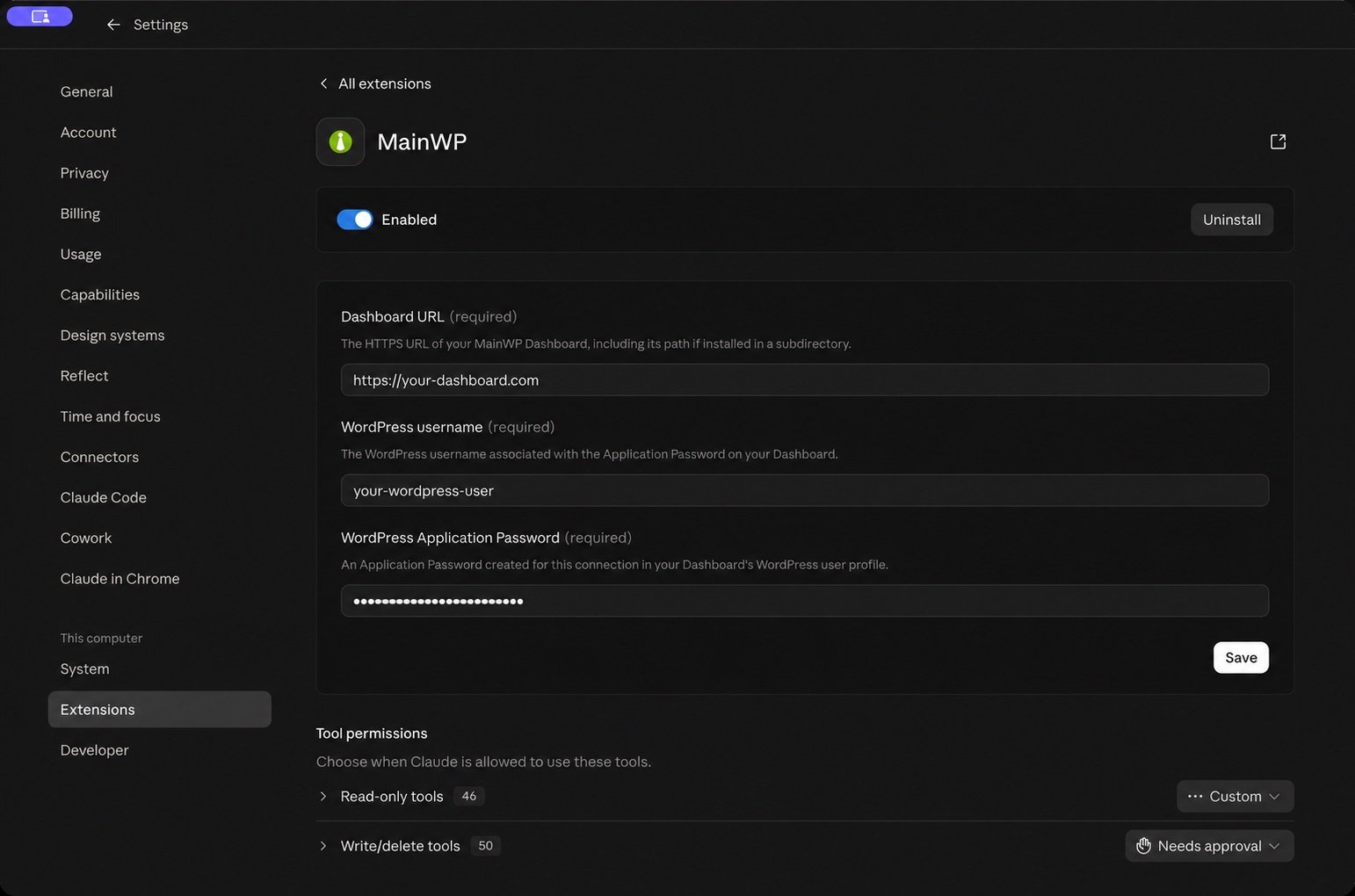
Under Settings → Extensions → Installed on your computer, find MainWP and click Configure. Enter:
-
Dashboard URL (required): your Dashboard’s full HTTPS address, such as
https://your-dashboard.com. - WordPress username (required): the login name of the user who owns the Application Password.
-
WordPress Application Password (required): that user’s Application Password.
5
Choose how Claude can use MainWP tools
On the MainWP configuration page, scroll to Tool permissions. Claude Desktop separates Read-only tools from Write/delete tools.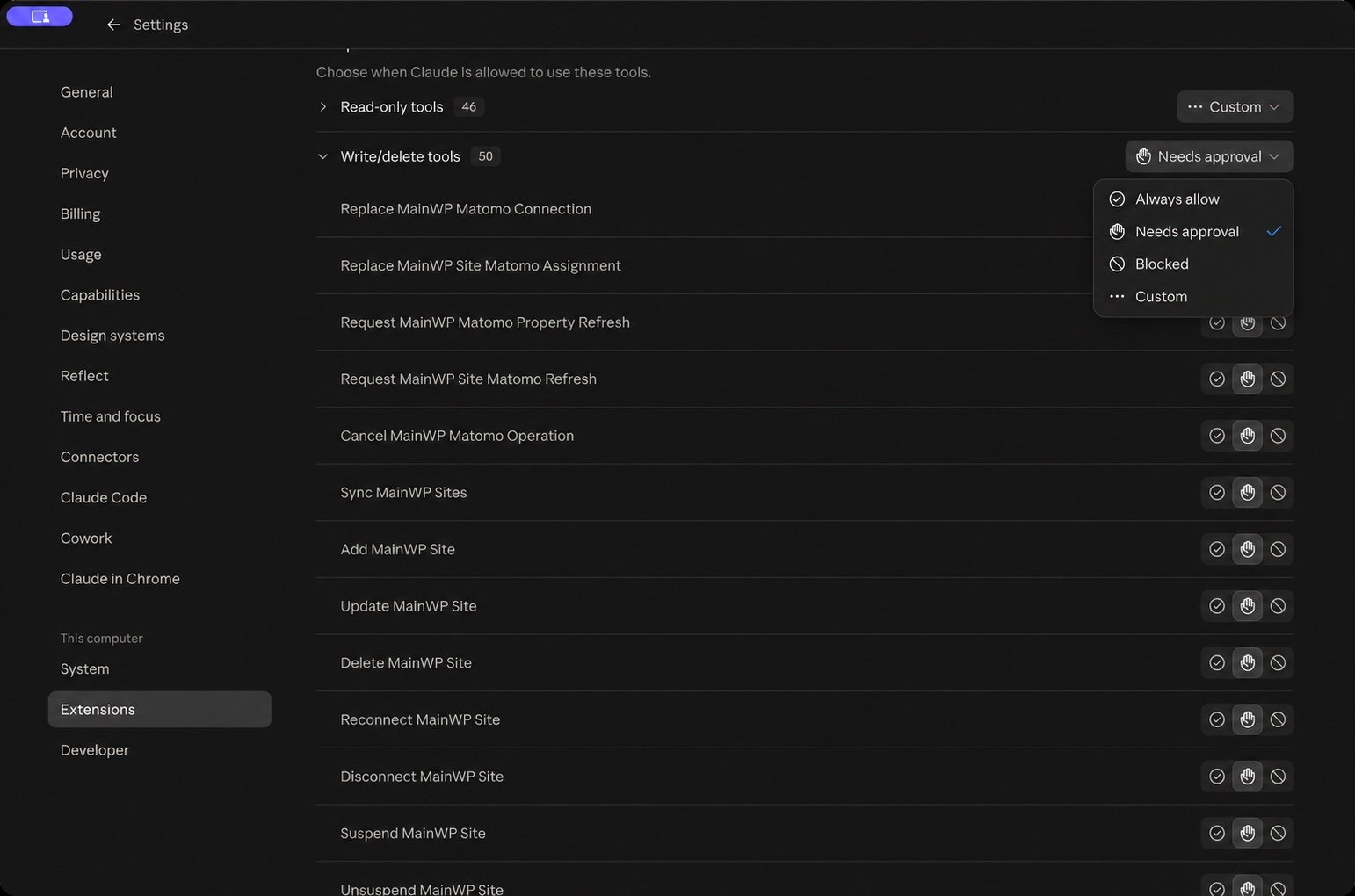
6
Test the connection in a Desktop chat
Return to Claude and start a new chat. Ask:
Use MainWP to list all my sites. Do not change anything.If Desktop asks to use a MainWP tool, click Allow once. A working connection returns your child sites. If Claude reports a connection problem, correct it under MainWP → Configure; see the Desktop troubleshooting guide.
Make changes from Claude Desktop
Claude Desktop can make WordPress site changes through MainWP when the required write tool is available and permitted. A read-only connection can inspect sites and prepare recommendations; it cannot apply those changes.- Open Settings → Extensions → MainWP → Configure → Tool permissions.
- Under Write/delete tools, find the operation you need and select Needs approval. A tool set to Blocked cannot run.
-
In a new Desktop chat, name the child site and the exact change. For example, if Hello Dolly is installed but inactive on a test site:
Activate Hello Dolly on Example Test Site. Leave every other plugin unchanged.
Replace “Example Test Site” with your child site’s name. - Review the requested tool and its inputs. Click Allow once to permit that call. This allows one call; Always allow changes the tool’s permission for future calls.
- Hello Dolly activation is classified as non-destructive, so this example has no separate MainWP confirmation. If MainWP returns a confirmation for a destructive operation, review it and explicitly approve the stated change in the chat. Desktop’s tool approval and MainWP’s server confirmation are separate steps.
- Ask Claude to check the result, then verify it on the child site.
Desktop approval does not override MainWP’s server settings. A read-only tool allowlist removes write tools; safe mode blocks operations classified as destructive. Safe mode alone is not read-only because some permitted operations still change sites. Keep MainWP’s
requireUserConfirmation enabled. See Safety & Permissions and Restrict Tools.
For the Desktop bundle, put safeMode, allowedTools, blockedTools, and requireUserConfirmation in ~/.config/mainwp-mcp/settings.json. The bundle’s Configure form has only the three connection fields. Turn the extension off and on after changing the file; see the configuration file instructions.
For download verification, connection fields, updates, and troubleshooting, see the Claude Desktop bundle guide.
Claude Code CLI plugin
The Claude Code plugin includes the MCP server, themainwp-dashboard agent skill, and ten /mainwp:* workflow commands.
Before you start with Claude Code CLI
You need Claude Code CLI installed and signed in, Node.js 20.19 or later withnpx, and an HTTPS connection to your MainWP Dashboard. Create a WordPress Application Password for a Dashboard user with the manage_options capability, which WordPress administrators have; see Application Passwords.
Install in Claude Code CLI
1
Open your terminal
Run the installation commands from your shell:If you already have an interactive Claude Code session open, use these slash commands there instead:Both forms install the same plugin. Choose one form for the place where you are working.
2
Configure your Dashboard connection
Set your Dashboard URL, WordPress username, and Application Password in the environment that launches Claude Code or the central
settings.json file. The credentials and settings section below explains both sources.3
Start a new Claude Code session
Run
claude in your terminal. If a session was already open, restart it after changing connection settings. For a plugin installation with no connection-setting changes, you can run /reload-plugins in the existing session.4
Verify the connection
Run
/mainwp:setup, then ask:List all my sitesA working connection returns your child sites by name and URL. Use
/mainwp:tools to inspect the capabilities available on your Dashboard.Credentials and settings
The plugin carries no credential values. The server it starts inheritsMAINWP_URL, MAINWP_USER, and MAINWP_APP_PASSWORD from the environment Claude Code runs in, so export them in the shell profile (or launcher) that starts Claude Code. A central ~/.config/mainwp-mcp/settings.json works too; see the Configuration Reference.
The server checks ./settings.json in its working directory first and uses only the first file it finds, so a settings file in the folder where you start Claude Code takes precedence over the central file; the files are not merged.
Optional settings, such as safe mode or tool filters, can also come from that environment or the central settings.json. Environment variables take precedence over file settings. The plugin ships no env map of its own.
Read-only access and making changes
Installing the plugin does not make your MainWP Dashboard read-only. What Claude can do depends on the tools exposed by the server, its configuration, and the permissions of the WordPress user whose Application Password you use. Claude Code’s own tool permissions can also prevent a call.
For strictly read-only access, use the read-only tool allowlist. Safe mode alone is not read-only; on Dashboards before 6.3, it also permits updates.
To carry out a change, the tool for that operation must be available: include it if you use
allowedTools, and make sure blockedTools does not exclude it. Safe mode must be off for a destructive operation. Keep requireUserConfirmation enabled, review the preview or confirmation request, and approve the specific operation before Claude executes it. Approval cannot override safe mode, tool filters, or WordPress permissions. See Safety & Permissions.
Most /mainwp:* commands below inspect data or prepare a plan. For example, /mainwp:update-workflow prepares an update plan for review; it does not apply updates automatically. Ask Claude to carry out the changes you want after reviewing the plan. In a read-only session, you must first change the server configuration to expose the required write tools and restart Claude Code.
If you already added a mainwp server by hand
Claude Code suppresses a plugin MCP server that duplicates a manually configured one, matching on the command and args. A hand-added mainwp entry that runs the standard npx -y @mainwp/mcp wins silently: the plugin’s server never starts, and the plugin still contributes its commands and skill. A manual entry that runs anything else (a pinned version, a local checkout) is not a duplicate, so both servers start. The plugin’s copy reads its launching environment and the first settings.json it finds, with environment variables taking precedence.
Run claude mcp list, or /mcp in a Claude Code session, to check which MainWP server is active before relying on its configuration.
To switch to the plugin’s server:
- Move everything in the manual entry’s
envblock (credentials and anyMAINWP_*settings such as safe mode or tool filters) into the environment that launches Claude Code, or into the corresponding fields in the firstsettings.jsonthe server will load. It checks./settings.jsonin its working directory before~/.config/mainwp-mcp/settings.json; the files are not merged. - Remove the manual entry.
env map by design. Preserve those values in the launching environment or the settings file the server will load before removing the manual entry, or the plugin’s server may start without credentials or with different settings than before.
The agent skill
Themainwp-dashboard skill loads automatically when a task involves managing sites through MainWP. It teaches the agent how this server behaves: the tool catalog comes from your Dashboard at runtime and varies with version, add-ons, and filtering; destructive operations stop for user confirmation; safe mode blocks destructive calls at execution, tool filtering can remove tools on purpose, and the agent reports either rather than working around it.
Workflow commands
/mainwp:site-report and /mainwp:troubleshoot-site accept a site ID or name. With no argument, they list your managed sites and ask which one you want.
/mainwp:backup-status, /mainwp:security-audit, and /mainwp:update-workflow take site IDs or all for their site scope. /mainwp:performance-check takes one site ID or all. An empty site scope means every managed site. Commands resolve the requested sites against your Dashboard and stop if a supplied site cannot be found.