
What You’ll Learn
- Review Cost Summary widgets
- Add, edit, and delete cost entries
- Import multiple cost entries from CSV
- Configure currencies, product types, and payment methods
- Understand what the Cost Tracker Assistant add-on extends
- Use Cost Tracker REST API endpoints
Prerequisites
- MainWP Dashboard installed and activated
- At least one child site, client, or tag available for cost assignment
Cost Summary page
Cost Summary is a widgetized page that provides a visual breakdown of costs associated with clients and child sites. Widgets can be resized, rearranged, and disabled in Page Settings.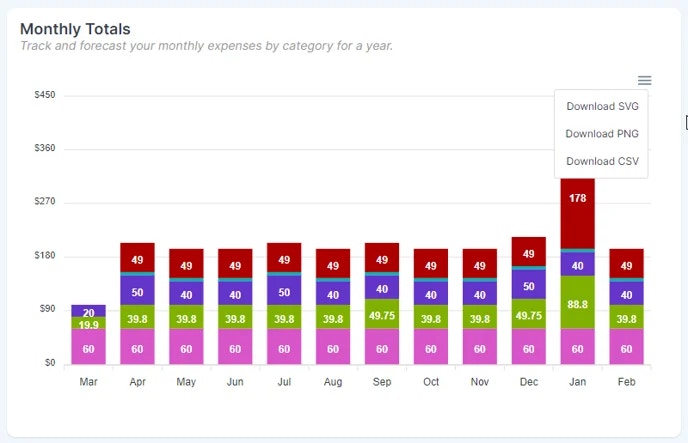
Manage Costs page
Manage Costs is the central table for reviewing, filtering, and updating all tracked costs. You can filter by Sites, Clients, subscription type, payment method, and more, then save filters as segments for reuse.Adding a New Cost
1
Open Add New
Go to Costs > Add New.
2
Enter cost details
Provide the name, pricing, type, product category, payment method, and purchase date.
3
Assign sites, clients, or tags
From the right sidebar, select related sites, clients, or tags.
4
Save the cost entry
Click Save Cost Tracking Item.
Import Costs (CSV)
Use CSV import to add multiple cost entries in one run.1
Open Import Costs
Go to Costs > Import Costs.
2
Prepare your CSV file
Click Download Sample, then keep the same column order in your file.
3
Upload and start import
Upload your
.csv file, keep CSV file contains a header enabled if your file has a header row, then click Import Operational Costs.4
Review results
Watch the row-by-row import log in the modal. Use Pause and Continue during import, and use Try Again after fixing failed rows.
CSV columns and formats
The importer skips lines that start with
# and treats them as comments.Edit or Delete an Item
- Go to Costs > Manage Costs.
- Find the item and open the ellipsis menu.
- Choose Edit or Delete.
Settings page
Go to Settings > Cost Tracker Settings to configure:- Currency and currency symbol position
- Thousand and decimal separators
- Decimal places
- Default product categories
- Custom payment methods
Widgets and table information
Cost-related widgets are available on individual site Operations and client overview pages for quick visibility. Manage Clients and Manage Sites tables include Cost Tracker columns showing 30-day cost forecasts.Cost Tracker Assistant add-on
Cost Tracker Assistant is the add-on that adds extra functionality to the core Cost Tracker feature, including:- Subscription expiration notifications
- Faster cost entry when installing plugins or themes from ZIP files
Cost Tracker REST API
For automation and integrations, use the Cost Tracker endpoints in MainWP REST API:Related Resources
- Cost Tracker Assistant - Add-on that adds advanced Cost Tracker workflows
- Manage Clients - Manage client records and relationships
- Client Add-ons - Browse client-focused add-ons