
What You’ll Learn
- Identify when 20i’s WAF is blocking connections
- Find your Dashboard IP address and User-Agent
- Request a whitelist from 20i support
Prerequisites
- MainWP Dashboard installed and activated
- A child site hosted on 20i
- Your Dashboard IP address
Symptoms
You may be experiencing 20i WAF blocking if:- Connection attempts time out or fail
- Error message states “MainWP Child plugin not detected”
- Connection test returns a 403 or 406 status code
- Other child sites connect successfully but 20i-hosted sites don’t
Find Your Dashboard Information
Before contacting 20i support, gather the required information.Dashboard IP Address
1
Navigate to Server Information
In your MainWP Dashboard, go to MainWP > Info > Server.
2
Locate Server IP
Find the Server IP field and note the IP address.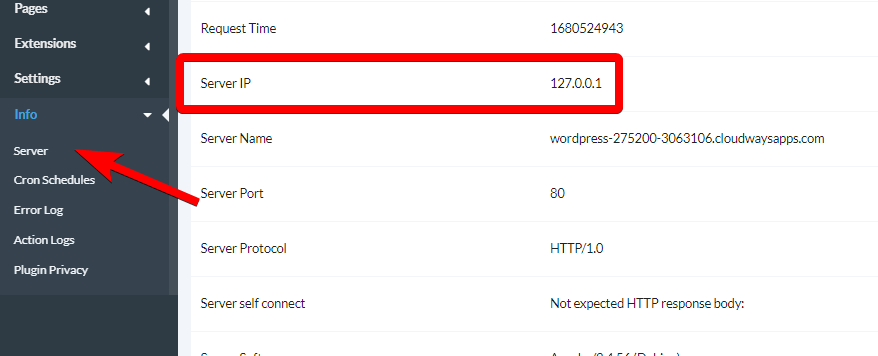
If the Server IP shows a local address (like 127.0.0.x or 10.x.x.x), contact your Dashboard hosting provider to get the external IP address. Alternatively, check your hosting control panel for the server’s public IP.
MainWP User-Agent
MainWP uses this User-Agent string for all requests:Contact 20i Support
1
Open a support ticket
Contact 20i support through their help desk or live chat.
2
Request whitelist
Ask them to whitelist your MainWP Dashboard in their WAF. Provide:
- Your Dashboard IP address
- The MainWP User-Agent string
- The child site domain that needs to connect
3
Wait for confirmation
20i support will update their WAF rules. This typically takes a few hours.
4
Test connection
After 20i confirms the whitelist is in place, attempt to connect or reconnect the child site from your Dashboard.
Sample Support Request
You can use this template when contacting 20i:Hi, I’m trying to connect my WordPress site [your-child-site.com] to my MainWP Dashboard management system. The connection is being blocked by your WAF. Please whitelist the following:Thank you.
- IP Address: [Your Dashboard IP]
- User-Agent: Mozilla/5.0 (compatible; MainWP/4.0; +http://mainwp.com)
Self-Check Checklist
- Noted your Dashboard IP address
- Copied the MainWP User-Agent string
- Contacted 20i support with whitelist request
- Received confirmation that whitelist is in place
- Successfully connected the child site
Related Resources
- Troubleshoot Connection Problems - General connection troubleshooting
- Connection Test Status Codes - Interpret error codes
- What Port and User-Agent Does MainWP Use - Technical details