
The WP Admin link was moved to the three-dot menu in the top right corner to streamline the navigation bar. If you prefer having it in the main navigation sidebar, you can add it back using PHP and CSS snippets.

What You’ll Learn

  • How to add a WP Admin link to the sidebar
  • How to position it at the bottom of the navigation

Prerequisites


Add the WP Admin Button

This requires both a PHP snippet (to create the menu item) and a CSS snippet (to position it at the bottom).

Step 1: Add PHP Code

1

Open Custom Dashboard

Navigate to the Custom Dashboard extension settings.
2

Add the PHP snippet

Go to the PHP tab and add this code:
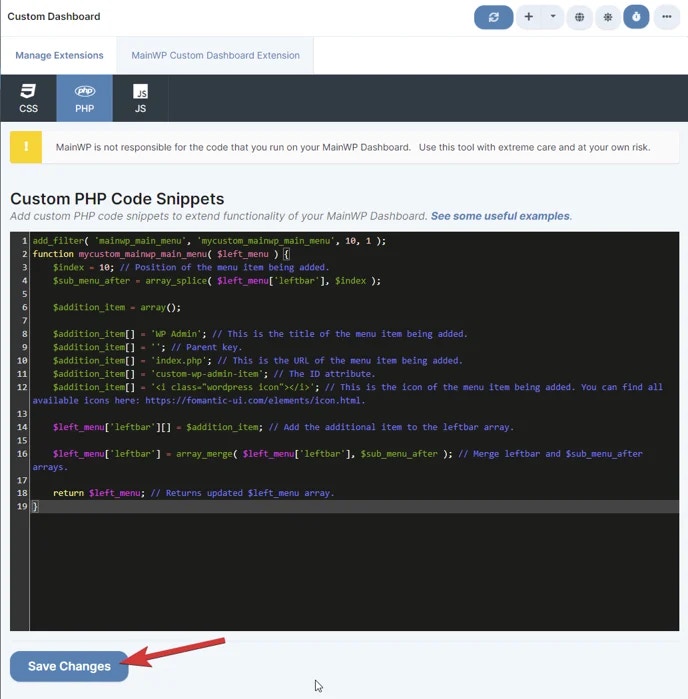
add_filter( 'mainwp_main_menu', 'mycustom_mainwp_main_menu', 10, 1 );
function mycustom_mainwp_main_menu( $left_menu ) {
    $index = 10; // Position in the menu
    $sub_menu_after = array_splice( $left_menu['leftbar'], $index );

    $addition_item = array();

    $addition_item[] = 'WP Admin';           // Menu item title
    $addition_item[] = '';                   // Parent key
    $addition_item[] = 'index.php';          // URL to WP Admin dashboard
    $addition_item[] = 'custom-wp-admin-item'; // HTML ID attribute
    $addition_item[] = '';                   // Icon (optional)

    $left_menu['leftbar'][] = $addition_item;
    $left_menu['leftbar'] = array_merge( $left_menu['leftbar'], $sub_menu_after );

    return $left_menu;
}
Custom Dashboard - PHP Code Snippet
3

Save the PHP code

Click Save Changes.

Step 2: Add CSS Code

1

Go to CSS tab

Switch to the CSS tab in the Custom Dashboard extension.
2

Add the CSS snippet

Add this code to position the button at the bottom of the sidebar:
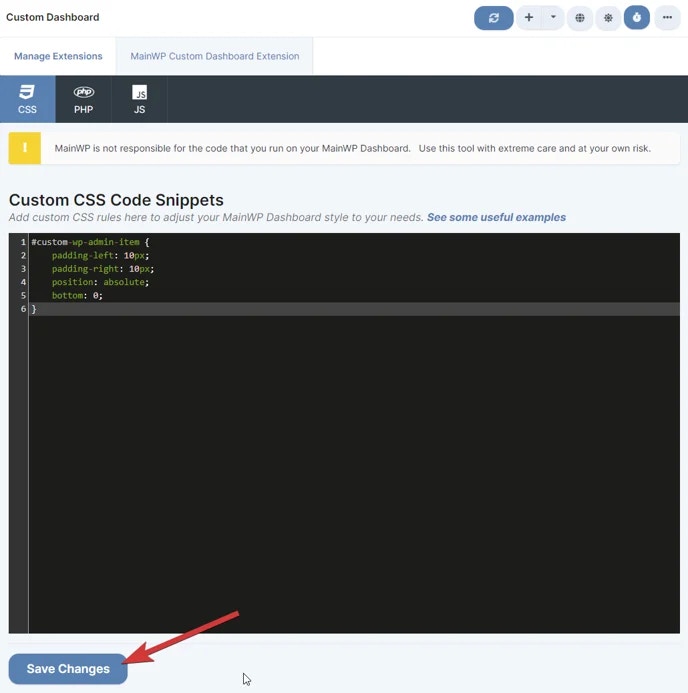
#custom-wp-admin-item {
    padding-left: 10px;
    padding-right: 10px;
    position: absolute;
    bottom: 0;
}
Custom Dashboard - CSS snippet
3

Save the CSS code

Click Save Changes. The WP Admin button now appears at the bottom of the navigation sidebar.

Customization Options

OptionChange
Position in menuModify $index value (lower = higher in menu)
Button textChange 'WP Admin' to your preferred label
Link destinationChange 'index.php' to another admin page
Visual positionModify CSS bottom value or remove position: absolute

Self-Check Checklist

  • Custom Dashboard extension installed
  • PHP code added to PHP tab
  • CSS code added to CSS tab
  • Both snippets saved
  • WP Admin button visible in navigation sidebar