

- Bearer token (recommended for
/mainwp/v2) - Consumer Key and Consumer Secret (legacy
/mainwp/v1)
Use the MainWP Postman collection as the source of truth for request and response schemas.
What You’ll Learn
- How to authenticate with REST API keys
- How to create v2 API keys and optionally enable v1 compatibility in the UI
- How to manage key permissions and API access state
- Which endpoint category to use for each task
- How long-running update actions return responses
Base URL
All v2 endpoints use:Set Up API Keys
Create a key in API Access
Go to MainWP Dashboard > API Access > API Keys > Add API Keys and enter a key name.
Assign permission scope
Choose one or more permissions based on the endpoints you plan to call.
ReadforGETWrite & DeleteforPOST,PUT,PATCH, andDELETE
Optional: enable v1 compatibility
If your integration requires 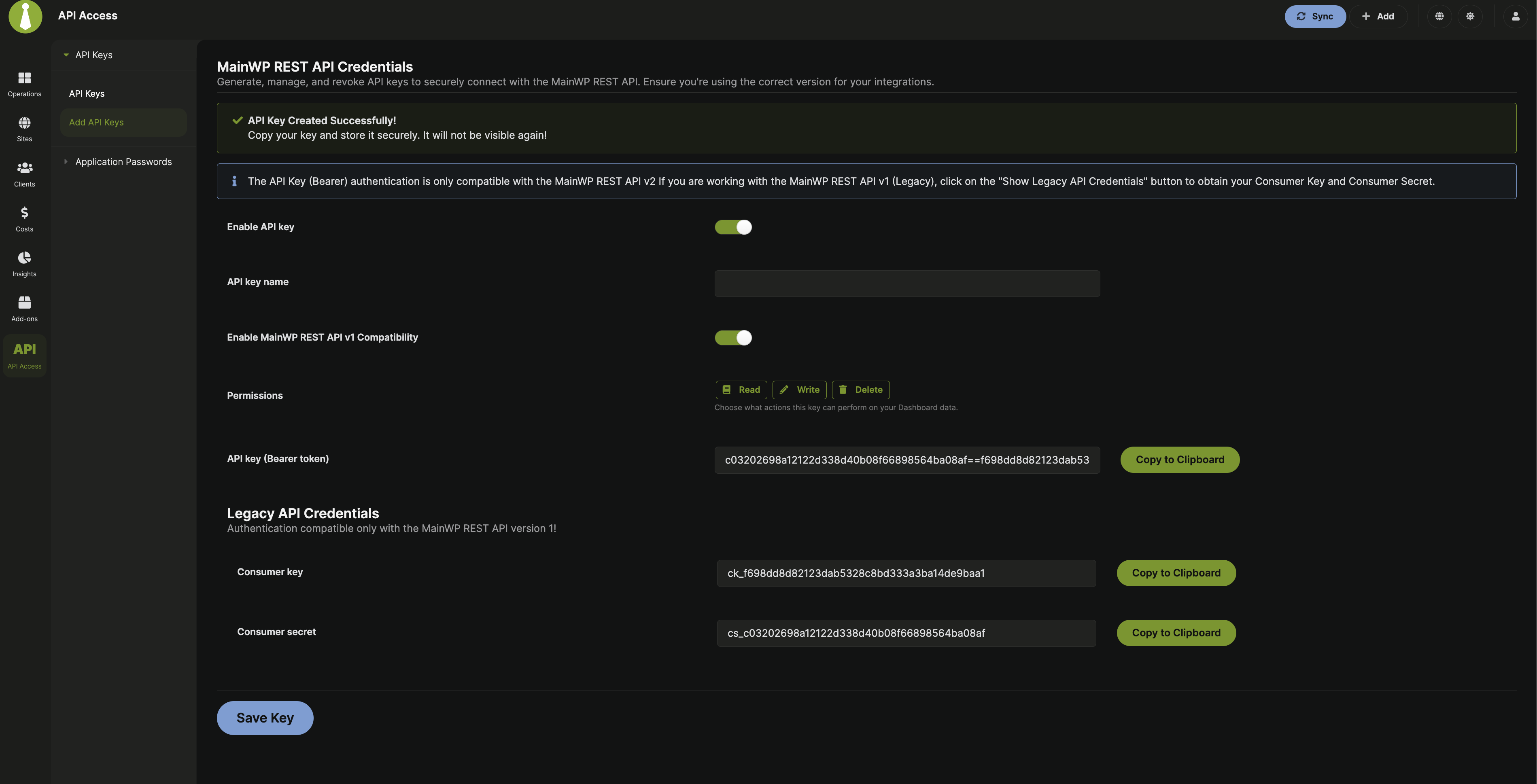
/mainwp/v1, enable MainWP REST API v1 Compatibility to generate legacy Consumer Key and Consumer Secret in the same creation flow.Save and store credentials
Click Save Key, then copy the generated credentials and store them safely.
Permission Scope
This table reflects v2 permission behavior.| Permission | Methods | Purpose |
|---|---|---|
| Read | GET | Fetch data |
| Write & Delete | POST, PUT, PATCH, DELETE | Create, update, and remove resources |
Manage API Access State
MainWP REST API stays active while at least one API key is enabled.- To disable API access, disable all enabled keys in MainWP Dashboard > API Access > API Keys.
- To delete keys, use Delete for single keys or bulk delete on the same page.
Endpoint Categories
Sites
Site inventory, sync, plugins, themes, and site operations.
Clients
Client CRUD, client fields, and client-level site/cost endpoints.
Tags
Tag CRUD, plus related sites and clients.
Updates
Update listing, execution, and ignore management.
Costs
Cost tracker records, linked sites/clients, and batch operations.
Users
User listing, create/edit/delete, CSV import, and admin password updates.
Settings
General, advanced, monitoring, email, tools, and other settings domains.
Monitoring
Uptime monitor list, incidents, heartbeat, and monitor settings.
API Keys
REST API key list, create, edit, and delete endpoints.
Posts
Cross-site post listing and post CRUD actions.
Pages
Cross-site page listing and page CRUD actions.
Batch
Global
/batch orchestration across multiple controllers.Legacy v1 Compatibility
MainWP still supports legacy v1 endpoints (/wp-json/mainwp/v1/) for backward compatibility.
In the UI flow (MainWP Dashboard > API Access > API Keys > Add API Keys), you can enable MainWP REST API v1 Compatibility to generate legacy Consumer Key and Consumer Secret along with the v2 Bearer token.
The v2 API key endpoints create and manage v2 keys and do not create legacy v1 credentials.
X-Api-Key header payload that includes consumer_key and consumer_secret.
Build new integrations on v2 first. Use v1 only where an existing integration still requires it.
Batch Update Response Handling
Some update endpoints start background work and return a start or queue confirmation immediately instead of waiting for completion.job_id and queued_count.
After you receive a start or queued response, wait for the process to finish, then sync your Dashboard or recheck update endpoints.