
The MainWP Early Access Extension lets you opt into Early Access versions of both the MainWP Dashboard plugin and the MainWP Child plugin. This allows you to test upcoming features, help evaluate changes before they reach WordPress.org, or prepare workflows for new versions still in development.
What You’ll Learn
- How to install and configure the Early Access Extension
- How to enable Early Access updates globally or per-site
- How to create a GitHub Personal Access Token for higher rate limits
- How to roll back to stable versions
Prerequisites
- Active MainWP license with Early Access Extension access
- Staging or testing environment (Early Access builds should not be used in production)
Install the Early Access Extension
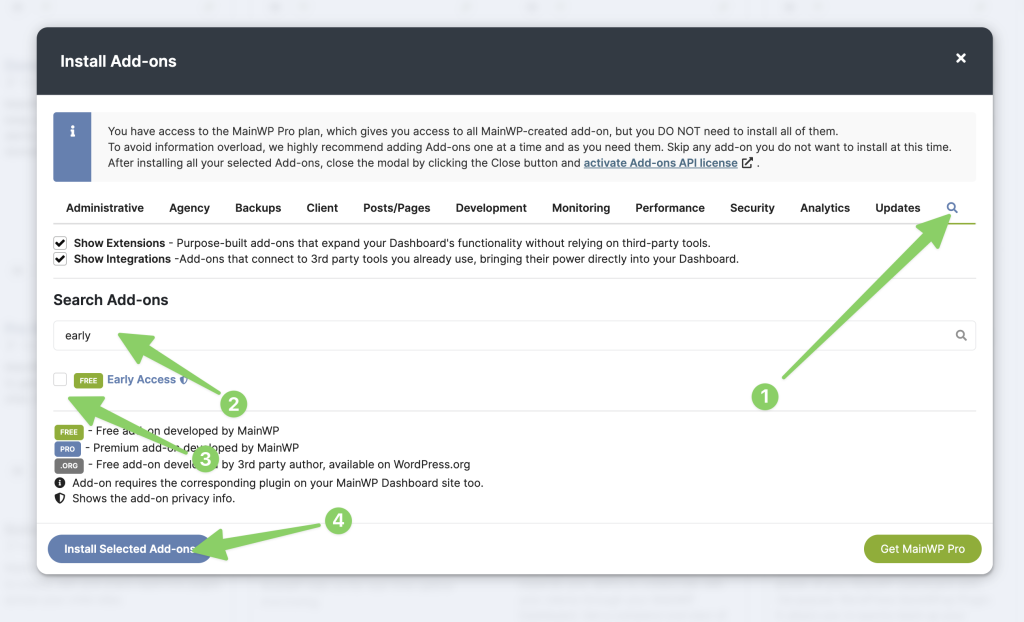
1
Open the Add-ons page
Go to MainWP Dashboard > Add-ons.
2
Click Install Add-ons
Click the Install Add-ons button.
3
Search for Early Access
Search for “MainWP Early Access” in the add-on list.
4
Install the add-on
Select it in the list, then click Install Selected Add-ons.
5
Wait for installation
The page will automatically refresh after installation completes.
6
Activate the license
Click the Activate Add-ons button to activate the license for the newly installed add-on.
Access Early Access Settings
The add-on provides two settings locations:Global Settings
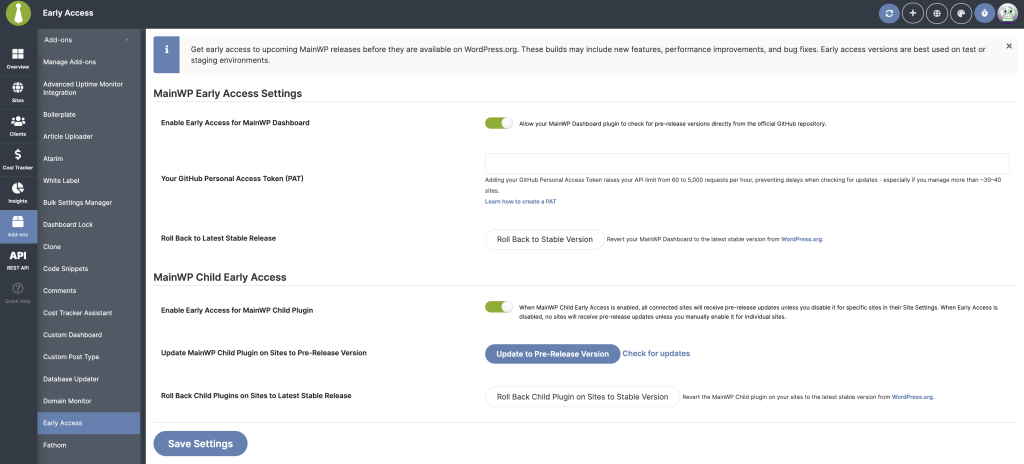
Enable Early Access for MainWP Dashboard
Toggle this option to receive Early Access updates for your Dashboard plugin. When enabled, update checks include GitHub releases marked as prereleases.GitHub Personal Access Token (PAT)
If you manage many sites, GitHub rate limits may slow update checks. Adding a PAT increases your limit from 60 requests/hour to 5,000 requests/hour.1
Open GitHub Developer Settings
Go to GitHub Developer Settings.
2
Navigate to tokens
Click Personal access tokens > Fine-Grained tokens.
3
Generate new token
Click Generate new token.
4
Name the token
Give the token a descriptive name (e.g., “MainWP Early Access”).
5
Set expiration
Select an expiration date. We recommend longer than the default 30 days.
6
Select scopes
Use the default scope (Public repositories, no additional permissions). This provides the minimal required permission level.
7
Generate and copy
Click Generate token and copy the token immediately.
8
Save in MainWP
Paste your PAT into the Early Access settings field and save.
The PAT key is securely encrypted by the Dashboard.
Roll Back to Latest Stable Release
This reinstalls the current stable version of the MainWP Dashboard plugin from WordPress.org. Use this option if:- You no longer want to stay on Early Access builds
- An Early Access build causes compatibility issues
Child Site Settings
Enable Early Access for MainWP Child Plugin
When enabled, all child sites will use the Early Access track unless an individual site overrides this setting.Update MainWP Child Plugin on Sites to Pre-Release Version
Runs a bulk update across all eligible sites. A modal window displays progress and site-by-site results.Check for Updates
If a new Early Access version is available, this link forces a fresh update check.Roll Back Child Plugins on Sites to Latest Stable Release
Reinstalls the stable WordPress.org version of MainWP Child on all eligible sites.Per-Site Settings
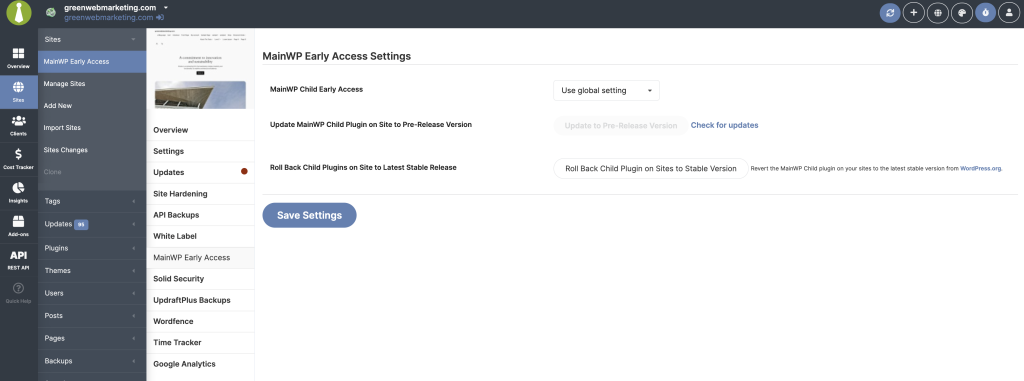
These controls are available inside each site’s MainWP Early Access tab.MainWP Child Early Access
A dropdown lets you choose:- Use global setting - Follow the global Early Access configuration
- Enable - Force Early Access on for this site
- Disable - Force Early Access off for this site
Update MainWP Child Plugin on Site to Pre-Release Version
Runs the same action as the global updater but affects only that single site. A Check for updates link refreshes Early Access update availability for that site.Roll Back Child Plugin on Site to Latest Stable Release
Reverts the site back to the stable MainWP Child plugin from WordPress.org.What to Expect During Updates
- Manual Check for updates links are available on both global and per-site pages
- If an Early Access version of MainWP Child is available and Early Access is enabled, the Dashboard may display an admin notice with a shortcut to the Early Access settings page
- When the Early Access Extension license is active, plugin row meta will include a Check for updates now link
Best Practices
- Test Early Access builds on staging sites before rolling into production
- Per-site overrides always take priority over global settings
- If an Early Access update fails, check the site’s connection status and retry from the modal
- Rollback operations always use the stable version provided by WordPress.org
Self-Check Checklist
- Early Access Extension installed and activated
- License activated for the add-on
- Global settings configured for Dashboard and/or Child plugin
- GitHub PAT added (optional, for higher rate limits)
- Per-site overrides configured where needed
- Testing on staging environment (not production)
Related Resources
- Manage Add-ons - Add-on management
- MainWP Telemetry - Early Access telemetry options