> ## Documentation Index
> Fetch the complete documentation index at: https://docs.mainwp.com/llms.txt
> Use this file to discover all available pages before exploring further.
# Resolve connection issues with 20i hosting
> The 20i WAF may block MainWP Dashboard connections. Contact 20i support to whitelist your Dashboard IP address or MainWP User-Agent. Find your Dashboard IP on the Info > Server page.
20i hosting uses a Web Application Firewall (WAF) that may block MainWP Dashboard connection requests. The solution requires contacting 20i support to whitelist your Dashboard's IP address or User-Agent.
## What You'll Learn
* Identify when 20i's WAF is blocking connections
* Find your Dashboard IP address and User-Agent
* Request a whitelist from 20i support
## Prerequisites
* MainWP Dashboard installed and activated
* A child site hosted on 20i
* Your Dashboard IP address
***
## Symptoms
You may be experiencing 20i WAF blocking if:
* Connection attempts time out or fail
* Error message states "MainWP Child plugin not detected"
* Connection test returns a 403 or 406 status code
* Other child sites connect successfully but 20i-hosted sites don't
***
## Find Your Dashboard Information
Before contacting 20i support, gather the required information.
### Dashboard IP Address
In your MainWP Dashboard, go to **MainWP > Info > Server**.
Find the **Server IP** field and note the IP address.
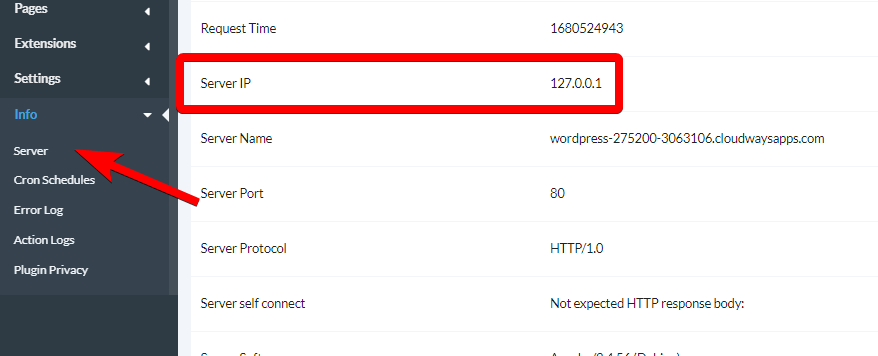 If the Server IP shows a local address (like 127.0.0.x or 10.x.x.x), contact your Dashboard hosting provider to get the external IP address. Alternatively, check your hosting control panel for the server's public IP.
### MainWP User-Agent
MainWP uses this User-Agent string for all requests:
```text theme={null}
Mozilla/5.0 (compatible; MainWP/4.0; +http://mainwp.com)
```
***
## Contact 20i Support
Contact 20i support through their help desk or live chat.
Ask them to whitelist your MainWP Dashboard in their WAF. Provide:
* Your Dashboard IP address
* The MainWP User-Agent string
* The child site domain that needs to connect
20i support will update their WAF rules. This typically takes a few hours.
After 20i confirms the whitelist is in place, attempt to connect or reconnect the child site from your Dashboard.
***
## Sample Support Request
You can use this template when contacting 20i:
> Hi,
>
> I'm trying to connect my WordPress site \[your-child-site.com] to my MainWP Dashboard management system. The connection is being blocked by your WAF.
>
> Please whitelist the following:
>
> * IP Address: \[Your Dashboard IP]
> * User-Agent: Mozilla/5.0 (compatible; MainWP/4.0; +[http://mainwp.com](http://mainwp.com))
>
> Thank you.
***
## Self-Check Checklist
* [ ] Noted your Dashboard IP address
* [ ] Copied the MainWP User-Agent string
* [ ] Contacted 20i support with whitelist request
* [ ] Received confirmation that whitelist is in place
* [ ] Successfully connected the child site
***
## Related Resources
* [Troubleshoot Connection Problems](/troubleshooting/potential-issues) - General connection troubleshooting
* [Connection Test Status Codes](/troubleshooting/connection-test-results-status-codes) - Interpret error codes
* [What Port and User-Agent Does MainWP Use](/troubleshooting/what-port-and-user-agent-does-mainwp-use) - Technical details
If the Server IP shows a local address (like 127.0.0.x or 10.x.x.x), contact your Dashboard hosting provider to get the external IP address. Alternatively, check your hosting control panel for the server's public IP.
### MainWP User-Agent
MainWP uses this User-Agent string for all requests:
```text theme={null}
Mozilla/5.0 (compatible; MainWP/4.0; +http://mainwp.com)
```
***
## Contact 20i Support
Contact 20i support through their help desk or live chat.
Ask them to whitelist your MainWP Dashboard in their WAF. Provide:
* Your Dashboard IP address
* The MainWP User-Agent string
* The child site domain that needs to connect
20i support will update their WAF rules. This typically takes a few hours.
After 20i confirms the whitelist is in place, attempt to connect or reconnect the child site from your Dashboard.
***
## Sample Support Request
You can use this template when contacting 20i:
> Hi,
>
> I'm trying to connect my WordPress site \[your-child-site.com] to my MainWP Dashboard management system. The connection is being blocked by your WAF.
>
> Please whitelist the following:
>
> * IP Address: \[Your Dashboard IP]
> * User-Agent: Mozilla/5.0 (compatible; MainWP/4.0; +[http://mainwp.com](http://mainwp.com))
>
> Thank you.
***
## Self-Check Checklist
* [ ] Noted your Dashboard IP address
* [ ] Copied the MainWP User-Agent string
* [ ] Contacted 20i support with whitelist request
* [ ] Received confirmation that whitelist is in place
* [ ] Successfully connected the child site
***
## Related Resources
* [Troubleshoot Connection Problems](/troubleshooting/potential-issues) - General connection troubleshooting
* [Connection Test Status Codes](/troubleshooting/connection-test-results-status-codes) - Interpret error codes
* [What Port and User-Agent Does MainWP Use](/troubleshooting/what-port-and-user-agent-does-mainwp-use) - Technical details