> ## Documentation Index
> Fetch the complete documentation index at: https://docs.mainwp.com/llms.txt
> Use this file to discover all available pages before exploring further.
# Does MainWP have Visual Regression Tests?
> The Regression Testing add-on monitors Child Site source code changes after plugin, theme, or core updates. Compare HTML snapshots, review CSS/JS changes, and receive email notifications when changes exceed thresholds.
MainWP offers the **[Regression Testing](https://mainwp.com/add-on/regression-testing/)** add-on to detect visual and code changes on your child sites after updates.
## What You'll Learn
* What the Regression Testing add-on does
* Key features available
* How to get started
***
## What It Does
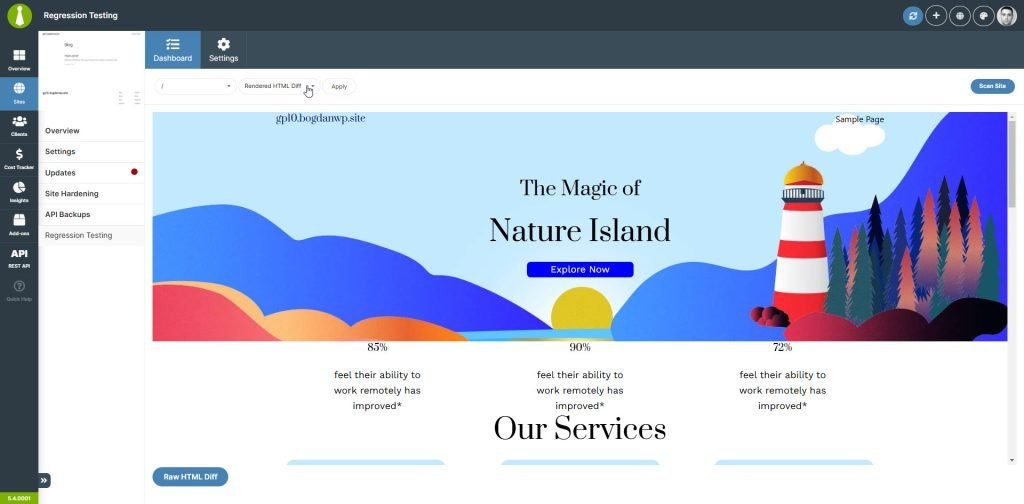
The Regression Testing add-on monitors changes in your child sites' source code. It helps you spot unexpected modifications after plugin, theme, or WordPress core updates by comparing HTML snapshots between scans.
 ***
## Key Features
| Feature | Description |
| ------------------- | ----------------------------------------------------- |
| HTML snapshots | Compare page source before and after updates |
| Change threshold | Set acceptable change percentage before notifications |
| Email alerts | Receive notifications when changes exceed thresholds |
| Flexible scheduling | Daily, weekly, twice monthly, or monthly scans |
| Auto-trigger | Run scans automatically after updates |
| CSS/JS tracking | Monitor changes to stylesheets and scripts |
| Custom pages | Monitor any page, not just the homepage |
***
## Comparison Views
The add-on provides multiple ways to review differences:
* Raw HTML comparisons
* Rendered before/after views
* CSS/JS file changes (when tracking enabled)
***
## Key Features
| Feature | Description |
| ------------------- | ----------------------------------------------------- |
| HTML snapshots | Compare page source before and after updates |
| Change threshold | Set acceptable change percentage before notifications |
| Email alerts | Receive notifications when changes exceed thresholds |
| Flexible scheduling | Daily, weekly, twice monthly, or monthly scans |
| Auto-trigger | Run scans automatically after updates |
| CSS/JS tracking | Monitor changes to stylesheets and scripts |
| Custom pages | Monitor any page, not just the homepage |
***
## Comparison Views
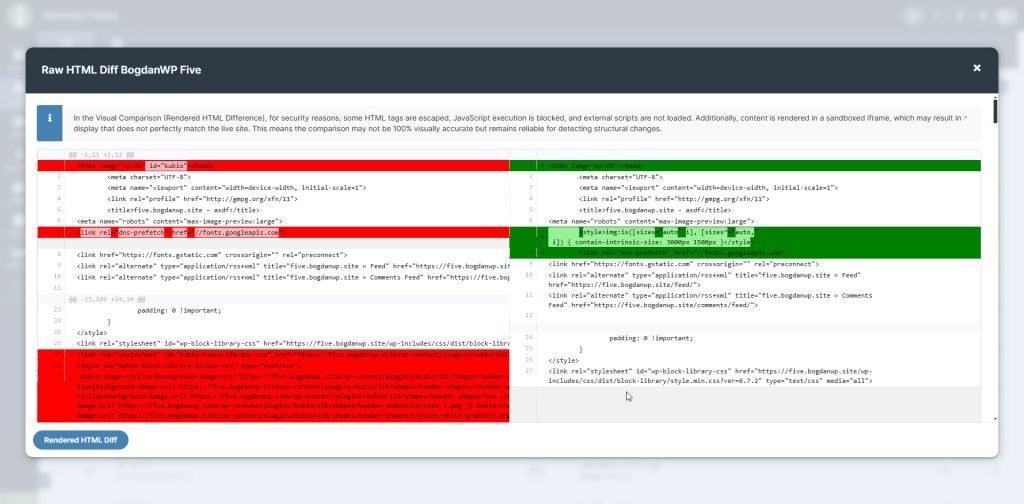
The add-on provides multiple ways to review differences:
* Raw HTML comparisons
* Rendered before/after views
* CSS/JS file changes (when tracking enabled)
 ***
## Get Started
For complete setup instructions and configuration options, see the [Regression Testing documentation](/add-ons/security/regression-testing-extension).
***
## Related Resources
* [Regression Testing Add-on](https://mainwp.com/add-on/regression-testing/) - Product page
* [Manage Updates](/sites/updates/manage-updates) - Update management in MainWP
* [Does MainWP Have Safe Updates](/sites/updates/does-mainwp-have-safe-updates) - Update safety features
***
## Get Started
For complete setup instructions and configuration options, see the [Regression Testing documentation](/add-ons/security/regression-testing-extension).
***
## Related Resources
* [Regression Testing Add-on](https://mainwp.com/add-on/regression-testing/) - Product page
* [Manage Updates](/sites/updates/manage-updates) - Update management in MainWP
* [Does MainWP Have Safe Updates](/sites/updates/does-mainwp-have-safe-updates) - Update safety features