> ## Documentation Index
> Fetch the complete documentation index at: https://docs.mainwp.com/llms.txt
> Use this file to discover all available pages before exploring further.
# Password Policy
> Configure password change reminders across child sites, track last password changes, and manage per-site overrides from your MainWP Dashboard.
Password Policy in MainWP Dashboard v6 helps you monitor password freshness across connected sites and optionally show reminder notices before passwords become overdue.
## What You'll Learn
* Configure global password policy settings
* Understand how policy settings sync to child sites
* Override policy settings for a single site
* Read Last Password Change and Password Status in Manage Users
* Control which users see Due Soon and Overdue notices
## Prerequisites
* MainWP Dashboard v6 or newer
* MainWP Child v6 or newer on your connected child sites
* Administrator access to your MainWP Dashboard
***
## Configure Global Password Policy
Go to **MainWP > Users > Password Policy**.
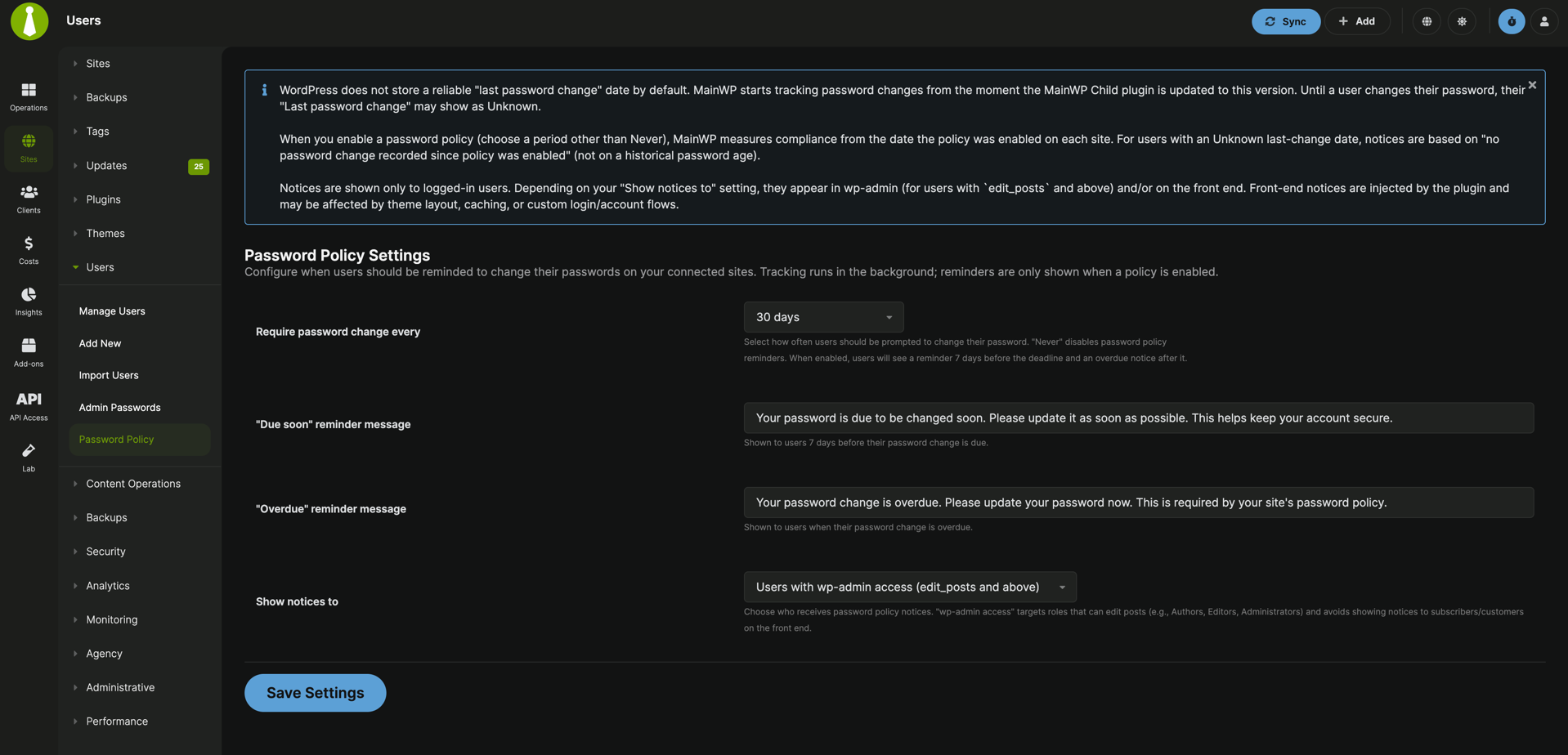 Choose your password policy period, customize reminder messages, and select who should receive notices.
Click **Save Settings** to store global settings and push updates to eligible child sites.
### Global options
| Setting | Details |
| ----------------------------- | ------------------------------------------------------------------------------ |
| Require password change every | `Never`, `30`, `60`, `90`, `120`, `180`, or `360` days |
| "Due soon" reminder message | Custom message shown in warning state |
| "Overdue" reminder message | Custom message shown after the policy deadline passes |
| Show notices to | `Users with wp-admin access (edit_posts and above)` or `All users (all roles)` |
In the current UI, the Due Soon warning window is 7 days before the due date.
***
## How Settings Sync
When you save global Password Policy settings:
* MainWP pushes settings to connected child sites
* Sites with sync errors or suspended status are skipped
* Sites with **Overwrite global settings for this site** enabled are skipped
Password Policy settings are also included in normal site sync requests. This means newly added sites receive policy settings on their next sync.
***
## Per-Site Override
Go to **MainWP > Sites > Manage Sites**, open a site, then select **Password Policy**.
Enable **Overwrite global settings for this site**.
Set the same policy options for that site and click **Save Settings**.
If override is enabled, the site uses its own policy settings and is excluded from global Password Policy update pushes.
***
## What MainWP Tracks
MainWP Child tracks password changes in user meta (`mainwp_last_password_change`) whenever WordPress records a password update event.
Supported flows include:
* Lost password reset flow
* Password changes in WordPress profile screens
* Programmatic or front-end password updates that use WordPress user update hooks
* Password updates initiated from MainWP Dashboard user actions
WordPress does not provide a reliable historical "last password change" value by default. Tracking starts after MainWP Child is updated to a version that includes this feature.
***
## Password Status in Manage Users
Go to [MainWP > Users > Manage Users](/sites/users/manage-users) to see:
* **Last Password Change**
* **Password Status**
Status labels:
* **Fresh**: Password is within policy window
* **Due Soon**: Password is in the warning window
* **Overdue**: Password is past due
* **Disabled**: Policy period is set to Never
* **Unknown**: No password change has been recorded yet
When no password change is recorded, policy timing is measured from when policy was enabled on that child site.
***
## Notice Behavior
Password Policy in MainWP v6 is reminder-based:
* Shows warning/critical notices for Due Soon and Overdue users
* Does not force password reset
* Does not block login
* Does not lock user accounts
Audience behavior:
* `Users with wp-admin access`: notices are shown in wp-admin to users who can `edit_posts`
* `All users`: low-level users can also see notices on the front end when logged in
Front-end notice display can be affected by theme output, caching layers, and custom account/login flows.
Choose your password policy period, customize reminder messages, and select who should receive notices.
Click **Save Settings** to store global settings and push updates to eligible child sites.
### Global options
| Setting | Details |
| ----------------------------- | ------------------------------------------------------------------------------ |
| Require password change every | `Never`, `30`, `60`, `90`, `120`, `180`, or `360` days |
| "Due soon" reminder message | Custom message shown in warning state |
| "Overdue" reminder message | Custom message shown after the policy deadline passes |
| Show notices to | `Users with wp-admin access (edit_posts and above)` or `All users (all roles)` |
In the current UI, the Due Soon warning window is 7 days before the due date.
***
## How Settings Sync
When you save global Password Policy settings:
* MainWP pushes settings to connected child sites
* Sites with sync errors or suspended status are skipped
* Sites with **Overwrite global settings for this site** enabled are skipped
Password Policy settings are also included in normal site sync requests. This means newly added sites receive policy settings on their next sync.
***
## Per-Site Override
Go to **MainWP > Sites > Manage Sites**, open a site, then select **Password Policy**.
Enable **Overwrite global settings for this site**.
Set the same policy options for that site and click **Save Settings**.
If override is enabled, the site uses its own policy settings and is excluded from global Password Policy update pushes.
***
## What MainWP Tracks
MainWP Child tracks password changes in user meta (`mainwp_last_password_change`) whenever WordPress records a password update event.
Supported flows include:
* Lost password reset flow
* Password changes in WordPress profile screens
* Programmatic or front-end password updates that use WordPress user update hooks
* Password updates initiated from MainWP Dashboard user actions
WordPress does not provide a reliable historical "last password change" value by default. Tracking starts after MainWP Child is updated to a version that includes this feature.
***
## Password Status in Manage Users
Go to [MainWP > Users > Manage Users](/sites/users/manage-users) to see:
* **Last Password Change**
* **Password Status**
Status labels:
* **Fresh**: Password is within policy window
* **Due Soon**: Password is in the warning window
* **Overdue**: Password is past due
* **Disabled**: Policy period is set to Never
* **Unknown**: No password change has been recorded yet
When no password change is recorded, policy timing is measured from when policy was enabled on that child site.
***
## Notice Behavior
Password Policy in MainWP v6 is reminder-based:
* Shows warning/critical notices for Due Soon and Overdue users
* Does not force password reset
* Does not block login
* Does not lock user accounts
Audience behavior:
* `Users with wp-admin access`: notices are shown in wp-admin to users who can `edit_posts`
* `All users`: low-level users can also see notices on the front end when logged in
Front-end notice display can be affected by theme output, caching layers, and custom account/login flows.