> ## Documentation Index
> Fetch the complete documentation index at: https://docs.mainwp.com/llms.txt
> Use this file to discover all available pages before exploring further.
# Parent Theme Lock
> The Parent Theme Lock feature prevents accidental deletion of parent themes used by active child themes. If you need to delete a parent theme, first activate a different theme on the Child Site.
Parent Theme Lock is an automatic protection that prevents you from deleting a parent theme while a child theme that depends on it is active on any site. This safeguard prevents broken site appearances and PHP errors that would occur if a parent theme were removed while still in use.
## What You'll Learn
* How Parent Theme Lock protects your sites
* Where the lock icon appears in the Dashboard
* How to safely delete a locked parent theme
## Prerequisites
* MainWP Dashboard with connected child sites
* Child sites using child themes (themes that depend on parent themes)
***
***
## How Parent Theme Lock Works
When a child theme is active on a site, it depends on its parent theme for core functionality and styling. Deleting the parent theme would break the site's appearance and potentially cause PHP errors.
Parent Theme Lock prevents this by blocking deletion of any parent theme that has an active child theme depending on it. The lock appears automatically—no configuration required.
***
## Where the Lock Appears
### Manage Themes Page
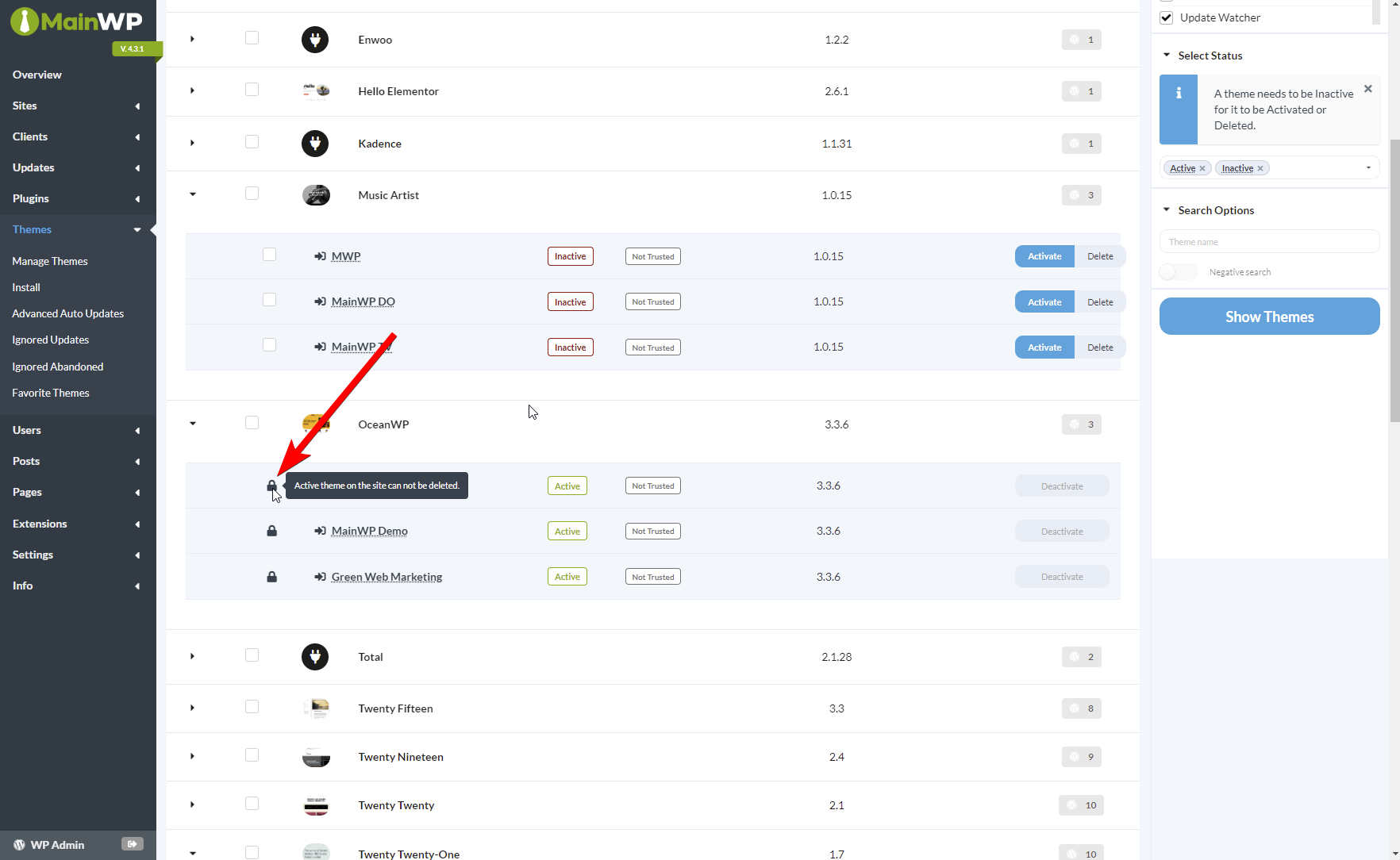
On **MainWP > Themes > Manage Themes**, locked parent themes show a lock icon. Hover over the icon to see why the theme cannot be deleted.
### Individual Site Overview
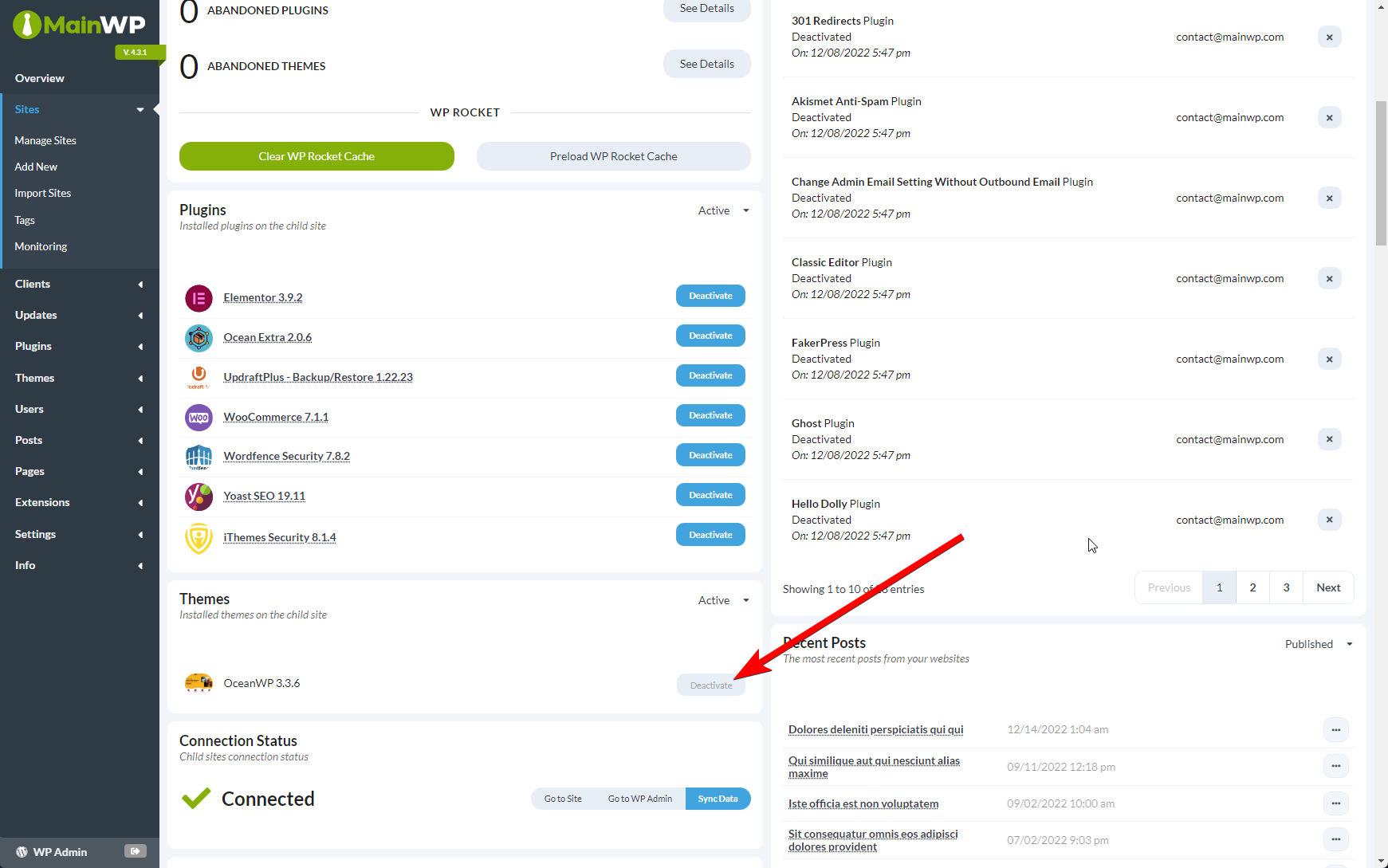
When viewing a specific child site's Overview page, the Themes widget shows the lock status for parent themes.
***
## Delete a Locked Parent Theme
If you need to delete a parent theme that's currently locked:
Navigate to the child site's wp-admin using Jump to WP Admin or by logging in directly.
Go to **Appearance > Themes**.
Activate a different theme that does not depend on the parent you want to delete.
Return to your MainWP Dashboard and sync the child site to update theme status.
The parent theme is now unlocked and can be deleted from Manage Themes.
If multiple child sites use child themes that depend on the same parent, you must switch themes on all of them before the parent becomes deletable.
***
## Why This Protection Matters
Without Parent Theme Lock, accidentally deleting a parent theme while cleaning up unused themes across your network could result in:
* Broken site appearance
* Missing templates
* Unstyled content
* PHP errors
The lock ensures you make a conscious decision to switch themes on affected sites before removing the parent from your network.
***
## Key Points
| Aspect | Detail |
| -------------- | ------------------------------------------------------------------ |
| Applies to | Theme deletion only (not updates) |
| Configuration | Automatic—cannot be disabled |
| Multiple sites | All sites using dependent child themes must switch before deletion |
| Override | Cannot be overridden from Dashboard |
***
## Self-Check Checklist
* [ ] You understand why the lock icon appears on certain themes
* [ ] You know how to switch themes to unlock a parent theme
* [ ] You remember to sync after changing themes on child sites
***
## Related Resources
* [Manage Themes](/sites/themes/managing-themes-with-mainwp) - Full theme management documentation
* [Negative Search](/sites/themes/negative-search) - Find sites missing specific themes
 ### Individual Site Overview
When viewing a specific child site's Overview page, the Themes widget shows the lock status for parent themes.
### Individual Site Overview
When viewing a specific child site's Overview page, the Themes widget shows the lock status for parent themes.
 ***
## Delete a Locked Parent Theme
If you need to delete a parent theme that's currently locked:
***
## Delete a Locked Parent Theme
If you need to delete a parent theme that's currently locked: