> ## Documentation Index
> Fetch the complete documentation index at: https://docs.mainwp.com/llms.txt
> Use this file to discover all available pages before exploring further.
# How to limit the number of entries loaded in the Non-MainWP widget
> Limit the number of entries in the Non-MainWP widget to improve Dashboard performance for sites with hundreds of child sites.
For Dashboards with many child sites, the Non-MainWP widget can accumulate thousands of entries, slowing down the Overview page. You can limit the number of entries displayed to improve performance.
## What You'll Learn
* Why large Dashboards need entry limits
* How to set a custom limit
* Two methods to apply the setting
## Prerequisites
* Choose **one** method below (using both is unnecessary)
***
## When to Use This
Apply this setting if:
* You manage hundreds of child sites
* The Overview page loads slowly
* The Non-MainWP widget has thousands of entries
The default behavior loads all entries, which can cause performance issues on large Dashboards.
***
## Method 1: Custom Dashboard Extension (Recommended)
[Install](/dashboard/overview/manage-extensions#install-extensions) the [Custom Dashboard](https://mainwp.com/extension/mainwp-custom-dashboard-extension/) extension.
Navigate to **MainWP > Add-ons > Custom Dashboard**.
Go to the **PHP** tab and add this code:
```php theme={null}
add_filter( 'mainwp_widget_site_actions_limit_number', 'mycustom_mainwp_widget_site_actions_limit_number' );
function mycustom_mainwp_widget_site_actions_limit_number( $value ) {
return 200;
}
```
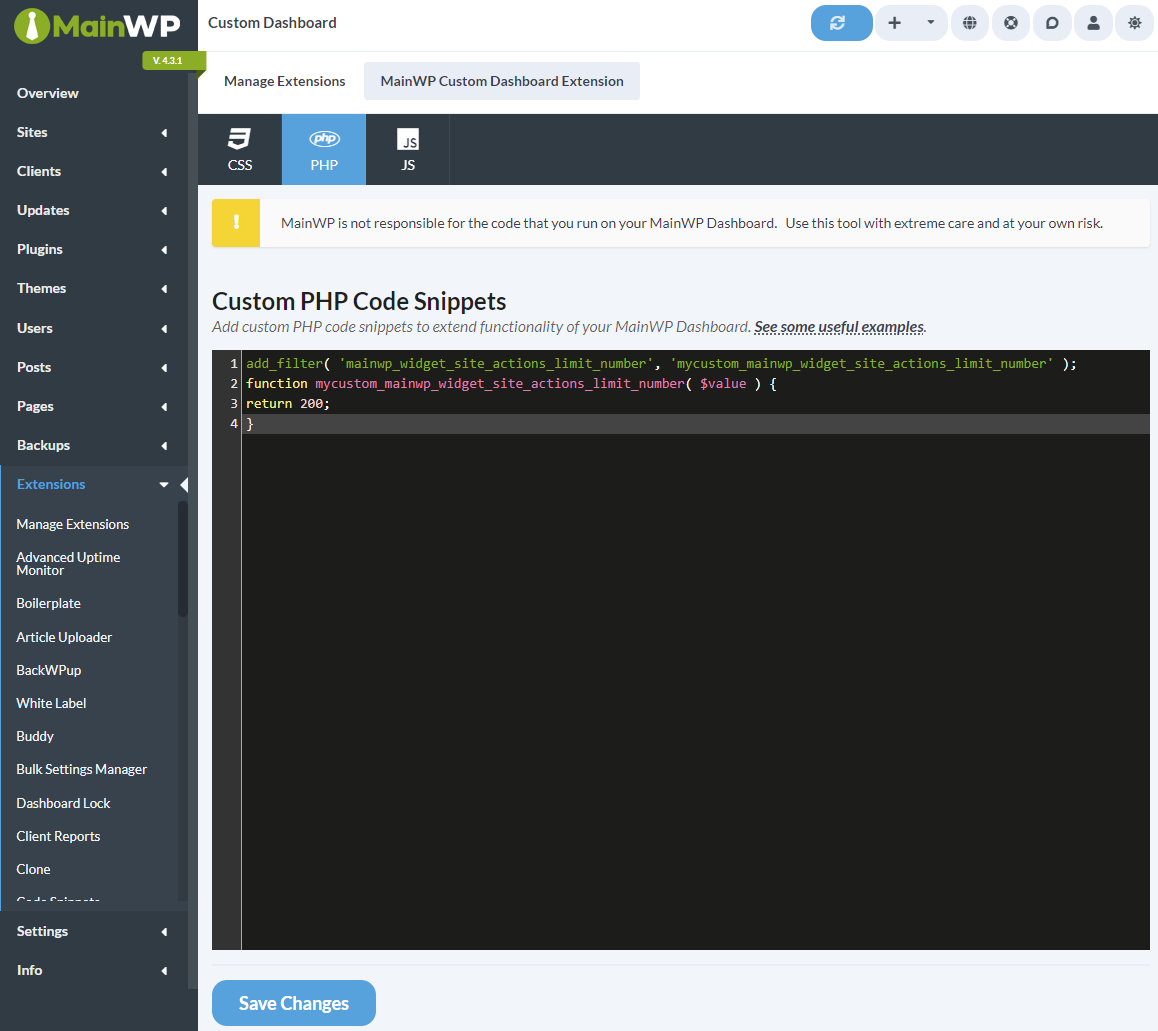 Change `200` to your preferred maximum number of entries.
Click **Save Changes**. The widget now displays only the specified number of entries.
***
## Method 2: Edit functions.php
Use this method if you prefer not to install an extension.
If you're not using a child theme, theme updates will overwrite your changes. Consider using a plugin like [Code Snippets](https://wordpress.org/plugins/code-snippets/) instead.
Navigate to **WP Admin > Tools > Theme File Editor** on your Dashboard site.
In the right sidebar, click on **Theme Functions (functions.php)**.
Add this code at the end of the file:
```php theme={null}
add_filter( 'mainwp_widget_site_actions_limit_number', 'mycustom_mainwp_widget_site_actions_limit_number' );
function mycustom_mainwp_widget_site_actions_limit_number( $value ) {
return 200;
}
```
Click **Update File**.
***
## Recommended Limits
| Number of Child Sites | Suggested Limit |
| --------------------- | --------------- |
| 100-200 sites | 500 entries |
| 200-500 sites | 200 entries |
| 500+ sites | 100 entries |
Adjust based on your server performance and how much history you need to view.
***
## Self-Check Checklist
* [ ] Code added via Custom Dashboard OR functions.php
* [ ] Limit value set appropriately for your Dashboard size
* [ ] Changes saved
* [ ] Overview page loads faster
***
## Related Resources
* [Optimize Dashboard for Shared Hosting](/dashboard/overview/how-to-optimize-your-mainwp-dashboard-for-shared-hosting) - Performance tips
* [Hide Widgets](/customization/can-i-hide-widgets-that-i-dont-need) - Remove unused widgets
* [Custom Dashboard Extension](/add-ons/development/mainwp-custom-dashboard-extension) - Extension documentation
Change `200` to your preferred maximum number of entries.
Click **Save Changes**. The widget now displays only the specified number of entries.
***
## Method 2: Edit functions.php
Use this method if you prefer not to install an extension.
If you're not using a child theme, theme updates will overwrite your changes. Consider using a plugin like [Code Snippets](https://wordpress.org/plugins/code-snippets/) instead.
Navigate to **WP Admin > Tools > Theme File Editor** on your Dashboard site.
In the right sidebar, click on **Theme Functions (functions.php)**.
Add this code at the end of the file:
```php theme={null}
add_filter( 'mainwp_widget_site_actions_limit_number', 'mycustom_mainwp_widget_site_actions_limit_number' );
function mycustom_mainwp_widget_site_actions_limit_number( $value ) {
return 200;
}
```
Click **Update File**.
***
## Recommended Limits
| Number of Child Sites | Suggested Limit |
| --------------------- | --------------- |
| 100-200 sites | 500 entries |
| 200-500 sites | 200 entries |
| 500+ sites | 100 entries |
Adjust based on your server performance and how much history you need to view.
***
## Self-Check Checklist
* [ ] Code added via Custom Dashboard OR functions.php
* [ ] Limit value set appropriately for your Dashboard size
* [ ] Changes saved
* [ ] Overview page loads faster
***
## Related Resources
* [Optimize Dashboard for Shared Hosting](/dashboard/overview/how-to-optimize-your-mainwp-dashboard-for-shared-hosting) - Performance tips
* [Hide Widgets](/customization/can-i-hide-widgets-that-i-dont-need) - Remove unused widgets
* [Custom Dashboard Extension](/add-ons/development/mainwp-custom-dashboard-extension) - Extension documentation