> ## Documentation Index
> Fetch the complete documentation index at: https://docs.mainwp.com/llms.txt
> Use this file to discover all available pages before exploring further.
# How to remove unwanted Hardening Checks
> Remove specific Site Hardening checks from MainWP scan results using a PHP filter in the Custom Dashboard extension.
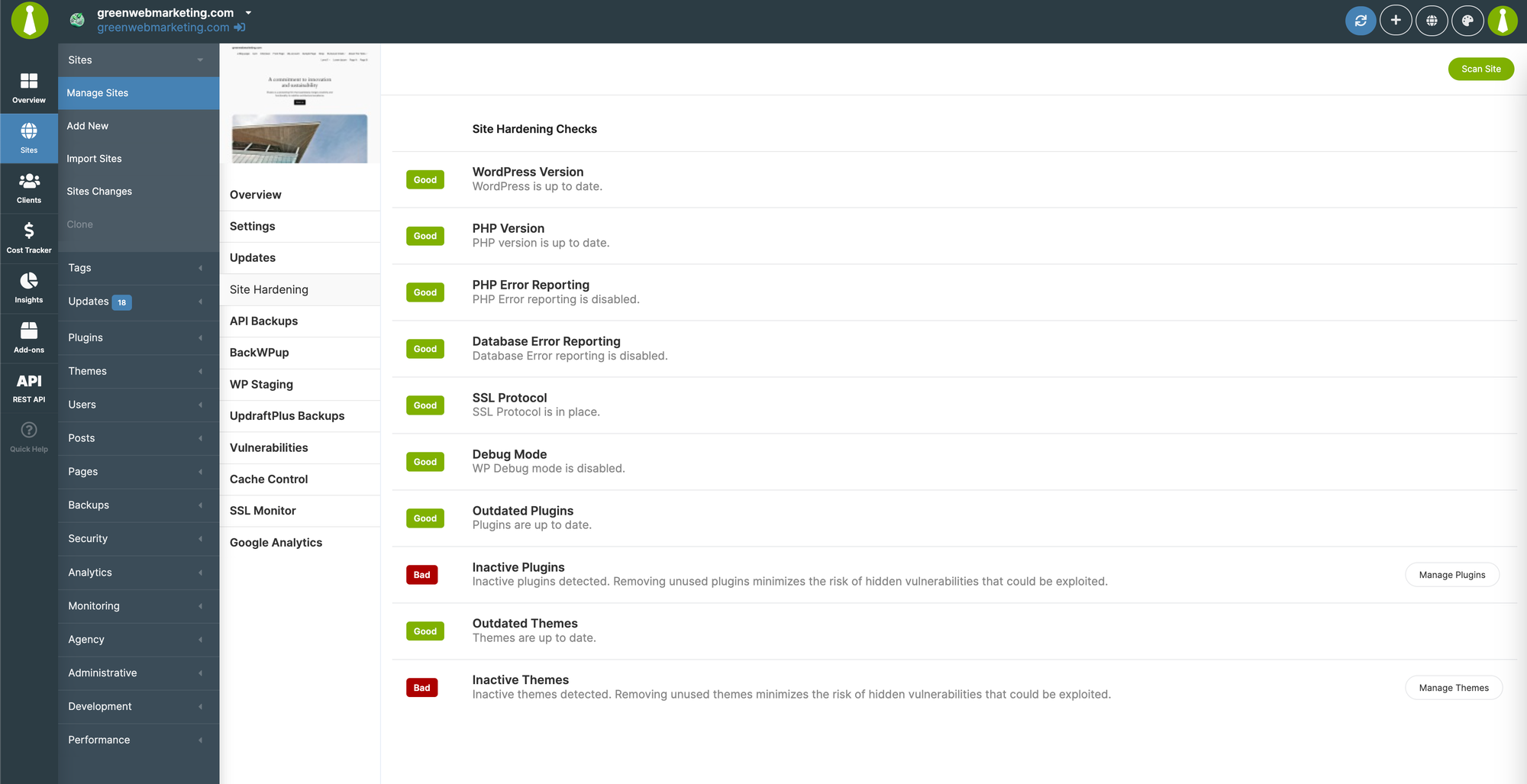
MainWP performs Site Hardening checks on your child sites to identify potential issues. You can disable specific checks that are not relevant to your setup using a code snippet.
## What You'll Learn
* How to disable individual Site Hardening checks
* How to disable multiple checks at once
* Available check identifiers
## Prerequisites
* [Custom Dashboard extension](/add-ons/development/mainwp-custom-dashboard-extension) (free)
***
## Why Remove Site Hardening Checks
Some security checks may not apply to your environment. For example:
* You intentionally keep debug mode enabled on development sites
* Your server configuration requires specific PHP settings
* Certain inactive themes are kept for testing purposes
 ***
## Disable a Single Check
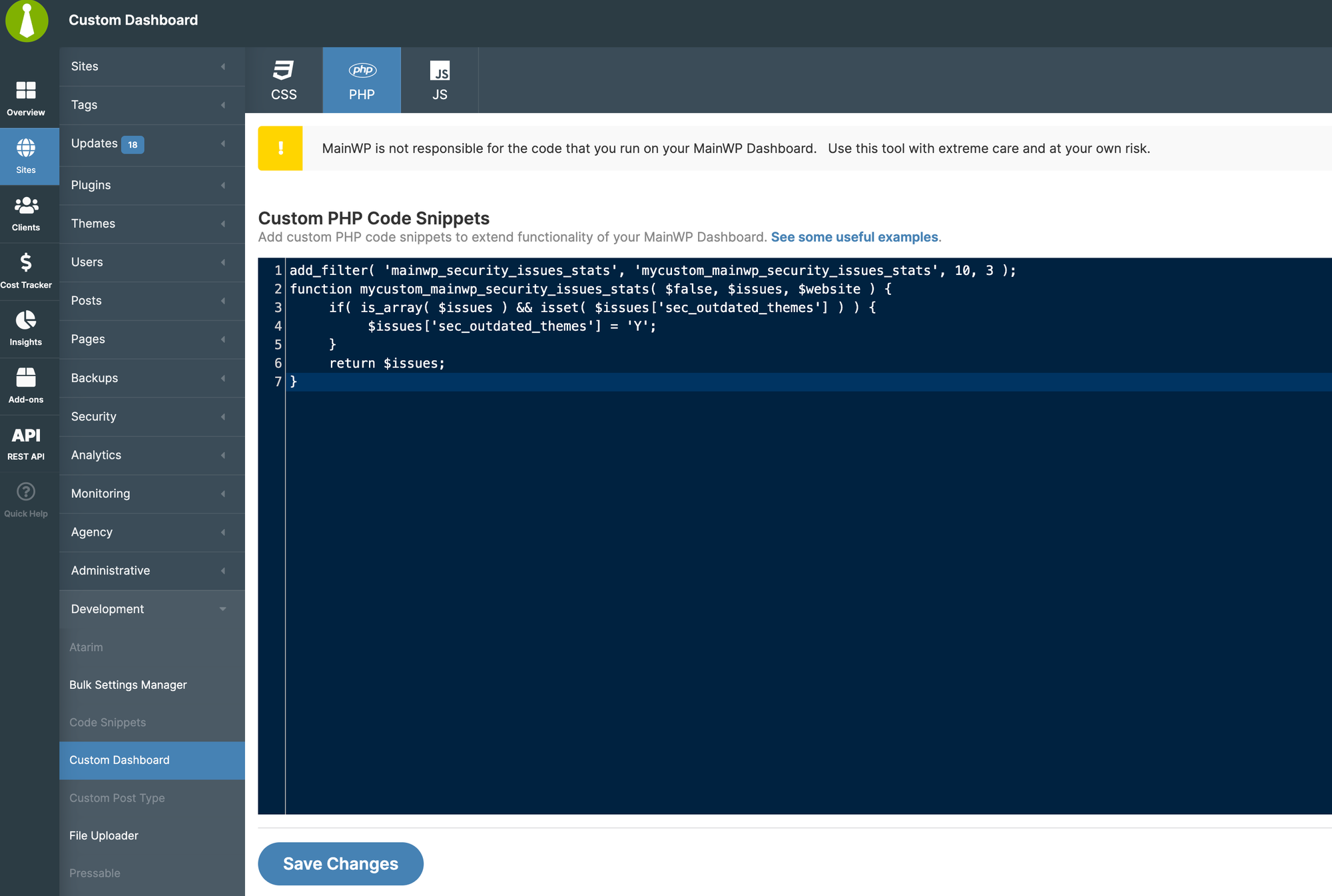
Navigate to **MainWP > Add-ons > Custom Dashboard**.
Go to the **PHP** tab and add this code:
```php theme={null}
add_filter( 'mainwp_security_issues_stats', 'mycustom_mainwp_security_issues_stats', 10, 3 );
function mycustom_mainwp_security_issues_stats( $false, $issues, $website ) {
if( is_array( $issues ) && isset( $issues['sec_inactive_themes'] ) ) {
$issues['sec_inactive_themes'] = 'Y';
}
return $issues;
}
```
Replace `'sec_inactive_themes'` with the identifier for the Site Hardening check you want to disable.
Click **Save Changes**.
***
## Disable a Single Check
Navigate to **MainWP > Add-ons > Custom Dashboard**.
Go to the **PHP** tab and add this code:
```php theme={null}
add_filter( 'mainwp_security_issues_stats', 'mycustom_mainwp_security_issues_stats', 10, 3 );
function mycustom_mainwp_security_issues_stats( $false, $issues, $website ) {
if( is_array( $issues ) && isset( $issues['sec_inactive_themes'] ) ) {
$issues['sec_inactive_themes'] = 'Y';
}
return $issues;
}
```
Replace `'sec_inactive_themes'` with the identifier for the Site Hardening check you want to disable.
Click **Save Changes**.
 ***
## Available Check Identifiers
| Check | Identifier |
| ------------------------ | ------------------------ |
| WordPress Version | `'wp_uptodate'` |
| PHP Version | `'phpversion_matched'` |
| PHP Error Reporting | `'php_reporting'` |
| Database Error Reporting | `'db_reporting'` |
| SSL Protocol | `'sslprotocol'` |
| Debug Mode | `'debug_disabled'` |
| Outdated Plugins | `'sec_outdated_plugins'` |
| Inactive Plugins | `'sec_inactive_plugins'` |
| Outdated Themes | `'sec_outdated_themes'` |
| Inactive Themes | `'sec_inactive_themes'` |
***
## Disable Multiple Checks
To disable several checks at once, use this code and uncomment the checks you want to disable:
```php theme={null}
add_filter( 'mainwp_security_issues_stats', 'mycustom_mainwp_security_issues_stats', 10, 3 );
function mycustom_mainwp_security_issues_stats( $false, $issues, $website ) {
if( is_array( $issues ) ) {
//$issues['wp_uptodate'] = 'Y';
//$issues['phpversion_matched'] = 'Y';
//$issues['php_reporting'] = 'Y';
//$issues['db_reporting'] = 'Y';
//$issues['sslprotocol'] = 'Y';
$issues['debug_disabled'] = 'Y';
$issues['sec_outdated_plugins'] = 'Y';
$issues['sec_inactive_plugins'] = 'Y';
$issues['sec_outdated_themes'] = 'Y';
$issues['sec_inactive_themes'] = 'Y';
}
return $issues;
}
```
Lines starting with `//` are commented out and the check remains active. Remove the `//` to disable that check.
***
## Restore Checks
To re-enable a check:
1. Return to the Custom Dashboard extension
2. Remove the corresponding line from the PHP code (or comment it out with `//`)
3. Click **Save Changes**
***
## Self-Check Checklist
* [ ] Custom Dashboard extension installed
* [ ] PHP code added to PHP tab
* [ ] Correct identifiers used for checks to disable
* [ ] Changes saved
* [ ] Site Hardening scan no longer shows disabled checks
***
## Related Resources
* [Custom Dashboard Extension](/add-ons/development/mainwp-custom-dashboard-extension) - Extension documentation
* [Vulnerability Checker Extension](/add-ons/security/vulnerability-checker-extension) - Security scanning
* [How Secure is MainWP](/getting-started/how-secure-is-the-mainwp-plugin) - Security overview
***
## Available Check Identifiers
| Check | Identifier |
| ------------------------ | ------------------------ |
| WordPress Version | `'wp_uptodate'` |
| PHP Version | `'phpversion_matched'` |
| PHP Error Reporting | `'php_reporting'` |
| Database Error Reporting | `'db_reporting'` |
| SSL Protocol | `'sslprotocol'` |
| Debug Mode | `'debug_disabled'` |
| Outdated Plugins | `'sec_outdated_plugins'` |
| Inactive Plugins | `'sec_inactive_plugins'` |
| Outdated Themes | `'sec_outdated_themes'` |
| Inactive Themes | `'sec_inactive_themes'` |
***
## Disable Multiple Checks
To disable several checks at once, use this code and uncomment the checks you want to disable:
```php theme={null}
add_filter( 'mainwp_security_issues_stats', 'mycustom_mainwp_security_issues_stats', 10, 3 );
function mycustom_mainwp_security_issues_stats( $false, $issues, $website ) {
if( is_array( $issues ) ) {
//$issues['wp_uptodate'] = 'Y';
//$issues['phpversion_matched'] = 'Y';
//$issues['php_reporting'] = 'Y';
//$issues['db_reporting'] = 'Y';
//$issues['sslprotocol'] = 'Y';
$issues['debug_disabled'] = 'Y';
$issues['sec_outdated_plugins'] = 'Y';
$issues['sec_inactive_plugins'] = 'Y';
$issues['sec_outdated_themes'] = 'Y';
$issues['sec_inactive_themes'] = 'Y';
}
return $issues;
}
```
Lines starting with `//` are commented out and the check remains active. Remove the `//` to disable that check.
***
## Restore Checks
To re-enable a check:
1. Return to the Custom Dashboard extension
2. Remove the corresponding line from the PHP code (or comment it out with `//`)
3. Click **Save Changes**
***
## Self-Check Checklist
* [ ] Custom Dashboard extension installed
* [ ] PHP code added to PHP tab
* [ ] Correct identifiers used for checks to disable
* [ ] Changes saved
* [ ] Site Hardening scan no longer shows disabled checks
***
## Related Resources
* [Custom Dashboard Extension](/add-ons/development/mainwp-custom-dashboard-extension) - Extension documentation
* [Vulnerability Checker Extension](/add-ons/security/vulnerability-checker-extension) - Security scanning
* [How Secure is MainWP](/getting-started/how-secure-is-the-mainwp-plugin) - Security overview