> ## Documentation Index
> Fetch the complete documentation index at: https://docs.mainwp.com/llms.txt
> Use this file to discover all available pages before exploring further.
# How to change the FROM address for MainWP emails
> Change the sender address for MainWP email notifications using a PHP filter without affecting your WordPress administration email address.
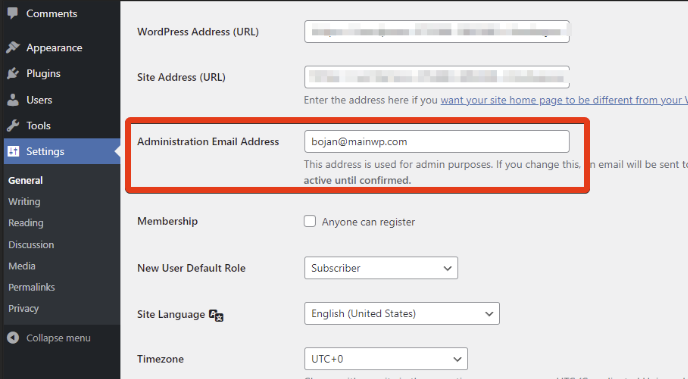
By default, MainWP uses the **Administration Email Address** from your WordPress General Settings for email notifications. You can change the FROM address specifically for MainWP emails without modifying that WordPress setting.
## What You'll Learn
* How to customize the FROM address for MainWP emails
* How to change it for specific email types only
## Prerequisites
* [Custom Dashboard extension](/add-ons/development/mainwp-custom-dashboard-extension) (free)
***
## Default Behavior
MainWP uses the email address configured in **WP Admin > Settings > General** under **Administration Email Address**.
 ***
## Change FROM Address for All MainWP Emails
[Install](/dashboard/overview/manage-extensions#install-extensions) the [Custom Dashboard](https://mainwp.com/extension/mainwp-custom-dashboard-extension/) extension.
Navigate to **MainWP > Add-ons > Custom Dashboard**.
Go to the **PHP** tab and add this code:
```php theme={null}
add_filter( 'mainwp_send_mail_from_header', 'myhook_mainwp_send_mail_from_header', 10, 3 );
function myhook_mainwp_send_mail_from_header( $input, $email, $subject ) {
return array(
'from_name' => 'Your Name',
'from_email' => 'your-email@example.com',
);
}
```
Replace the placeholder values:
* `'Your Name'` - The sender name recipients will see
* `'your-email@example.com'` - The email address to send from
Click **Save Changes**. All MainWP emails now use your custom FROM address.
***
## Change FROM Address for Specific Emails Only
To customize the sender only for certain MainWP emails (e.g., Daily Digest), use this conditional version:
```php theme={null}
add_filter( 'mainwp_send_mail_from_header', 'myhook_mainwp_send_mail_from_header', 10, 3 );
function myhook_mainwp_send_mail_from_header( $input, $email, $subject ) {
// Only change FROM for specific email/subject combinations
if ( 'recipient@example.com' == $email && 'Daily Digest' == $subject ) {
return array(
'from_name' => 'Custom Name',
'from_email' => 'custom@example.com',
);
}
// Return original for all other emails
return $input;
}
```
Adjust the `$email` and `$subject` conditions to match the emails you want to customize.
***
## Common Use Cases
| Scenario | Solution |
| ---------------------------- | ------------------------------------------ |
| Brand all MainWP emails | Use the basic filter with your brand email |
| Separate addresses by type | Use conditional filter based on subject |
| Different sender for reports | Check for "Pro Reports" in subject line |
***
## Self-Check Checklist
* [ ] Custom Dashboard extension installed
* [ ] PHP code added with your email details
* [ ] Changes saved
* [ ] Test email sent to verify new FROM address
***
## Related Resources
* [Dashboard Not Sending Emails](/troubleshooting/my-mainwp-dashboard-not-sending-emails) - Email troubleshooting
* [Edit Email Templates](/troubleshooting/why-cant-i-edit-email-templates-in-my-mainwp-dashboard) - Template customization
* [Custom Dashboard Extension](/add-ons/development/mainwp-custom-dashboard-extension) - Extension documentation
***
## Change FROM Address for All MainWP Emails
[Install](/dashboard/overview/manage-extensions#install-extensions) the [Custom Dashboard](https://mainwp.com/extension/mainwp-custom-dashboard-extension/) extension.
Navigate to **MainWP > Add-ons > Custom Dashboard**.
Go to the **PHP** tab and add this code:
```php theme={null}
add_filter( 'mainwp_send_mail_from_header', 'myhook_mainwp_send_mail_from_header', 10, 3 );
function myhook_mainwp_send_mail_from_header( $input, $email, $subject ) {
return array(
'from_name' => 'Your Name',
'from_email' => 'your-email@example.com',
);
}
```
Replace the placeholder values:
* `'Your Name'` - The sender name recipients will see
* `'your-email@example.com'` - The email address to send from
Click **Save Changes**. All MainWP emails now use your custom FROM address.
***
## Change FROM Address for Specific Emails Only
To customize the sender only for certain MainWP emails (e.g., Daily Digest), use this conditional version:
```php theme={null}
add_filter( 'mainwp_send_mail_from_header', 'myhook_mainwp_send_mail_from_header', 10, 3 );
function myhook_mainwp_send_mail_from_header( $input, $email, $subject ) {
// Only change FROM for specific email/subject combinations
if ( 'recipient@example.com' == $email && 'Daily Digest' == $subject ) {
return array(
'from_name' => 'Custom Name',
'from_email' => 'custom@example.com',
);
}
// Return original for all other emails
return $input;
}
```
Adjust the `$email` and `$subject` conditions to match the emails you want to customize.
***
## Common Use Cases
| Scenario | Solution |
| ---------------------------- | ------------------------------------------ |
| Brand all MainWP emails | Use the basic filter with your brand email |
| Separate addresses by type | Use conditional filter based on subject |
| Different sender for reports | Check for "Pro Reports" in subject line |
***
## Self-Check Checklist
* [ ] Custom Dashboard extension installed
* [ ] PHP code added with your email details
* [ ] Changes saved
* [ ] Test email sent to verify new FROM address
***
## Related Resources
* [Dashboard Not Sending Emails](/troubleshooting/my-mainwp-dashboard-not-sending-emails) - Email troubleshooting
* [Edit Email Templates](/troubleshooting/why-cant-i-edit-email-templates-in-my-mainwp-dashboard) - Template customization
* [Custom Dashboard Extension](/add-ons/development/mainwp-custom-dashboard-extension) - Extension documentation