> ## Documentation Index
> Fetch the complete documentation index at: https://docs.mainwp.com/llms.txt
> Use this file to discover all available pages before exploring further.
# Required Plugins Check for MainWP Extensions
> When a MainWP extension requires a third-party plugin on child sites, the Dashboard prompts you to install it automatically.
Some MainWP extensions require third-party plugins to be installed on your child sites. When you open an extension page, the Dashboard checks for missing required plugins and prompts you to install them.
## What You'll Learn
* How the required plugins check works
* How to install required plugins
* What happens if you dismiss the prompt
***
## How the Check Works
The required plugin check is triggered when you open an extension page (e.g., **Dashboard > Add-ons > UpdraftPlus**).
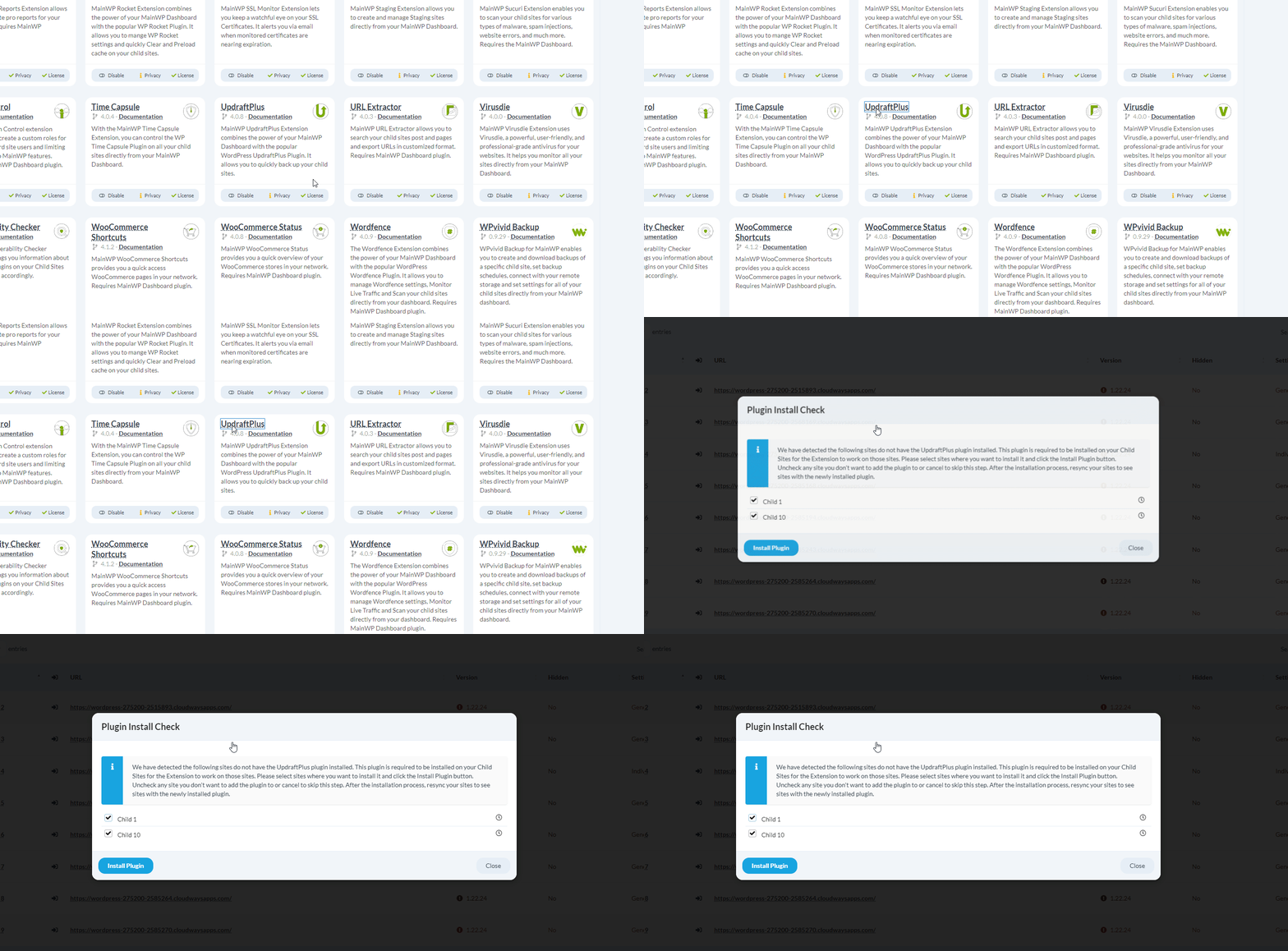 If any required plugins are missing from your child sites, a popup modal appears with installation options.
***
## Installing Required Plugins
When the prompt appears, you have two options:
| Action | Result |
| ------------------------ | --------------------------------------------------------- |
| Click **Install Plugin** | Installs and activates the required plugin on child sites |
| Click **Close** | Dismisses the prompt for 30 days |
Installed plugins are automatically activated on child sites.
***
## After Installation
After installing the required plugins, synchronize your Dashboard with child sites for the extension to detect the newly installed plugins.
Go to **MainWP > Sites > Manage Sites** and click **Sync Dashboard** or wait for the next automatic sync.
***
## Dismissed Prompt Timing
If you dismiss the modal by clicking **Close**, the next check for required plugins will occur no sooner than 30 days later.
To trigger an immediate check, deactivate and reactivate the extension, then open the extension page again.
***
## Self-Check Checklist
* [ ] Opened extension page to trigger check
* [ ] Installed required plugins (if prompted)
* [ ] Synchronized Dashboard with child sites
* [ ] Extension showing expected functionality
***
## Related Resources
* [Manage Add-ons](/dashboard/overview/manage-extensions) - Extension management
* [Managing Plugins](/sites/plugins/managing-plugins-with-mainwp) - Plugin management
If any required plugins are missing from your child sites, a popup modal appears with installation options.
***
## Installing Required Plugins
When the prompt appears, you have two options:
| Action | Result |
| ------------------------ | --------------------------------------------------------- |
| Click **Install Plugin** | Installs and activates the required plugin on child sites |
| Click **Close** | Dismisses the prompt for 30 days |
Installed plugins are automatically activated on child sites.
***
## After Installation
After installing the required plugins, synchronize your Dashboard with child sites for the extension to detect the newly installed plugins.
Go to **MainWP > Sites > Manage Sites** and click **Sync Dashboard** or wait for the next automatic sync.
***
## Dismissed Prompt Timing
If you dismiss the modal by clicking **Close**, the next check for required plugins will occur no sooner than 30 days later.
To trigger an immediate check, deactivate and reactivate the extension, then open the extension page again.
***
## Self-Check Checklist
* [ ] Opened extension page to trigger check
* [ ] Installed required plugins (if prompted)
* [ ] Synchronized Dashboard with child sites
* [ ] Extension showing expected functionality
***
## Related Resources
* [Manage Add-ons](/dashboard/overview/manage-extensions) - Extension management
* [Managing Plugins](/sites/plugins/managing-plugins-with-mainwp) - Plugin management