> ## Documentation Index
> Fetch the complete documentation index at: https://docs.mainwp.com/llms.txt
> Use this file to discover all available pages before exploring further.
# MainWP and Strattic compatibility
> How to connect Strattic-hosted WordPress sites to MainWP Dashboard, including HTTP authentication setup and known limitations.
 [Strattic](https://www.strattic.com/) is a solution for headless and static WordPress hosting. When a WordPress site is hosted on Strattic, it has three versions:
| Version | Purpose | MainWP Compatibility |
| ------- | ----------------------------------- | -------------------------------- |
| Staging | WordPress administration (wp-admin) | Connect to MainWP using this URL |
| Preview | Review changes before publishing | Not used with MainWP |
| Live | Static public-facing site | Not accessible via MainWP |
MainWP connects only to the Staging version, which is the dynamic WordPress instance.
## What You'll Learn
* How to add a Strattic site to MainWP
* Current limitations when using MainWP with Strattic
## Prerequisites
* Strattic account with access to site details
* MainWP Dashboard installed and configured
* MainWP Child plugin installed on the Strattic Staging site
***
## Add a Strattic Site to MainWP
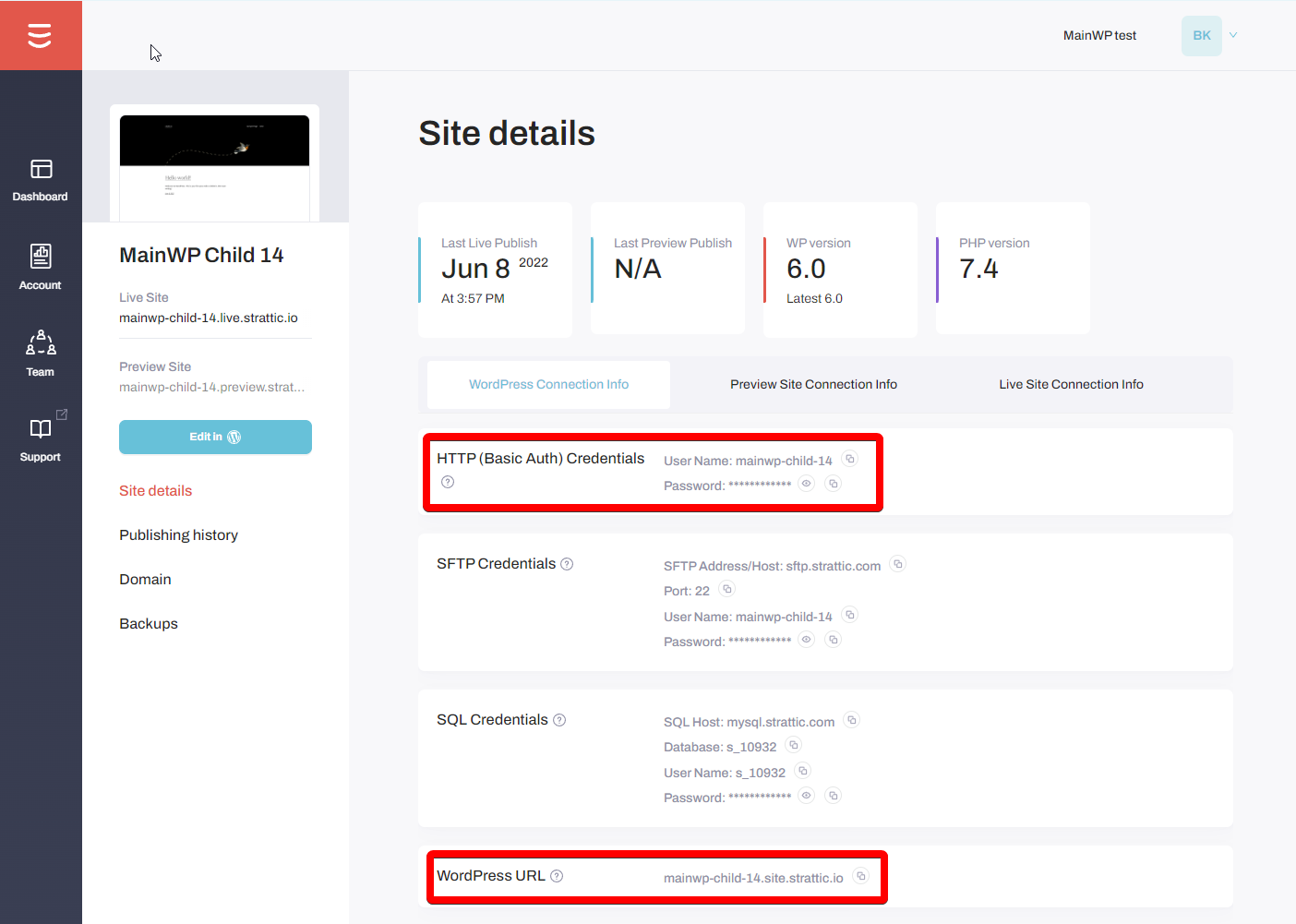
Go to your [Strattic Dashboard](http://app.strattic.com/), locate the site you want to add, and click **Details**.
From the site details page, copy the HTTP (Basic Auth) Credentials and the WordPress URL.
HTTP Basic Auth is mandatory for the Staging version of the site.
[Strattic](https://www.strattic.com/) is a solution for headless and static WordPress hosting. When a WordPress site is hosted on Strattic, it has three versions:
| Version | Purpose | MainWP Compatibility |
| ------- | ----------------------------------- | -------------------------------- |
| Staging | WordPress administration (wp-admin) | Connect to MainWP using this URL |
| Preview | Review changes before publishing | Not used with MainWP |
| Live | Static public-facing site | Not accessible via MainWP |
MainWP connects only to the Staging version, which is the dynamic WordPress instance.
## What You'll Learn
* How to add a Strattic site to MainWP
* Current limitations when using MainWP with Strattic
## Prerequisites
* Strattic account with access to site details
* MainWP Dashboard installed and configured
* MainWP Child plugin installed on the Strattic Staging site
***
## Add a Strattic Site to MainWP
Go to your [Strattic Dashboard](http://app.strattic.com/), locate the site you want to add, and click **Details**.
From the site details page, copy the HTTP (Basic Auth) Credentials and the WordPress URL.
HTTP Basic Auth is mandatory for the Staging version of the site.
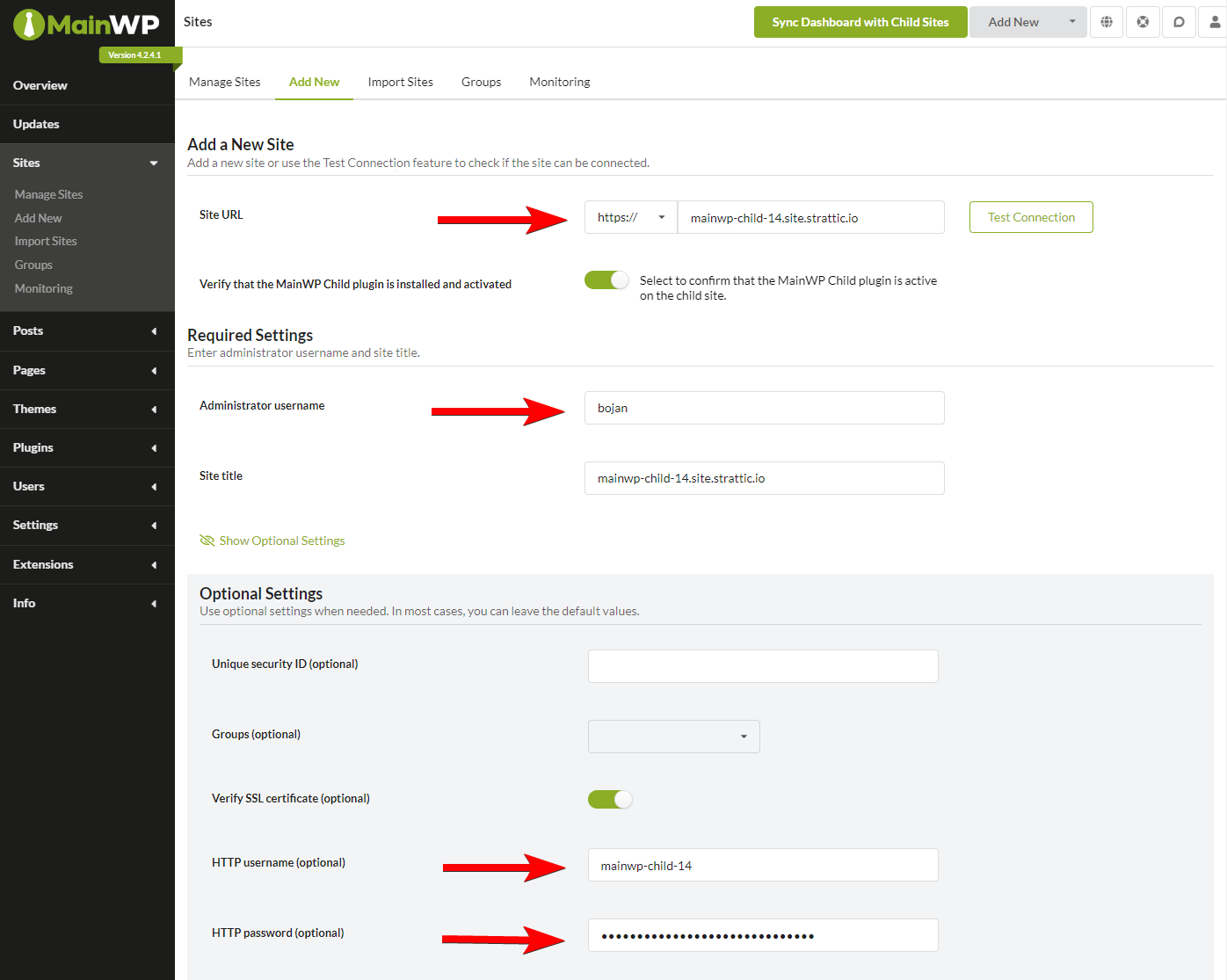
 Navigate to **MainWP Dashboard > Sites > Add New**.
Fill in the required fields:
* **Site URL**: Use the Staging WordPress URL from Strattic
* **Administrator username**: Admin username for the child site
* **HTTP username**: From Strattic's HTTP credentials
* **HTTP password**: From Strattic's HTTP credentials
Navigate to **MainWP Dashboard > Sites > Add New**.
Fill in the required fields:
* **Site URL**: Use the Staging WordPress URL from Strattic
* **Administrator username**: Admin username for the child site
* **HTTP username**: From Strattic's HTTP credentials
* **HTTP password**: From Strattic's HTTP credentials
 Click **Add Site**. MainWP connects to the Staging version of your Strattic site.
***
## Current Limitations
### Publishing Required After Changes
When you make changes through MainWP (updates, plugin installations, etc.), the Staging site is modified. These changes are not visible on your Live site until you publish.
Publishing generates a fresh static version of your site. See [Strattic's publishing documentation](https://support.strattic.com/en/articles/2574386-how-to-publish-to-static-with-strattic) for publishing options.
### Container Shutdown
After a period of inactivity on the Staging site, Strattic automatically shuts down the container for security and resource reasons.
| Impact | Description |
| -------------------- | -------------------------------------------------------- |
| MainWP communication | Dashboard cannot sync or connect while container is down |
| Wake process | Currently only possible through Strattic dashboard |
| Live site | Completely unaffected by container shutdown |
Before performing MainWP operations, ensure the Strattic container is running by accessing the Staging site through the Strattic dashboard.
***
## Self-Check Checklist
* [ ] Located Staging URL in Strattic Dashboard
* [ ] Copied HTTP Basic Auth credentials
* [ ] Entered HTTP credentials in MainWP Add Site form
* [ ] Site successfully added and syncing
* [ ] Published changes to Live after MainWP updates
***
## Related Resources
* [HTTP Basic Authentication](/troubleshooting/use-of-jump-to-wp-admin-with-child-sites-protected-by-http-basic-authentication) - Using MainWP with HTTP auth
* [Hosting Compatibility](/advanced/miscellaneous/hosting-compatibility) - General hosting information
Click **Add Site**. MainWP connects to the Staging version of your Strattic site.
***
## Current Limitations
### Publishing Required After Changes
When you make changes through MainWP (updates, plugin installations, etc.), the Staging site is modified. These changes are not visible on your Live site until you publish.
Publishing generates a fresh static version of your site. See [Strattic's publishing documentation](https://support.strattic.com/en/articles/2574386-how-to-publish-to-static-with-strattic) for publishing options.
### Container Shutdown
After a period of inactivity on the Staging site, Strattic automatically shuts down the container for security and resource reasons.
| Impact | Description |
| -------------------- | -------------------------------------------------------- |
| MainWP communication | Dashboard cannot sync or connect while container is down |
| Wake process | Currently only possible through Strattic dashboard |
| Live site | Completely unaffected by container shutdown |
Before performing MainWP operations, ensure the Strattic container is running by accessing the Staging site through the Strattic dashboard.
***
## Self-Check Checklist
* [ ] Located Staging URL in Strattic Dashboard
* [ ] Copied HTTP Basic Auth credentials
* [ ] Entered HTTP credentials in MainWP Add Site form
* [ ] Site successfully added and syncing
* [ ] Published changes to Live after MainWP updates
***
## Related Resources
* [HTTP Basic Authentication](/troubleshooting/use-of-jump-to-wp-admin-with-child-sites-protected-by-http-basic-authentication) - Using MainWP with HTTP auth
* [Hosting Compatibility](/advanced/miscellaneous/hosting-compatibility) - General hosting information