> ## Documentation Index
> Fetch the complete documentation index at: https://docs.mainwp.com/llms.txt
> Use this file to discover all available pages before exploring further.
# Custom signature algorithm and PHPSecLib as alternative to OpenSSL
> Configure custom signature algorithms and use PHPSecLib as an alternative to OpenSSL for Dashboard-to-Child communication.
MainWP Dashboard version 4.5 introduced the ability to set a custom signature algorithm and added PHPSecLib as an alternative to OpenSSL. Both options can be configured globally or on a per-site basis.
## What You'll Learn
* When to change the signature algorithm
* How to switch between OpenSSL and PHPSecLib
* How to configure these settings per site
## Prerequisites
* MainWP Dashboard version 4.5 or later
* Admin access to your Dashboard
***
## Signature Algorithm
### Background
MainWP uses digital signatures to verify communication between Dashboard and Child Sites. Previously, MainWP used SHA1 for signature verification. As hosts updated to OpenSSL 3, some disabled SHA1 as a legacy option.
MainWP now defaults to SHA256, which provides enhanced security and works with both OpenSSL 1 and OpenSSL 3.
### Change the Global Signature Algorithm
If your Dashboard host doesn't support a certain SHA algorithm, connections may fail.
Go to **MainWP Dashboard > Settings > Advanced Settings**.
Find **OpenSSL signature algorithm** and select a supported algorithm.
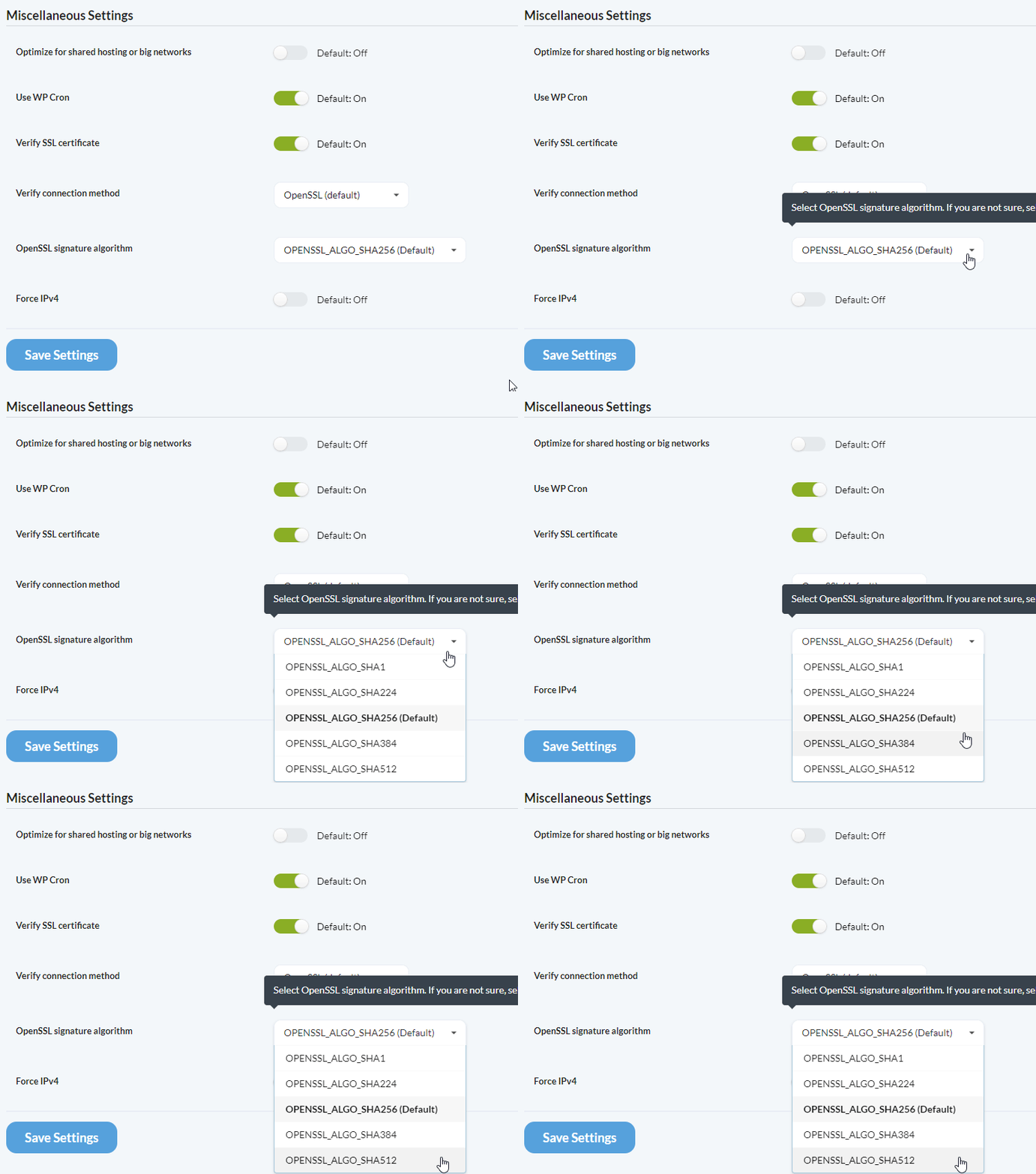 Save your changes.
Most hosts support SHA256. If yours doesn't, contact support to ask which algorithms they support.
Signature verification happens after a site is added to the Dashboard. If verification fails, the site can still be added, but sync and other authenticated actions will fail.
### Switching Back to SHA1
To switch from SHA256 to SHA1 (globally or for specific sites), you must reconnect affected child sites:
1. Visit each child site's WP Admin
2. Deactivate and reactivate the MainWP Child plugin (this disconnects it)
3. Reconnect the site from your Dashboard
***
## PHPSecLib as Alternative to OpenSSL
### When to Use PHPSecLib
PHPSecLib is a pure PHP implementation of cryptographic functions. Use it when:
| Scenario | Description |
| -------------------- | -------------------------------------------------- |
| OpenSSL unavailable | Server doesn't have OpenSSL installed |
| Configuration issues | OpenSSL misconfigured (common on localhost setups) |
| openssl.cnf problems | Cannot locate or configure the openssl.cnf file |
If OpenSSL works properly on your host (most web hosts), there's no need to switch to PHPSecLib.
### Enable PHPSecLib Globally
Go to **MainWP Dashboard > Settings > Advanced Settings**.
Find **Verify connection method** and select **PHPSecLib**.
Save your changes.
Most hosts support SHA256. If yours doesn't, contact support to ask which algorithms they support.
Signature verification happens after a site is added to the Dashboard. If verification fails, the site can still be added, but sync and other authenticated actions will fail.
### Switching Back to SHA1
To switch from SHA256 to SHA1 (globally or for specific sites), you must reconnect affected child sites:
1. Visit each child site's WP Admin
2. Deactivate and reactivate the MainWP Child plugin (this disconnects it)
3. Reconnect the site from your Dashboard
***
## PHPSecLib as Alternative to OpenSSL
### When to Use PHPSecLib
PHPSecLib is a pure PHP implementation of cryptographic functions. Use it when:
| Scenario | Description |
| -------------------- | -------------------------------------------------- |
| OpenSSL unavailable | Server doesn't have OpenSSL installed |
| Configuration issues | OpenSSL misconfigured (common on localhost setups) |
| openssl.cnf problems | Cannot locate or configure the openssl.cnf file |
If OpenSSL works properly on your host (most web hosts), there's no need to switch to PHPSecLib.
### Enable PHPSecLib Globally
Go to **MainWP Dashboard > Settings > Advanced Settings**.
Find **Verify connection method** and select **PHPSecLib**.
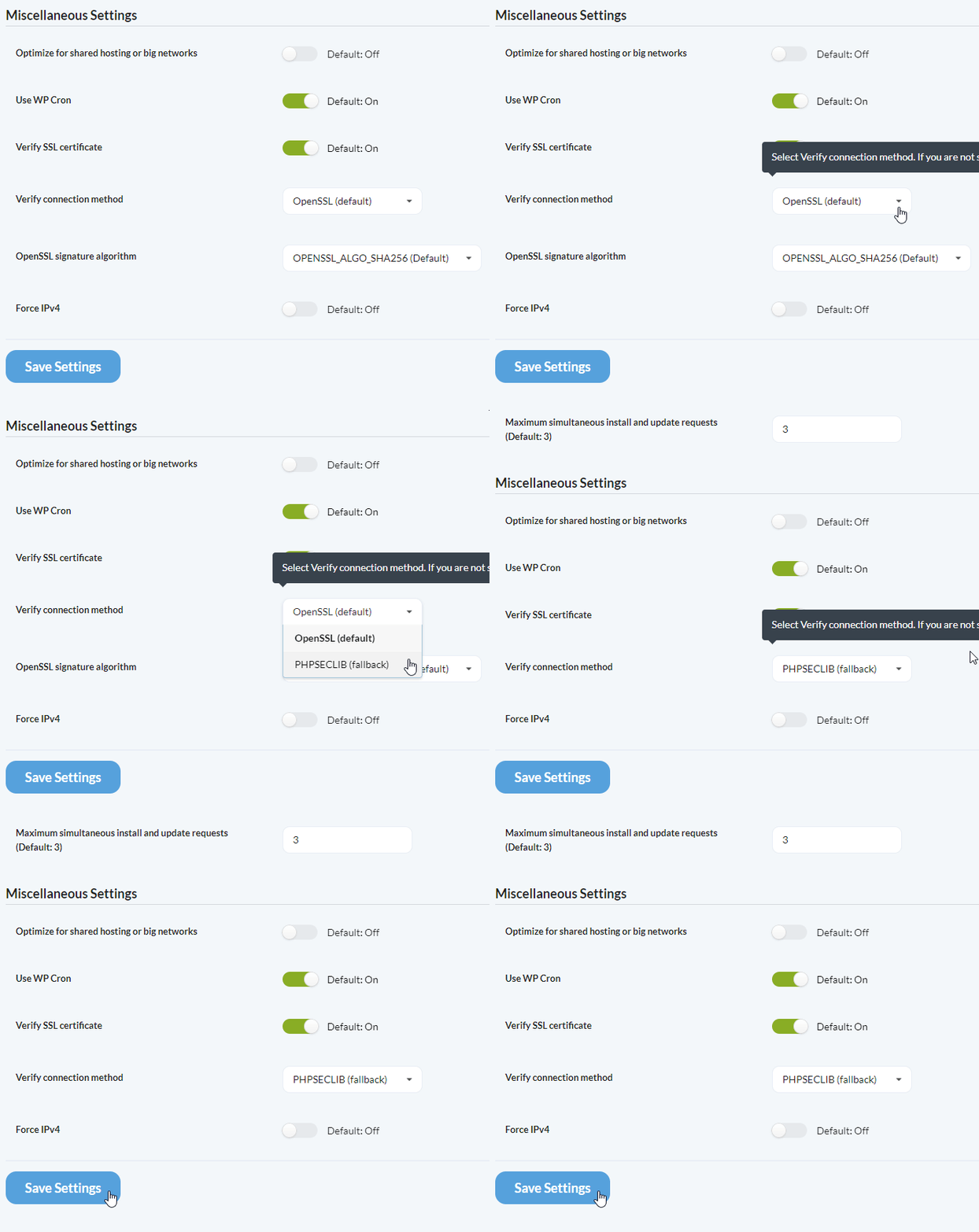 Save your changes.
Changing to PHPSecLib globally requires re-adding existing child sites. To avoid this, configure the setting per site instead.
***
## Per-Site Settings
Both signature algorithm and connection method can be configured per site. This is useful when a specific child site's host has different requirements.
Go to **MainWP Dashboard > Sites > Manage Sites**.
Click on the child site, then click **Edit**.
Scroll to the **Advanced Settings (Optional)** section.
Set the signature algorithm and/or verify connection method for this specific site.
Save your changes.
Changing to PHPSecLib globally requires re-adding existing child sites. To avoid this, configure the setting per site instead.
***
## Per-Site Settings
Both signature algorithm and connection method can be configured per site. This is useful when a specific child site's host has different requirements.
Go to **MainWP Dashboard > Sites > Manage Sites**.
Click on the child site, then click **Edit**.
Scroll to the **Advanced Settings (Optional)** section.
Set the signature algorithm and/or verify connection method for this specific site.
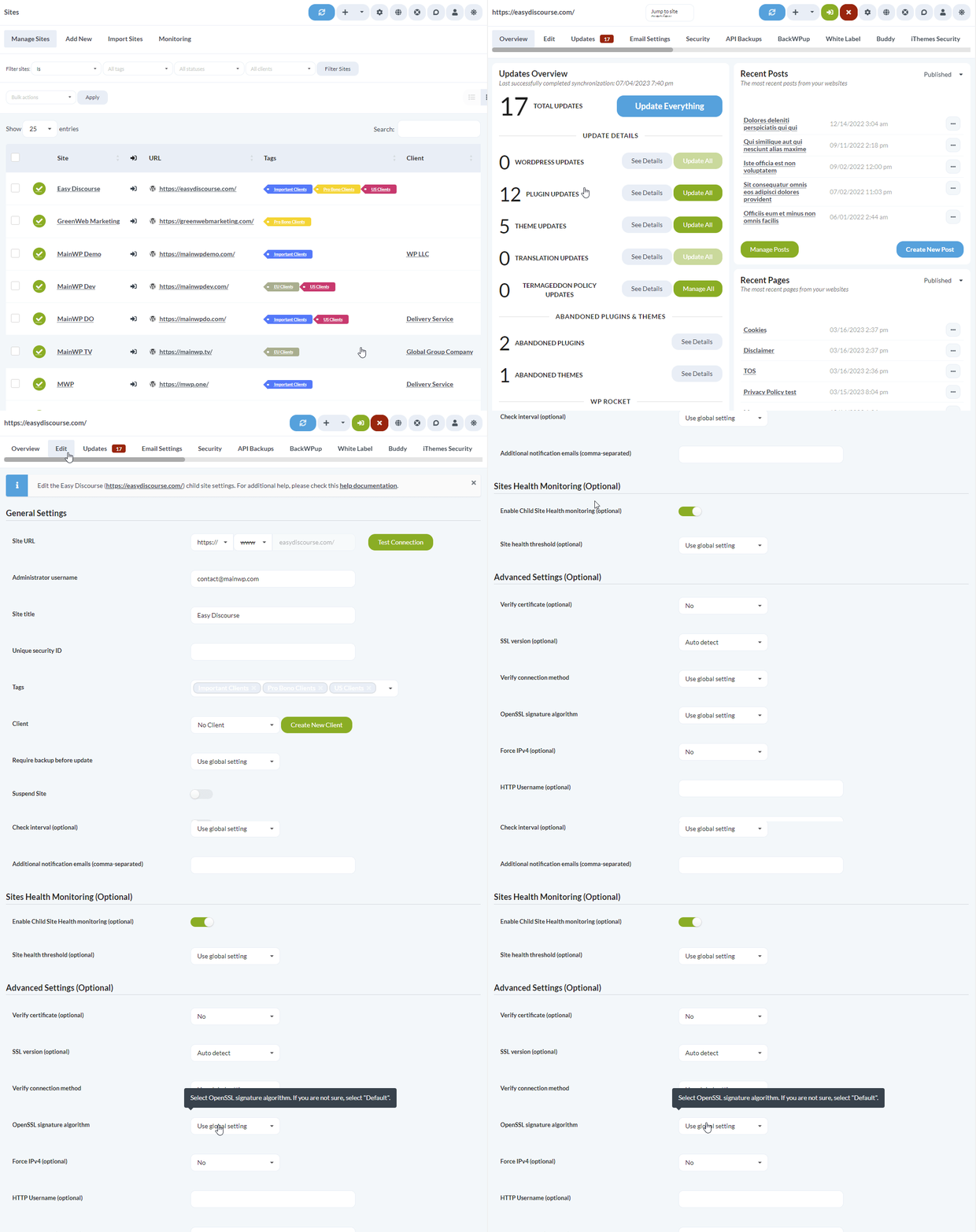 Save the site settings.
***
## Self-Check Checklist
* [ ] Identified whether connection issues are signature or OpenSSL related
* [ ] Selected appropriate signature algorithm for your host
* [ ] Configured PHPSecLib if OpenSSL is unavailable
* [ ] Child sites connecting and syncing successfully
***
## Related Resources
* [OpenSSL Key Encryption](/advanced/openssl-keys-encryption) - Private key encryption
* [Find openssl.cnf](/advanced/how-to-find-the-openssl-cnf-file) - Locate OpenSSL configuration
* [MainWP Security](/getting-started/how-secure-is-the-mainwp-plugin) - Security overview
Save the site settings.
***
## Self-Check Checklist
* [ ] Identified whether connection issues are signature or OpenSSL related
* [ ] Selected appropriate signature algorithm for your host
* [ ] Configured PHPSecLib if OpenSSL is unavailable
* [ ] Child sites connecting and syncing successfully
***
## Related Resources
* [OpenSSL Key Encryption](/advanced/openssl-keys-encryption) - Private key encryption
* [Find openssl.cnf](/advanced/how-to-find-the-openssl-cnf-file) - Locate OpenSSL configuration
* [MainWP Security](/getting-started/how-secure-is-the-mainwp-plugin) - Security overview