> ## Documentation Index
> Fetch the complete documentation index at: https://docs.mainwp.com/llms.txt
> Use this file to discover all available pages before exploring further.
# Vulnerability Checker
> MainWP Vulnerability Checker extension uses either the free MainWP NVD API or the paid WPScan Vulnerability Database API to bring you information about vulnerable plugins and themes on your Child Sites so you can act accordingly.
## What You'll Learn
* Scanning child sites for known plugin and theme vulnerabilities
* Scheduling automated vulnerability checks
* Using MainWP NVD API vs WPScan Vulnerability Database
* Acting on vulnerability scan results
***
**Extension Add-on** - This add-on provides standalone functionality within MainWP Dashboard. No third-party plugins required.
[MainWP Vulnerability Checker](https://mainwp.com/extension/vulnerability-checker/) extension uses [WPScan Vulnerability Database API](https://wpvulndb.com/) and [NVD Nist API](https://nvd.nist.gov/) to bring you **information about vulnerable** **plugins and themes on your Child Sites** so you can act accordingly. Directly from your MainWP Dashboard, you will be able to see vulnerable plugins and themes, what the issues are.
* The Vulnerability database updates itself in real-time, so you don’t miss out on any vulnerabilities.
* Premium plugins and themes are a part of wpvulndb.com.
* Get notified of vulnerabilities.
* Update vulnerable versions
* Delete vulnerable versions
## WPScan Vulnerability Database
The WPScan Vulnerability Database is an online browsable version of WPScan's data files that are used to detect known WordPress core, plugin, and theme vulnerabilities. This database has been compiled by the WPScan Team and various other contributors since WPScan's release. The development of the WPScan Vulnerability Database was funded by [BruCON](http://brucon.org/)'s 5by5 project.
## MainWP NVD Database
This API is free, so it’s a good alternative for users that don’t have an active subscription to the WPVulnDB ([https://wpscan.com/](https://wpscan.com/)). The NVD is the U.S. government repository of standards-based vulnerability management data represented using the Security Content Automation Protocol (SCAP). This data enables the automation of vulnerability management, security measurement, and compliance. The NVD includes databases of security checklist references, security-related software flaws, misconfigurations, product names, and impact metrics.
## Check Your Sites for Vulnerabilities
Click the **Check all sites** button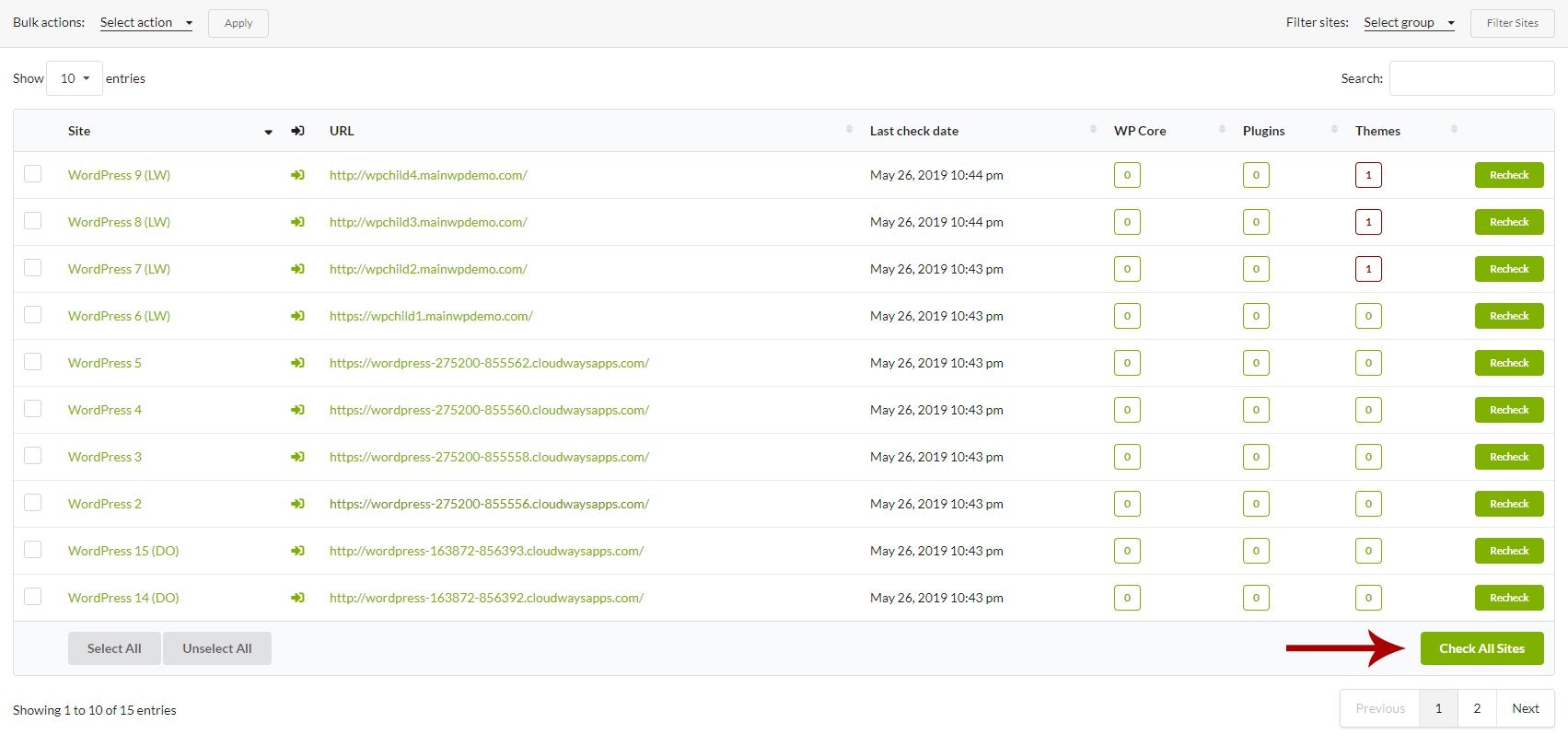 The Extension will check your sites right away.
### Schedule Scans
If you want the Extension to perform automated checks,
If you want to make sure that WP Cron jobs are regularly triggered on your MainWP Dashboard, you can Authorize the Uptime Robot service and add your dashboard site as a monitor. The Uptime Robot will ping your dashboard site regularly and make sure that all scheduled events are occurring.
### Include the Scan Process in the Sync Process
If you want the Vulnerability Checker extension to check your sites every time you Sync your sites,
## MainWP NVD API
Since the MainWP Vulnerability Checker Extension 4.1, MainWP NVD API that uses the [NVD Nist API](https://nvd.nist.gov/) to find potential vulnerabilities on your child sites **is available for all users**.
MainWP NVD API requires MainWP Dashboard and MainWP Child 4.1.7 or higher.
> The NVD is the U.S. government repository of standards-based vulnerability management data represented using the Security Content Automation Protocol (SCAP). This data enables the automation of vulnerability management, security measurement, and compliance. The NVD includes databases of security checklist references, security-related software flaws, misconfigurations, product names, and impact metrics.
This API is free, so it's a good alternative for users that don't have an active subscription to the WPVulnDB ([https://wpscan.com/](https://wpscan.com/)). To enable the MainWP NVD API,
Once the API Service has been selected, you can run the scan:
The NVD Nist API Database cannot be searched by plugin/theme slug (which would be unique for each item). It can only be searched by keyword, which means the API can return some false-positive results.
For some vulnerabilities, the NVD Nist API lacks the "Fixed in version" info, which can lead to the extension showing vulnerabilities that have already been resolved.
To remove false positives and get accurate results, use the "Ignore" function for detected vulnerabilities you recognize as false-positive.
***
## Related Resources
* [Security Add-ons](/add-ons/security) - Browse all security tools
* [Managing Plugins with MainWP](/sites/plugins/managing-plugins-with-mainwp) - Plugin management guide
* [How Secure is MainWP](/getting-started/how-secure-is-the-mainwp-plugin) - Security architecture overview
The Extension will check your sites right away.
### Schedule Scans
If you want the Extension to perform automated checks,
If you want to make sure that WP Cron jobs are regularly triggered on your MainWP Dashboard, you can Authorize the Uptime Robot service and add your dashboard site as a monitor. The Uptime Robot will ping your dashboard site regularly and make sure that all scheduled events are occurring.
### Include the Scan Process in the Sync Process
If you want the Vulnerability Checker extension to check your sites every time you Sync your sites,
## MainWP NVD API
Since the MainWP Vulnerability Checker Extension 4.1, MainWP NVD API that uses the [NVD Nist API](https://nvd.nist.gov/) to find potential vulnerabilities on your child sites **is available for all users**.
MainWP NVD API requires MainWP Dashboard and MainWP Child 4.1.7 or higher.
> The NVD is the U.S. government repository of standards-based vulnerability management data represented using the Security Content Automation Protocol (SCAP). This data enables the automation of vulnerability management, security measurement, and compliance. The NVD includes databases of security checklist references, security-related software flaws, misconfigurations, product names, and impact metrics.
This API is free, so it's a good alternative for users that don't have an active subscription to the WPVulnDB ([https://wpscan.com/](https://wpscan.com/)). To enable the MainWP NVD API,
Once the API Service has been selected, you can run the scan:
The NVD Nist API Database cannot be searched by plugin/theme slug (which would be unique for each item). It can only be searched by keyword, which means the API can return some false-positive results.
For some vulnerabilities, the NVD Nist API lacks the "Fixed in version" info, which can lead to the extension showing vulnerabilities that have already been resolved.
To remove false positives and get accurate results, use the "Ignore" function for detected vulnerabilities you recognize as false-positive.
***
## Related Resources
* [Security Add-ons](/add-ons/security) - Browse all security tools
* [Managing Plugins with MainWP](/sites/plugins/managing-plugins-with-mainwp) - Plugin management guide
* [How Secure is MainWP](/getting-started/how-secure-is-the-mainwp-plugin) - Security architecture overview