> ## Documentation Index
> Fetch the complete documentation index at: https://docs.mainwp.com/llms.txt
> Use this file to discover all available pages before exploring further.
# Jetpack Protect
> The Jetpack Protect Extension effectively detects vulnerabilities and provides detailed information about them, along with an easy update to the fixed version of WordPress, Plugins, or Themes.
## What You'll Learn
* Installing Jetpack Protect extension and plugin
* Viewing and fixing vulnerabilities on child sites
* Connecting child sites to Jetpack
* Using bulk actions to manage multiple sites
***
**Integration Add-on** - This add-on extends MainWP to work with Jetpack Protect. Requires Jetpack Protect to be installed and active on your child sites.
Jetpack Protect extension allows you to see any vulnerabilities on your child sites directly in your MainWP Dashboard. The extension works in tandem with the [Jetpack Protect](https://wordpress.org/plugins/jetpack-protect/) plugin on your child sites. Both the extension and the plugin are free to download and use.
Jetpack Protect automatically scans your child sites once per day. This means that after resolving vulnerability issues, it can take up to 24 hours before the extension reflects changes.
## Installing the extension
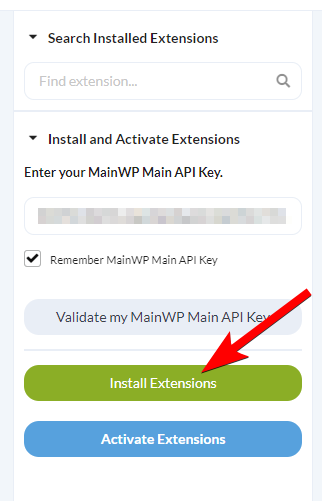
First step is to install the Jetpack Protect plugin on the desired child sites and activate it. After that, follow these steps to install the MainWP Jetpack Protect extension.
Click the **Install Add-ons** button
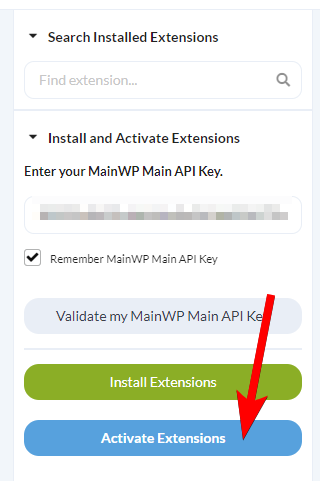
Once the installation process is complete, click the **Activate Add-ons** button.
## Vulnerabilities tab
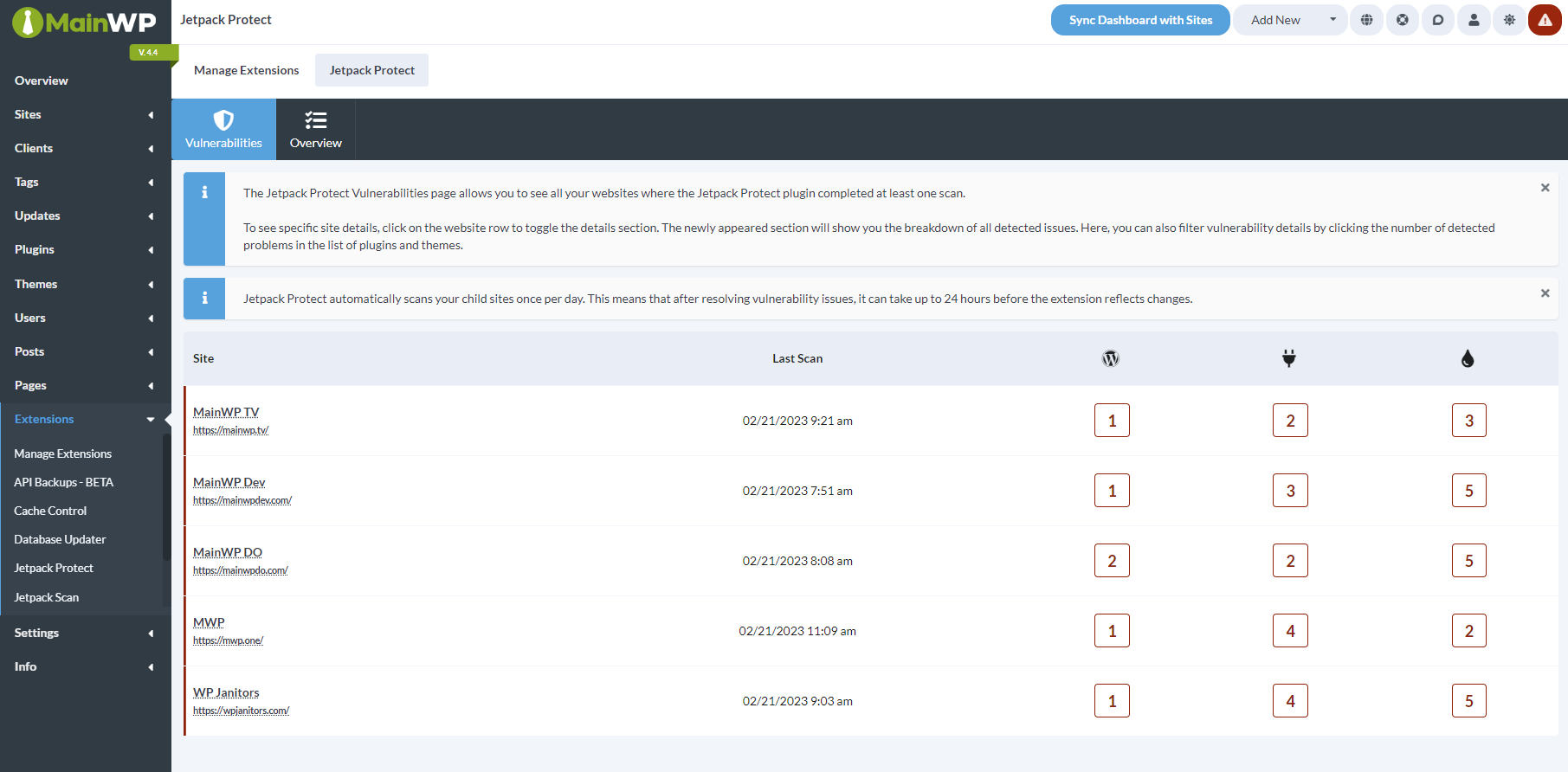
The Vulnerabilities tab shows the child sites that have the Jetpack Protect plugin installed, when the last scan was performed, and the number of vulnerabilities found for WordPress core, plugins, themes, files, and database items. File and database counts require Jetpack Scan data. You can click on the child site row to expand it and reveal detailed information about the detected vulnerabilities.
### Fix a vulnerability
Then you can click a vulnerability to reveal more information about it. For supported WordPress core, plugin, and theme vulnerabilities, you can update to the fixed version when one is available. For plugin and theme vulnerabilities, you can also delete the affected item.
## Overview tab
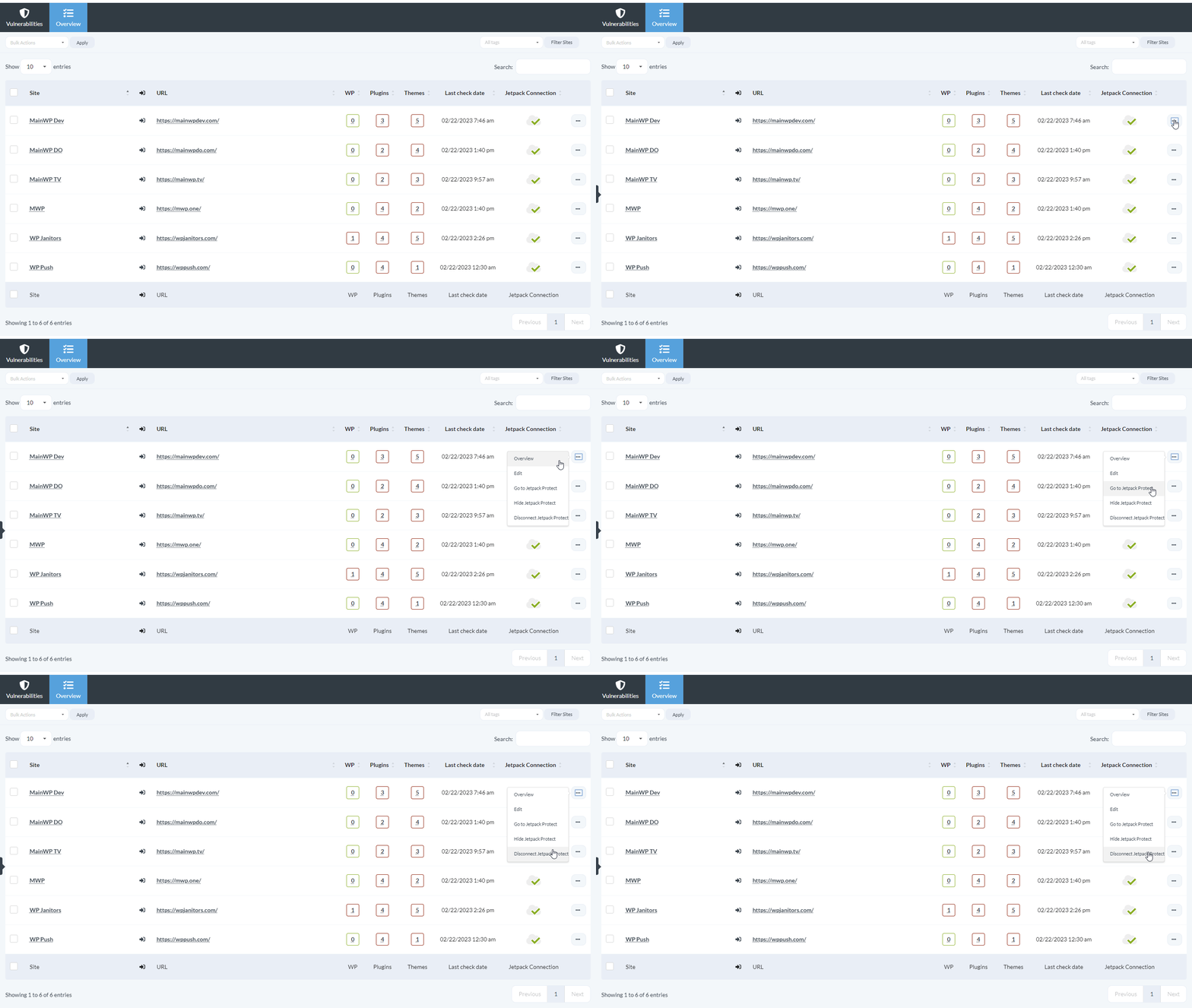
This page provides you with additional actions related to the Jetpack Protect plugin. The ellipsis menu includes actions such as **Overview**, **Edit**, **Go to Jetpack Protect**, **Hide Jetpack Protect** or **Unhide Jetpack Protect**, and **Connect Jetpack Protect** or **Disconnect Jetpack Protect**.
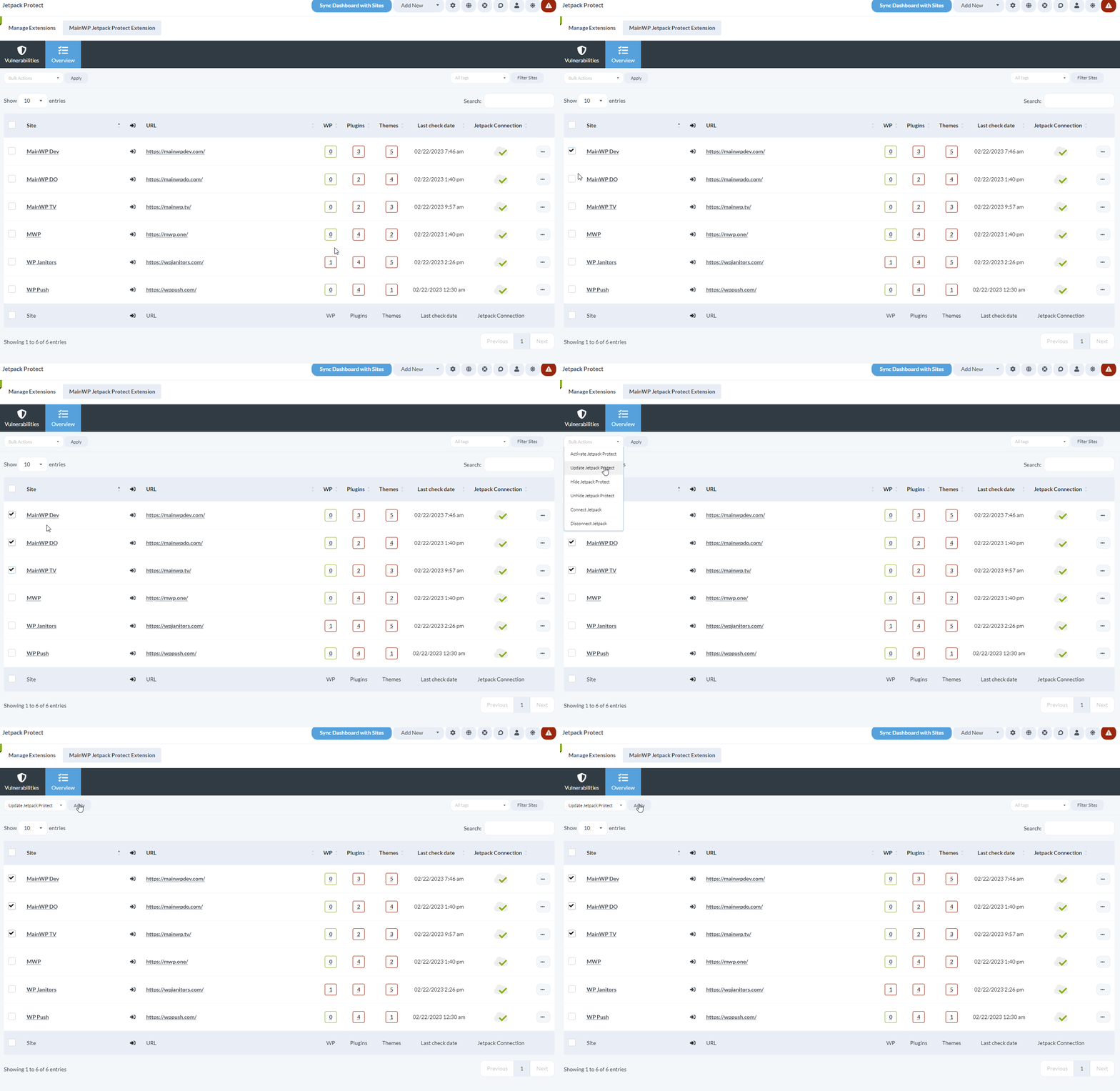
The **Bulk Actions** menu can activate, update, hide, unhide, connect, or disconnect Jetpack Protect for multiple child sites at once.
## Jetpack Protect REST API
The extension registers a v1 REST API endpoint at `wp-json/mainwp/v1/jetpack-protect/result`. All MainWP REST API calls, including full documentation and examples, are publicly available on [Postman](https://www.postman.com/mainwp/workspace/mainwp/overview). Please refer to our [REST API documentation](/api-reference/rest-api/overview) for more details on enabling REST API and managing API keys.
## Quick Start with Jetpack Protect
The extension works in tandem with the Jetpack Protect plugin on your Child Sites. Both the extension and the plugin are free to download and use.
Navigate to **MainWP Dashboard > Add-ons > Security > Jetpack Protect**.
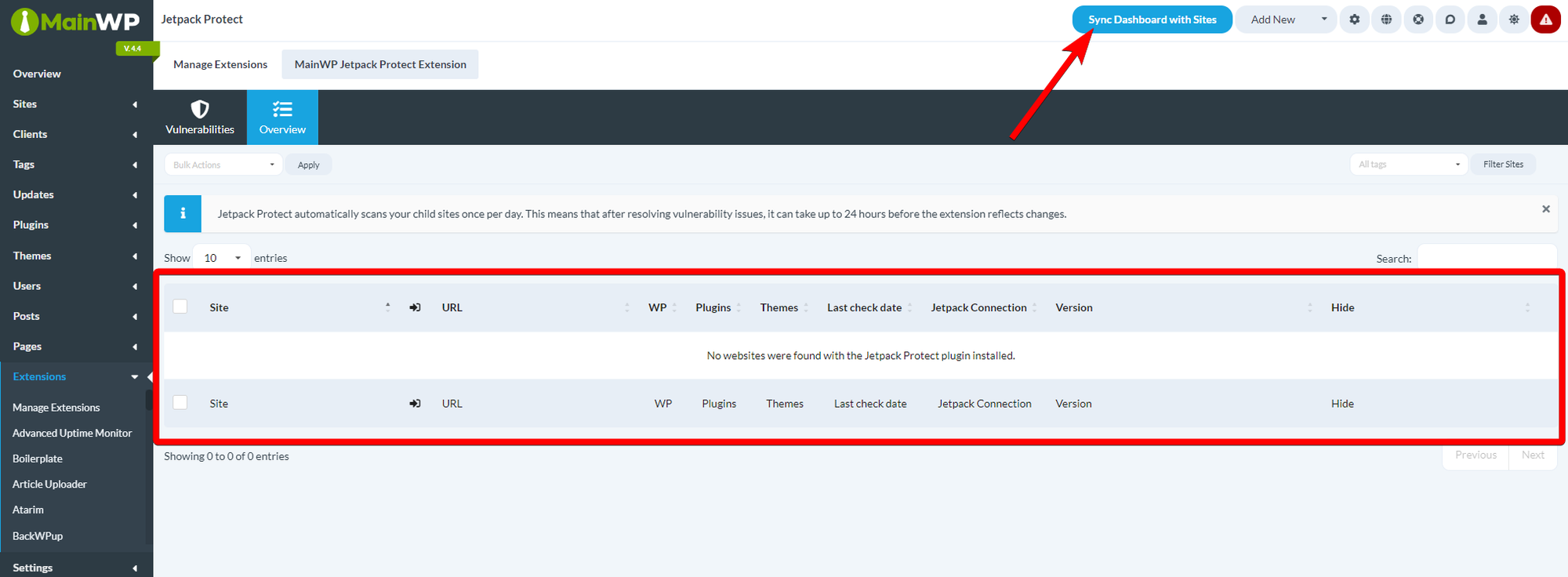
**NOTE**: If you don't immediately see all Child Sites on which you've installed Jetpack Protect plugin, please Synchronize all sites.
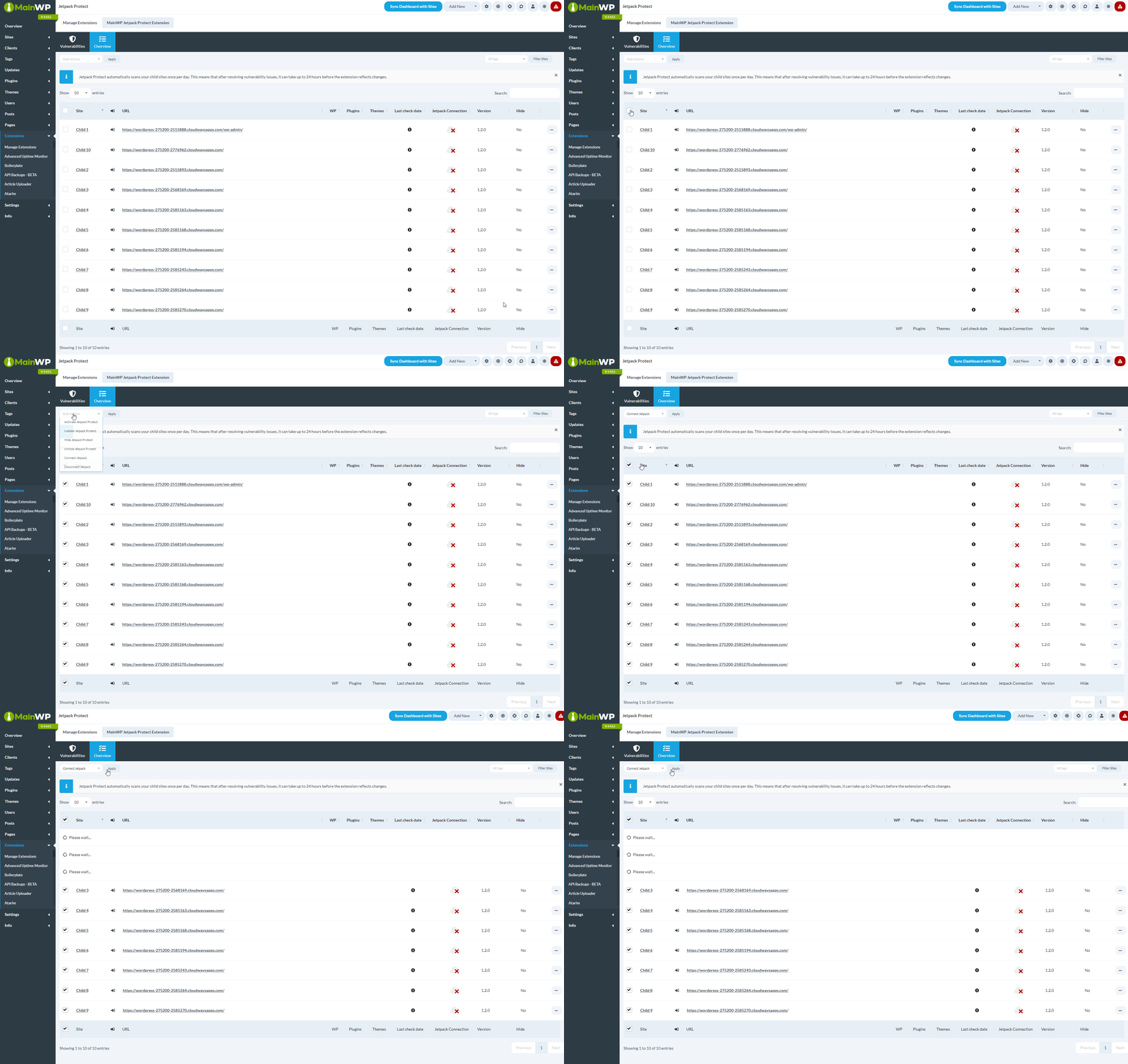
You should now see all sites in the table, with the red X icon in the **Jetpack Connection** column
To connect the Jetpack extension to the Jetpack plugin
1. Select all sites in the table
2. From the Bulk actions menu, select **Connect Jetpack**
3. Click **Apply** button
Perform another synchronization to get fresh data.
**NOTE:** After connecting the child sites to Jetpack Protect, it can take some time before Jetpack Protect completes the first scan.
***
## Related Resources
* [Security Add-ons](/add-ons/security) - Browse all security tools
* [Jetpack Scan Extension](/add-ons/security/jetpack-scan-extension) - Premium malware scanning
* [Vulnerability Checker Extension](/add-ons/security/vulnerability-checker-extension) - Alternative vulnerability scanning
 ## Installing the extension
First step is to install the Jetpack Protect plugin on the desired child sites and activate it. After that, follow these steps to install the MainWP Jetpack Protect extension.
## Installing the extension
First step is to install the Jetpack Protect plugin on the desired child sites and activate it. After that, follow these steps to install the MainWP Jetpack Protect extension.
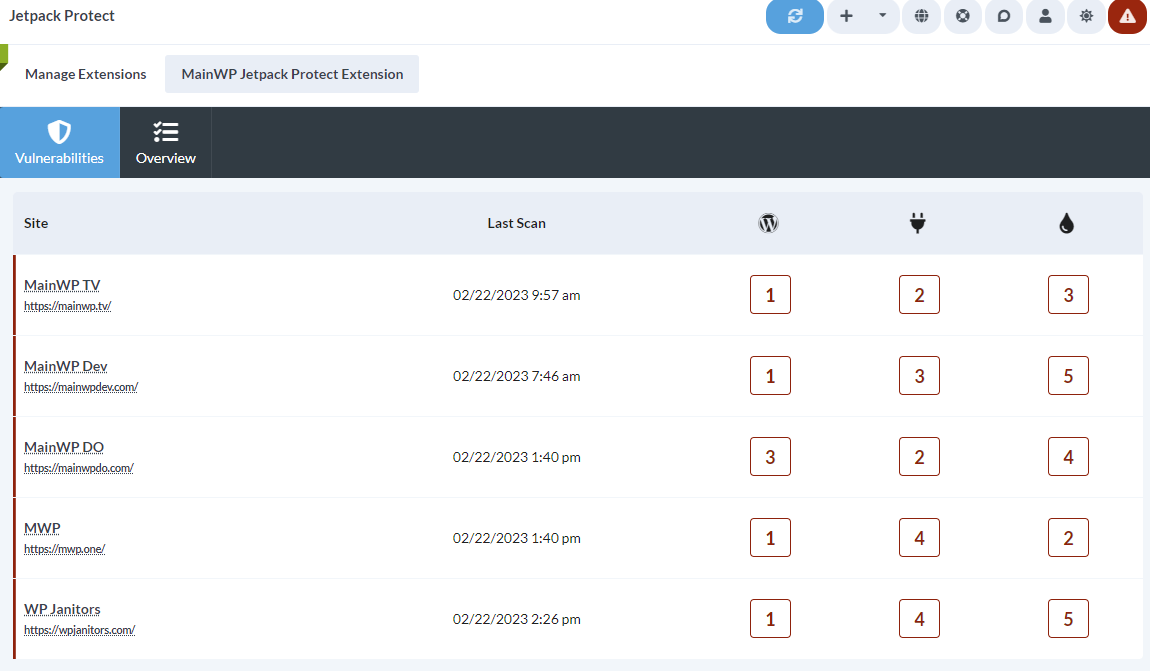 The Vulnerabilities tab shows the child sites that have the Jetpack Protect plugin installed, when the last scan was performed, and the number of vulnerabilities found for WordPress core, plugins, themes, files, and database items. File and database counts require Jetpack Scan data. You can click on the child site row to expand it and reveal detailed information about the detected vulnerabilities.
### Fix a vulnerability
Then you can click a vulnerability to reveal more information about it. For supported WordPress core, plugin, and theme vulnerabilities, you can update to the fixed version when one is available. For plugin and theme vulnerabilities, you can also delete the affected item.
The Vulnerabilities tab shows the child sites that have the Jetpack Protect plugin installed, when the last scan was performed, and the number of vulnerabilities found for WordPress core, plugins, themes, files, and database items. File and database counts require Jetpack Scan data. You can click on the child site row to expand it and reveal detailed information about the detected vulnerabilities.
### Fix a vulnerability
Then you can click a vulnerability to reveal more information about it. For supported WordPress core, plugin, and theme vulnerabilities, you can update to the fixed version when one is available. For plugin and theme vulnerabilities, you can also delete the affected item.  ## Overview tab
This page provides you with additional actions related to the Jetpack Protect plugin. The ellipsis menu includes actions such as **Overview**, **Edit**, **Go to Jetpack Protect**, **Hide Jetpack Protect** or **Unhide Jetpack Protect**, and **Connect Jetpack Protect** or **Disconnect Jetpack Protect**.
## Overview tab
This page provides you with additional actions related to the Jetpack Protect plugin. The ellipsis menu includes actions such as **Overview**, **Edit**, **Go to Jetpack Protect**, **Hide Jetpack Protect** or **Unhide Jetpack Protect**, and **Connect Jetpack Protect** or **Disconnect Jetpack Protect**.
 The **Bulk Actions** menu can activate, update, hide, unhide, connect, or disconnect Jetpack Protect for multiple child sites at once.
 ## Jetpack Protect REST API
The extension registers a v1 REST API endpoint at `wp-json/mainwp/v1/jetpack-protect/result`. All MainWP REST API calls, including full documentation and examples, are publicly available on [Postman](https://www.postman.com/mainwp/workspace/mainwp/overview). Please refer to our [REST API documentation](/api-reference/rest-api/overview) for more details on enabling REST API and managing API keys.
## Quick Start with Jetpack Protect
The extension works in tandem with the Jetpack Protect plugin on your Child Sites. Both the extension and the plugin are free to download and use.
## Jetpack Protect REST API
The extension registers a v1 REST API endpoint at `wp-json/mainwp/v1/jetpack-protect/result`. All MainWP REST API calls, including full documentation and examples, are publicly available on [Postman](https://www.postman.com/mainwp/workspace/mainwp/overview). Please refer to our [REST API documentation](/api-reference/rest-api/overview) for more details on enabling REST API and managing API keys.
## Quick Start with Jetpack Protect
The extension works in tandem with the Jetpack Protect plugin on your Child Sites. Both the extension and the plugin are free to download and use.