> ## Documentation Index
> Fetch the complete documentation index at: https://docs.mainwp.com/llms.txt
> Use this file to discover all available pages before exploring further.
# Custom Dashboard
> Customize the layout, appearance, and functionality of your MainWP Dashboard with this Extension to create an interface that suits your needs.
## What You'll Learn
* Adding custom PHP, CSS, and JavaScript to your Dashboard
* Where custom code is stored and executed
* Using the built-in code editor (CodeMirror 6) with autocompletion, code folding, and the One Dark theme
* Validating PHP snippets before saving with the built-in syntax check
* Handling PHP errors safely
* Accessing example code snippets
***
**Extension Add-on** - This add-on provides standalone functionality within MainWP Dashboard. No third-party plugins required.
The MainWP Custom Dashboard Extension is designed to contain your custom snippets for your MainWP Dashboard.
By adding custom snippets to this plugin, you can easily extend your MainWP Dashboard functionality or change the way it looks.
After activation, open it from **Add-ons > Administrative > Custom Dashboard** in MainWP Dashboard.
This extension will help you to keep all your changes in one location and independent of the other components.
This enables you to safely update your MainWP Dashboard plugin on your MainWP Dashboard site without worry about losing your modifications as well as deactivating your custom code if needed for troubleshooting.
The built-in code editor allows you to add your code directly through the extension interface.
**No FTP access is required.**
Check out our Github repository where we keep example snippets that will help you get started:
* [CSS Code Snippets](https://github.com/mainwp/mainwp-custom-dashboard-extension-examples/tree/master/css)
* [PHP Code Snippets](https://github.com/mainwp/mainwp-custom-dashboard-extension-examples/tree/master/php)
* [JS Code Snippets](https://github.com/mainwp/mainwp-custom-dashboard-extension-examples/tree/master/js)
## How It Works
MainWP Custom Dashboard Extension saves your PHP, CSS, and JS snippets in WordPress options on your MainWP Dashboard site instead of requiring separate PHP, CSS, or JS files.
CSS and JS snippets are added inline on MainWP pages only — they don't load on the rest of WP Admin or the front-end.
Saved PHP Code Snippets are executed on page load using the PHP function `eval()`.
In case the `eval()` function is disabled on your host, please contact your host support and have them enable it for you.
MainWP Custom Dashboard Extension is used to apply custom code snippets to the MainWP Dashboard site ONLY!
It doesn't apply code to child sites.
To apply custom code snippets to child sites, please see the [MainWP Code Snippets Extension](https://mainwp.com/extension/code-snippets/).
## The Code Editor
The editor is powered by CodeMirror 6 and ships with productivity features enabled by default:
* **Syntax highlighting** for PHP, CSS, and JavaScript
* **One Dark** theme for better readability
* **Autocompletion** as you type
* **Automatic bracket closing** for `()`, `{}`, `[]`, and quotes
* **Code folding** with gutter handles and keyboard shortcuts
* **Tab indentation** that respects natural tab behavior inside the editor
Use the language tab at the top of the page to switch between the PHP, CSS, and JS editors. Each language is saved independently.
## Writing PHP Snippets
PHP snippets are saved as **tagless** PHP — write your code without `` tags. The extension validates this on save and rejects snippets that contain PHP tags.
```php theme={null}
// ✅ Correct — no opening or closing tags
add_action( 'admin_footer', function () {
echo '';
} );
```
```php theme={null}
// ❌ Rejected — PHP tags are not allowed inside the editor
';
} );
?>
```
### Pre-save syntax validation
Before a PHP snippet is saved, the extension runs a syntax check on the code. If the snippet contains a parse error, the save is rejected and the editor displays the error message so you can fix it before it ever runs.
This catches the most common cause of a broken dashboard — a typo in a snippet — without you having to reload the page to find out.
### Runtime error handling
If a saved PHP snippet still produces a parse or compile fatal error at runtime, the extension catches it and shows a safe error message with a link back to the PHP editor. Snippet execution is disabled until you fix the code:
Other runtime exceptions (`Throwable`s) thrown by a snippet are caught and logged instead of taking down the page.
***
## Related Resources
* [Development Add-ons](/add-ons/development) - Browse all development tools
* [Code Snippets Extension](/add-ons/development/code-snippets-extension) - Deploy code to child sites
* [Dashboard Themes](/customization/how-to-change-the-theme-for-mainwp) - MainWP Dashboard appearance and theme behavior
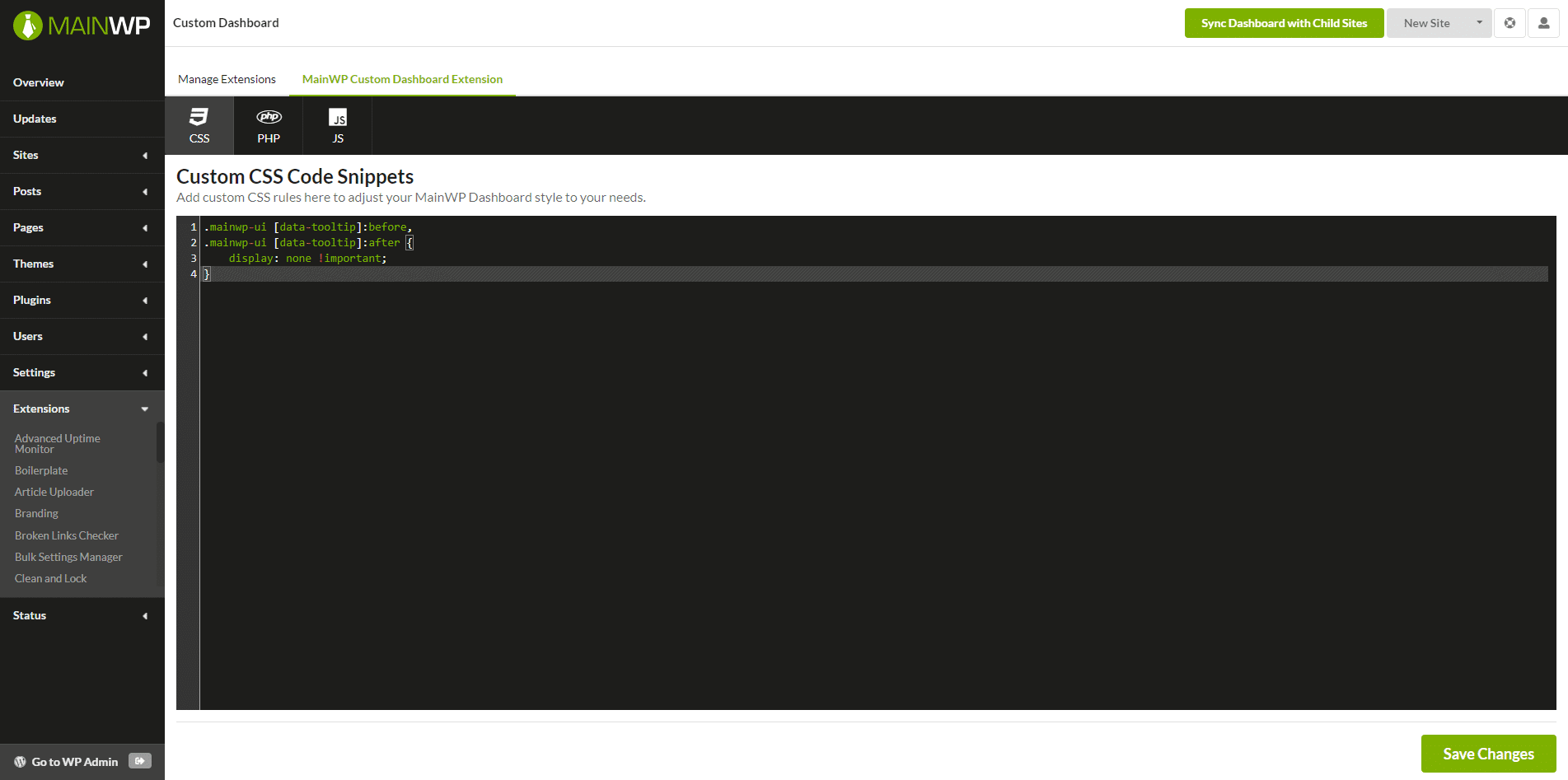 This extension will help you to keep all your changes in one location and independent of the other components.
This enables you to safely update your MainWP Dashboard plugin on your MainWP Dashboard site without worry about losing your modifications as well as deactivating your custom code if needed for troubleshooting.
The built-in code editor allows you to add your code directly through the extension interface.
**No FTP access is required.**
Check out our Github repository where we keep example snippets that will help you get started:
* [CSS Code Snippets](https://github.com/mainwp/mainwp-custom-dashboard-extension-examples/tree/master/css)
* [PHP Code Snippets](https://github.com/mainwp/mainwp-custom-dashboard-extension-examples/tree/master/php)
* [JS Code Snippets](https://github.com/mainwp/mainwp-custom-dashboard-extension-examples/tree/master/js)
## How It Works
MainWP Custom Dashboard Extension saves your PHP, CSS, and JS snippets in WordPress options on your MainWP Dashboard site instead of requiring separate PHP, CSS, or JS files.
CSS and JS snippets are added inline on MainWP pages only — they don't load on the rest of WP Admin or the front-end.
Saved PHP Code Snippets are executed on page load using the PHP function `eval()`.
In case the `eval()` function is disabled on your host, please contact your host support and have them enable it for you.
MainWP Custom Dashboard Extension is used to apply custom code snippets to the MainWP Dashboard site ONLY!
It doesn't apply code to child sites.
To apply custom code snippets to child sites, please see the [MainWP Code Snippets Extension](https://mainwp.com/extension/code-snippets/).
## The Code Editor
The editor is powered by CodeMirror 6 and ships with productivity features enabled by default:
* **Syntax highlighting** for PHP, CSS, and JavaScript
* **One Dark** theme for better readability
* **Autocompletion** as you type
* **Automatic bracket closing** for `()`, `{}`, `[]`, and quotes
* **Code folding** with gutter handles and keyboard shortcuts
* **Tab indentation** that respects natural tab behavior inside the editor
Use the language tab at the top of the page to switch between the PHP, CSS, and JS editors. Each language is saved independently.
## Writing PHP Snippets
PHP snippets are saved as **tagless** PHP — write your code without `` tags. The extension validates this on save and rejects snippets that contain PHP tags.
```php theme={null}
// ✅ Correct — no opening or closing tags
add_action( 'admin_footer', function () {
echo '';
} );
```
```php theme={null}
// ❌ Rejected — PHP tags are not allowed inside the editor
';
} );
?>
```
### Pre-save syntax validation
Before a PHP snippet is saved, the extension runs a syntax check on the code. If the snippet contains a parse error, the save is rejected and the editor displays the error message so you can fix it before it ever runs.
This catches the most common cause of a broken dashboard — a typo in a snippet — without you having to reload the page to find out.
### Runtime error handling
If a saved PHP snippet still produces a parse or compile fatal error at runtime, the extension catches it and shows a safe error message with a link back to the PHP editor. Snippet execution is disabled until you fix the code:
This extension will help you to keep all your changes in one location and independent of the other components.
This enables you to safely update your MainWP Dashboard plugin on your MainWP Dashboard site without worry about losing your modifications as well as deactivating your custom code if needed for troubleshooting.
The built-in code editor allows you to add your code directly through the extension interface.
**No FTP access is required.**
Check out our Github repository where we keep example snippets that will help you get started:
* [CSS Code Snippets](https://github.com/mainwp/mainwp-custom-dashboard-extension-examples/tree/master/css)
* [PHP Code Snippets](https://github.com/mainwp/mainwp-custom-dashboard-extension-examples/tree/master/php)
* [JS Code Snippets](https://github.com/mainwp/mainwp-custom-dashboard-extension-examples/tree/master/js)
## How It Works
MainWP Custom Dashboard Extension saves your PHP, CSS, and JS snippets in WordPress options on your MainWP Dashboard site instead of requiring separate PHP, CSS, or JS files.
CSS and JS snippets are added inline on MainWP pages only — they don't load on the rest of WP Admin or the front-end.
Saved PHP Code Snippets are executed on page load using the PHP function `eval()`.
In case the `eval()` function is disabled on your host, please contact your host support and have them enable it for you.
MainWP Custom Dashboard Extension is used to apply custom code snippets to the MainWP Dashboard site ONLY!
It doesn't apply code to child sites.
To apply custom code snippets to child sites, please see the [MainWP Code Snippets Extension](https://mainwp.com/extension/code-snippets/).
## The Code Editor
The editor is powered by CodeMirror 6 and ships with productivity features enabled by default:
* **Syntax highlighting** for PHP, CSS, and JavaScript
* **One Dark** theme for better readability
* **Autocompletion** as you type
* **Automatic bracket closing** for `()`, `{}`, `[]`, and quotes
* **Code folding** with gutter handles and keyboard shortcuts
* **Tab indentation** that respects natural tab behavior inside the editor
Use the language tab at the top of the page to switch between the PHP, CSS, and JS editors. Each language is saved independently.
## Writing PHP Snippets
PHP snippets are saved as **tagless** PHP — write your code without `` tags. The extension validates this on save and rejects snippets that contain PHP tags.
```php theme={null}
// ✅ Correct — no opening or closing tags
add_action( 'admin_footer', function () {
echo '';
} );
```
```php theme={null}
// ❌ Rejected — PHP tags are not allowed inside the editor
';
} );
?>
```
### Pre-save syntax validation
Before a PHP snippet is saved, the extension runs a syntax check on the code. If the snippet contains a parse error, the save is rejected and the editor displays the error message so you can fix it before it ever runs.
This catches the most common cause of a broken dashboard — a typo in a snippet — without you having to reload the page to find out.
### Runtime error handling
If a saved PHP snippet still produces a parse or compile fatal error at runtime, the extension catches it and shows a safe error message with a link back to the PHP editor. Snippet execution is disabled until you fix the code:
 Other runtime exceptions (`Throwable`s) thrown by a snippet are caught and logged instead of taking down the page.
***
## Related Resources
* [Development Add-ons](/add-ons/development) - Browse all development tools
* [Code Snippets Extension](/add-ons/development/code-snippets-extension) - Deploy code to child sites
* [Dashboard Themes](/customization/how-to-change-the-theme-for-mainwp) - MainWP Dashboard appearance and theme behavior
Other runtime exceptions (`Throwable`s) thrown by a snippet are caught and logged instead of taking down the page.
***
## Related Resources
* [Development Add-ons](/add-ons/development) - Browse all development tools
* [Code Snippets Extension](/add-ons/development/code-snippets-extension) - Deploy code to child sites
* [Dashboard Themes](/customization/how-to-change-the-theme-for-mainwp) - MainWP Dashboard appearance and theme behavior