> ## Documentation Index
> Fetch the complete documentation index at: https://docs.mainwp.com/llms.txt
> Use this file to discover all available pages before exploring further.
# How to detect the Essential Plugin wp-config.php compromise with Code Snippets
> Use the MainWP Code Snippets add-on to check child sites for indicators tied to the Essential Plugin `wpos-analytics` wp-config.php compromise and review the results from one dashboard.
This guide shows how to use the [Code Snippets](/add-ons/development/code-snippets-extension) add-on to check child sites for indicators tied to the `wpos-analytics` / Essential Plugin supply chain attack described by [Anchor Host](https://anchor.host/someone-bought-30-wordpress-plugins-and-planted-a-backdoor-in-all-of-them/). The incident was unrelated to MainWP, but this snippet gives MainWP users a fast way to inspect multiple child sites from one dashboard.
Copy the latest version of the detection snippet from [GitHub](https://github.com/mainwp/Code-Snippets-Functions/blob/main/Returns%20information%20from%20child%20Site/General/mainwp-detect-wpos-analytics-wp-config-compromise.php).
## What You'll Learn
* Why this snippet exists
* What the snippet checks for
* How to run it with **Return info from Child Sites**
* How to interpret the results and what to do next
## Prerequisites
* A MainWP Dashboard with the [Code Snippets](/add-ons/development/code-snippets-extension) add-on installed
* Child sites connected to your MainWP Dashboard
* The detection snippet copied from [GitHub](https://github.com/mainwp/Code-Snippets-Functions/blob/main/Returns%20information%20from%20child%20Site/General/mainwp-detect-wpos-analytics-wp-config-compromise.php)
***
This snippet is read-only when you run it as **Return info from Child Sites**.
It checks each child site and returns findings in the console. It does not save
code on the child site and does not modify `wp-config.php`.
This check targets one specific incident. A clean result means no known
indicators for this compromise were found. It is not a full malware scan.
## Why We Made This Snippet
According to Anchor Host's investigation, malicious code was planted in multiple Essential Plugin updates on August 8, 2025 and activated on April 5-6, 2026. The injected `wpos-analytics` code phoned home to `analytics.essentialplugin.com`, created a fake `wp-comments-posts.php` file in the site root, and appended malicious code to `wp-config.php`.
We created this snippet so MainWP users can quickly inspect many child sites for the known indicators of this specific compromise without logging in to each site one by one.
## What the Snippet Checks
* Unexpected content appended after the `wp-settings.php` require line in `wp-config.php`
* `eval()` or `base64_decode()` attached to that same line
* Known indicators in `wp-config.php`, including `analytics.essentialplugin.com`, `wp-comments-posts.php`, `wpos-analytics`, `wpos_analytics_anl`, `Plugin Wpos Analytics Data Starts`, `ethereum`, and `web3`
* The presence of `wp-comments-posts.php` in the site root
* An unusually large `wp-config.php`
The file size check is only a warning sign. The snippet adds a note if `wp-config.php` is over roughly 9 KB. Clean files are often under 5 KB, so size alone is not proof of compromise, but it is worth inspecting.
## Deploy and Run the Snippet
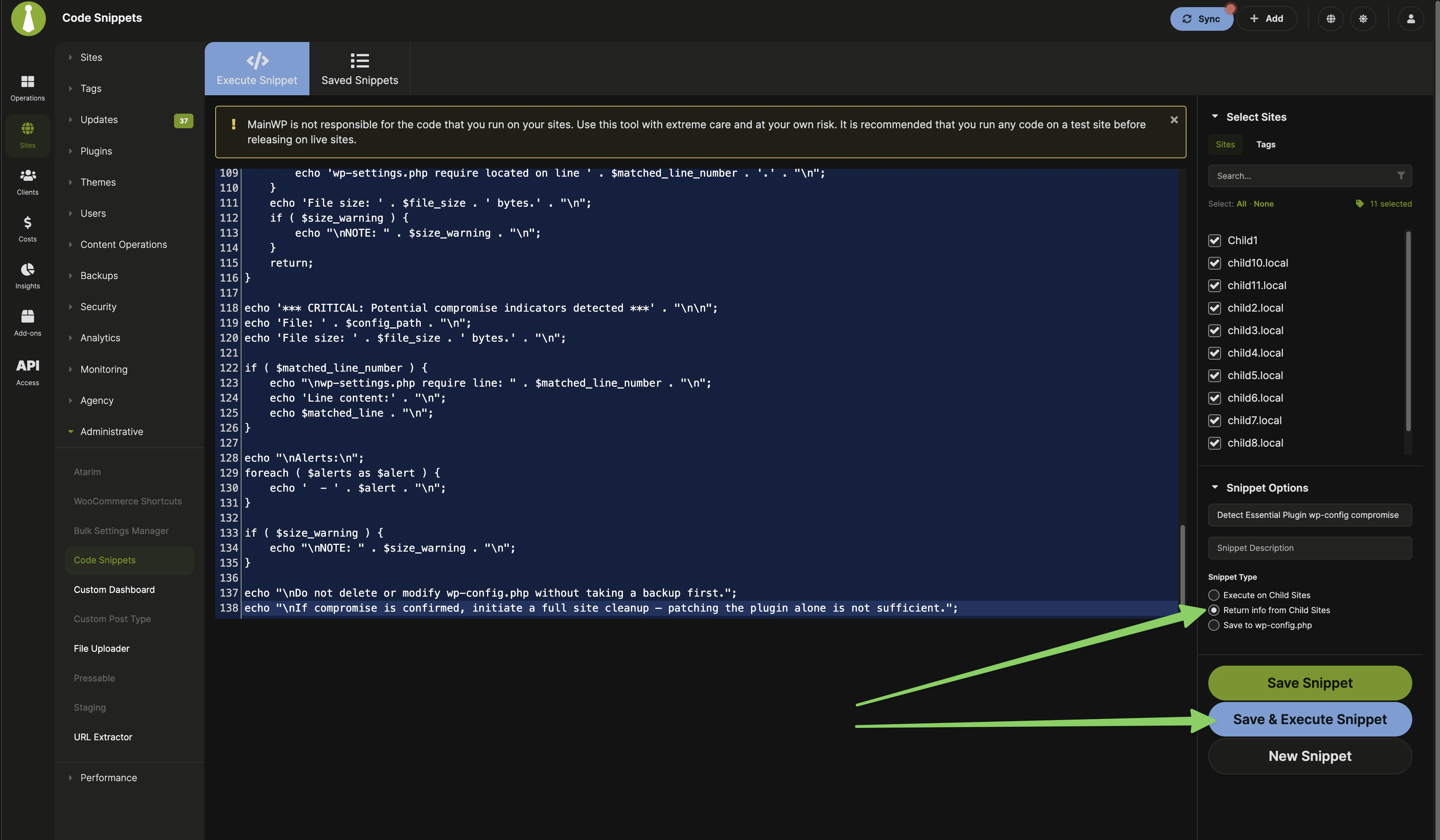 Open the [GitHub source file](https://github.com/mainwp/Code-Snippets-Functions/blob/main/Returns%20information%20from%20child%20Site/General/mainwp-detect-wpos-analytics-wp-config-compromise.php) and copy the full PHP snippet.
Go to **MainWP > Add-ons > Code Snippets > Execute Snippet**.
Use a clear title such as **Detect Essential Plugin wp-config compromise** so you can find it again later in **Saved Snippets**.
Choose **Return info from Child Sites**.
This is important. This snippet should not be run as **Execute on Child Sites** or **Save to wp-config.php**.
Choose the sites you want to inspect. If you know which sites used affected Essential Plugin plugins, start with those sites first. Otherwise, you can run the check across all relevant child sites.
Paste the snippet into the editor, then click **Save & Execute Snippet**.
MainWP opens the console and returns the result for each selected child site. Look for `OK`, `CRITICAL`, or `ERROR` in the output.
If you save the snippet in MainWP Dashboard, you can run it again later from
**Saved Snippets**. Even when saved there, the code is still not stored on
child sites when you use **Return info from Child Sites**.
## What the Results Mean
| Result | Meaning | What to do |
| ---------- | ---------------------------------------------------------------------------------------- | ------------------------------------------------------------------------------------------------------------------------ |
| `OK` | No known indicators were found in `wp-config.php` and the dropper file was not detected. | No immediate action is required for this specific incident. Continue normal security monitoring. |
| `CRITICAL` | One or more compromise indicators were found. | Investigate the site immediately. Review `wp-config.php`, check for `wp-comments-posts.php`, and perform a full cleanup. |
| `ERROR` | The snippet could not locate or read `wp-config.php`. | Check file location and permissions on the child site, then run the snippet again. |
If the snippet reports that `wp-config.php` is unusually large, treat that as an additional warning sign and inspect the file closely.
## If a Site Is Flagged
Do not assume the site is clean just because the plugin was updated, disabled,
or removed. This compromise modifies `wp-config.php` directly, and that change
must be inspected and cleaned separately.
1. Take a fresh backup or snapshot before editing anything.
2. Review `wp-config.php` and the site root for the indicators listed in the snippet output.
3. Remove the affected plugin and replace its functionality with a trusted alternative.
4. Perform a full malware review and cleanup of the site.
5. Re-run the snippet after cleanup to confirm the known indicators are gone.
## Related Resources
* [Code Snippets](/add-ons/development/code-snippets-extension) - Main documentation for the add-on
* [Managing Plugins with MainWP](/sites/plugins/managing-plugins-with-mainwp) - Update, install, and remove plugins across child sites
* [Wordfence Extension](/add-ons/security/wordfence-extension) - Additional security monitoring
Open the [GitHub source file](https://github.com/mainwp/Code-Snippets-Functions/blob/main/Returns%20information%20from%20child%20Site/General/mainwp-detect-wpos-analytics-wp-config-compromise.php) and copy the full PHP snippet.
Go to **MainWP > Add-ons > Code Snippets > Execute Snippet**.
Use a clear title such as **Detect Essential Plugin wp-config compromise** so you can find it again later in **Saved Snippets**.
Choose **Return info from Child Sites**.
This is important. This snippet should not be run as **Execute on Child Sites** or **Save to wp-config.php**.
Choose the sites you want to inspect. If you know which sites used affected Essential Plugin plugins, start with those sites first. Otherwise, you can run the check across all relevant child sites.
Paste the snippet into the editor, then click **Save & Execute Snippet**.
MainWP opens the console and returns the result for each selected child site. Look for `OK`, `CRITICAL`, or `ERROR` in the output.
If you save the snippet in MainWP Dashboard, you can run it again later from
**Saved Snippets**. Even when saved there, the code is still not stored on
child sites when you use **Return info from Child Sites**.
## What the Results Mean
| Result | Meaning | What to do |
| ---------- | ---------------------------------------------------------------------------------------- | ------------------------------------------------------------------------------------------------------------------------ |
| `OK` | No known indicators were found in `wp-config.php` and the dropper file was not detected. | No immediate action is required for this specific incident. Continue normal security monitoring. |
| `CRITICAL` | One or more compromise indicators were found. | Investigate the site immediately. Review `wp-config.php`, check for `wp-comments-posts.php`, and perform a full cleanup. |
| `ERROR` | The snippet could not locate or read `wp-config.php`. | Check file location and permissions on the child site, then run the snippet again. |
If the snippet reports that `wp-config.php` is unusually large, treat that as an additional warning sign and inspect the file closely.
## If a Site Is Flagged
Do not assume the site is clean just because the plugin was updated, disabled,
or removed. This compromise modifies `wp-config.php` directly, and that change
must be inspected and cleaned separately.
1. Take a fresh backup or snapshot before editing anything.
2. Review `wp-config.php` and the site root for the indicators listed in the snippet output.
3. Remove the affected plugin and replace its functionality with a trusted alternative.
4. Perform a full malware review and cleanup of the site.
5. Re-run the snippet after cleanup to confirm the known indicators are gone.
## Related Resources
* [Code Snippets](/add-ons/development/code-snippets-extension) - Main documentation for the add-on
* [Managing Plugins with MainWP](/sites/plugins/managing-plugins-with-mainwp) - Update, install, and remove plugins across child sites
* [Wordfence Extension](/add-ons/security/wordfence-extension) - Additional security monitoring