> ## Documentation Index
> Fetch the complete documentation index at: https://docs.mainwp.com/llms.txt
> Use this file to discover all available pages before exploring further.
# Code Snippets Overview
> WordPress Code Snippets for MainWP is a simple way to add code snippets to your Child Sites from one centralized location. No need to manually edit your theme's functions.php file or wp-config.php file.
## What You'll Learn
* Understanding the three code snippet types
* Using the updated code editor
* Selecting Sites, Tags, or Clients for snippets
* Running and saving code snippets
* Reviewing saved snippets and target counts
* Removing snippets from child sites
* Recovering from bad snippets
* Useful wp-config.php snippets
***
**Extension Add-on** - This add-on provides standalone functionality within MainWP Dashboard. No third-party plugins required.
The [MainWP Code Snippets Extension](https://mainwp.com/extension/code-snippets/) is a simple way to add code snippets to your child sites from one centralized location. A code snippet is a small chunk of PHP code that can be sent to your child sites, saved on your child sites, or written to `wp-config.php`, depending on the snippet type. Sometimes snippets contain full functions; other times, they modify an existing function.
**This tool is recommended for advanced users only.** We only recommend utilizing it if you are an experienced PHP coder.
## Code Snippet Types
The MainWP Code Snippets Extension allows you to process code in three ways:
This type of snippet saves the snippet in the selected child site database and executes it when the child site loads. Use this option to make persistent changes to selected child sites. For example, use it to customize the admin footer across different sites in your network.
This type of snippet runs on selected child sites and displays the returned output in the Console. It is useful for queries that return information, such as the published post count for each selected site. This type is not saved on child sites.
This type of snippet writes the snippet to the selected child site's `wp-config.php` file. Use it only for configuration constants and code that belongs in `wp-config.php`, such as increasing the WordPress memory limit, blocking external requests, or disabling WP-Cron.
MainWP is not responsible for the code that you run on your sites. Use this tool with extreme care and at your own risk. Run any code on a test site before releasing it on live sites. If you execute a bad code snippet and crash your child sites, you need to remove the code snippet from your sites.
## Code Editor and Validation
The snippet editor uses CodeMirror 6 and includes:
* Code folding controls and fold keyboard shortcuts
* Autocompletion
* Automatic bracket closing
* Bracket matching
* Tab indentation with a four-space tab size
* Line wrapping and active line highlighting
Before a snippet is saved, run, or pushed to child sites, the extension checks the PHP syntax. If the parser finds a syntax error, the extension stops the process and shows the error message.
Syntax validation helps catch malformed PHP before it reaches your sites. It does not verify that the code is logically safe, that called functions exist, or that the snippet will behave as intended in every site environment.
The validator also rejects top-level `namespace`, `declare`, and `use` statements because snippets are executed as raw PHP code, not as standalone PHP files.
## Select Sites, Tags, or Clients
Use the **Select Sites** panel to choose where a snippet applies. The selector includes tabs for **Sites**, **Tags**, and **Clients**.
Each saved snippet stores one targeting mode at a time:
* **Sites** - Save the selected child site IDs.
* **Tags** - Save the selected tag IDs.
* **Clients** - Save the selected client IDs.
If you switch from one targeting mode to another, the extension saves the targets from the active selection mode only.
## Snippets Table
The **Snippets** tab lists saved snippets in a table with these columns:
* **Snippet** - Shows the snippet title and description together.
* **Type** - Shows a colored label for **Execute**, **Return**, or **wp-config.php**.
* **Target** - Shows a count with an icon for Sites, Tags, or Clients.
* **Last Edited** - Shows the relative edit time, with the exact date available on hover.
* **Actions** - Open or delete the snippet.
## Remove a Code Snippet From a Broken Site
Code snippets can be removed directly from the database. To do this:
The default table name is `wp_options`, but the prefix may be different on your site.
Locate and remove the `option_name = mainwp_ext_snippets_enabled` row, or the `option_name = mainwp_ext_code_snippets` row.
**This will remove all database-saved code snippets that were applied using our Code Snippets extension.** If you use bad snippets that are saved to `wp-config.php`, the file will need to be edited manually.
## Run a Code Snippet
### Run a New Code Snippet
Open the **New Snippet** tab.
Choose **Execute on Site**, **Return Info**, or **Add to wp-config.php**.
Use the [site selector](/getting-started/mainwp-user-interface) to choose the Sites, Tags, or Clients where you want to run the snippet.
Add your Code Snippet in the code editor
The extension saves the snippet, validates the PHP syntax, and opens the Console. For **Return Info** snippets, the Console shows returned output for each selected child site. For **Execute on Site** and **Add to wp-config.php** snippets, the Console shows the processing status.
### Run a Saved Code Snippet
Open the **Snippets** tab.
Click the snippet title or the green action button in the table.
Confirm the snippet type and the selected Sites, Tags, or Clients.
## Save a Code Snippet
### Save a New Code Snippet
Open the **New Snippet** tab.
Choose **Execute on Site**, **Return Info**, or **Add to wp-config.php**.
Use the [site selector](/getting-started/mainwp-user-interface) to save the snippet target selection. The snippet stores only the active target mode: Sites, Tags, or Clients.
Add your Code Snippet in the code editor
The extension saves the snippet in MainWP Dashboard without pushing it to child sites.
### Edit a Saved Code Snippet
Open the **Snippets** tab.
Click the snippet title or the green action button in the table.
Update the title, description, snippet type, target selection, or code.
## Remove a Code Snippet From Child Sites
Open the **Snippets** tab.
Unselect the child sites, tags, or clients where you want to remove the snippet.
This process removes the existing saved copy from child sites and then re-adds it only to the currently selected targets. This method is recommended when you want to keep the snippet in the **Snippets** list so it can be used again later. To remove the snippet from all child sites but keep it saved in MainWP Dashboard, clear the selected targets and click **Run Snippet**.
## Console Process Status
When you click **Run Snippet**, the Console opens and shows the current process status. Depending on the snippet type and whether the snippet already exists on child sites, you may see steps such as checking existing snippets, saving snippets on child sites, and executing snippets on child sites.
The Console also shows progress counts, site-level status icons, returned output for **Return Info** snippets, and a **Stop Process** button for stopping queued or in-progress processing.
## Useful Code Snippets
MainWP is not responsible for the code that you run on your sites. Use this tool with extreme care and at your own risk. It is recommended that you run any code on a test site before releasing it on live sites. In case you damage your site by using a bad code snippet, read [Remove a Code Snippet From a Broken Site](#remove-a-code-snippet-from-a-broken-site) to see how to fix it.
### Delete rows in the wp\_mainwp\_stream\_meta and wp\_mainwp\_stream tables
This can be useful if the wp\_mainwp\_stream\_meta and wp\_mainwp\_stream tables have grown large in size. To prevent them from growing this large in the future, consider lowering the number of days for which the records are kept. **NOTE:** This will delete all records in these two tables, which means that the Pro Reports reports will not have any information about events prior to this deletion.
*When running the script, make sure to select **Return Info**.*
```php theme={null}
global $wpdb;
$wpdb->query( "TRUNCATE TABLE {$wpdb->mainwp_stream}" );
$wpdb->query( "TRUNCATE TABLE {$wpdb->mainwp_streammeta}" );
```
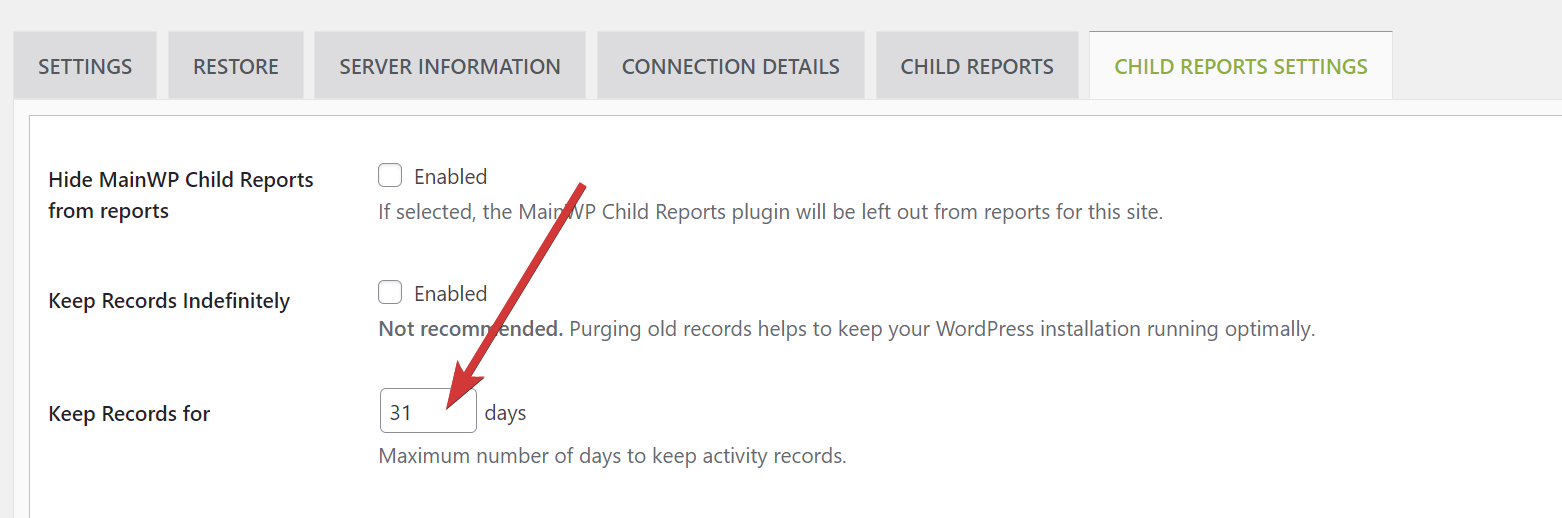
### Change the value of "Keep Records for" in MainWP Child Reports plugin
*When running the script, make sure to select **Return Info**.*
```php theme={null}
global $wpdb;
$option = get_option( 'wp_mainwp_stream' );
if ( $option && isset( $option['general_records_ttl'] ) ) {
$option['general_records_ttl'] = 31; // New desired value (e.g., 30 days)
update_option( 'wp_mainwp_stream', $option );
}
```
### Disable theme, plugin editor and plugin, core updates
*This snippet goes to the **wp-config.php** file of your child sites. Be sure to select **Add to wp-config.php** when using the code snippet.*
```php theme={null}
define('DISALLOW_FILE_EDIT',true); // theme, plugin
define('DISALLOW_FILE_MODS',true); // core, plugin
```
### Disable CRON job feature
*This snippet goes to the **wp-config.php** file of your site. Be sure to select **Add to wp-config.php** when using the code snippet.*
```php theme={null}
define('DISABLE_WP_CRON', true);
```
### Set auto-save interval
*This snippet goes to the **wp-config.php** file of your site. Be sure to select **Add to wp-config.php** when using the code snippet.*
```php theme={null}
define('AUTOSAVE_INTERVAL', 200);
```
### Block external requests
*This snippet goes to the **wp-config.php** file of your site. Be sure to select **Add to wp-config.php** when using the code snippet.*
```php theme={null}
define('WP_HTTP_BLOCK_EXTERNAL', true);
```
This snippet blocks outbound HTTP requests. It can also prevent WordPress, plugin, and theme update checks unless you allow the required hosts.
### Increase WordPress memory limit
*This snippet goes to the **wp-config.php** file of your site. Be sure to select **Add to wp-config.php** when using the code snippet.*
```php theme={null}
define('WP_MEMORY_LIMIT', '95M');
```
### Enable Debug Mode
*This snippet goes to the **wp-config.php** file of your site. Be sure to select **Add to wp-config.php** when using the code snippet.*
```php theme={null}
define( 'WP_DEBUG', true );
```
### Disable All Core Updates
*This snippet goes to the **wp-config.php** file of your site. Be sure to select **Add to wp-config.php** when using the code snippet.*
```php theme={null}
define( 'WP_AUTO_UPDATE_CORE', false );
```
### Protect WordPress against malicious URL requests
*Use the **Execute on Site** option when running this snippet. The extension saves this snippet in the child site's database and runs it when the child site loads.*
```php theme={null}
global $user_ID; if($user_ID) {
if(!current_user_can('administrator')) {
if (strlen($_SERVER['REQUEST_URI']) > 255 ||
stripos($_SERVER['REQUEST_URI'], "eval(") ||
stripos($_SERVER['REQUEST_URI'], "CONCAT") ||
stripos($_SERVER['REQUEST_URI'], "UNION+SELECT") ||
stripos($_SERVER['REQUEST_URI'], "base64")) {
@header("HTTP/1.1 414 Request-URI Too Long");
@header("Status: 414 Request-URI Too Long");
@header("Connection: Close");
@exit;
}
}
}
```
Source: [WPSnip.com](http://wpsnip.com/)
***
## Related Resources
* [Administrative Add-ons](/add-ons/administrative) - Browse administrative tools
* [Detect the Essential Plugin wp-config.php compromise](/add-ons/development/detect-wpos-analytics-wp-config-compromise) - Use a read-only snippet to check child sites for known compromise indicators
* [White Label Extension](/add-ons/agency/white-label-extension) - Deploy filters to child sites
* [Bulk Settings Manager](/add-ons/administrative/bulk-settings-manager-extension) - Manage plugin settings


 *When running the script, make sure to select **Return Info**.*
```php theme={null}
global $wpdb;
$option = get_option( 'wp_mainwp_stream' );
if ( $option && isset( $option['general_records_ttl'] ) ) {
$option['general_records_ttl'] = 31; // New desired value (e.g., 30 days)
update_option( 'wp_mainwp_stream', $option );
}
```
### Disable theme, plugin editor and plugin, core updates
*This snippet goes to the **wp-config.php** file of your child sites. Be sure to select **Add to wp-config.php** when using the code snippet.*
```php theme={null}
define('DISALLOW_FILE_EDIT',true); // theme, plugin
define('DISALLOW_FILE_MODS',true); // core, plugin
```
### Disable CRON job feature
*This snippet goes to the **wp-config.php** file of your site. Be sure to select **Add to wp-config.php** when using the code snippet.*
```php theme={null}
define('DISABLE_WP_CRON', true);
```
### Set auto-save interval
*This snippet goes to the **wp-config.php** file of your site. Be sure to select **Add to wp-config.php** when using the code snippet.*
```php theme={null}
define('AUTOSAVE_INTERVAL', 200);
```
### Block external requests
*This snippet goes to the **wp-config.php** file of your site. Be sure to select **Add to wp-config.php** when using the code snippet.*
```php theme={null}
define('WP_HTTP_BLOCK_EXTERNAL', true);
```
This snippet blocks outbound HTTP requests. It can also prevent WordPress, plugin, and theme update checks unless you allow the required hosts.
### Increase WordPress memory limit
*This snippet goes to the **wp-config.php** file of your site. Be sure to select **Add to wp-config.php** when using the code snippet.*
```php theme={null}
define('WP_MEMORY_LIMIT', '95M');
```
### Enable Debug Mode
*This snippet goes to the **wp-config.php** file of your site. Be sure to select **Add to wp-config.php** when using the code snippet.*
```php theme={null}
define( 'WP_DEBUG', true );
```
### Disable All Core Updates
*This snippet goes to the **wp-config.php** file of your site. Be sure to select **Add to wp-config.php** when using the code snippet.*
```php theme={null}
define( 'WP_AUTO_UPDATE_CORE', false );
```
### Protect WordPress against malicious URL requests
*Use the **Execute on Site** option when running this snippet. The extension saves this snippet in the child site's database and runs it when the child site loads.*
```php theme={null}
global $user_ID; if($user_ID) {
if(!current_user_can('administrator')) {
if (strlen($_SERVER['REQUEST_URI']) > 255 ||
stripos($_SERVER['REQUEST_URI'], "eval(") ||
stripos($_SERVER['REQUEST_URI'], "CONCAT") ||
stripos($_SERVER['REQUEST_URI'], "UNION+SELECT") ||
stripos($_SERVER['REQUEST_URI'], "base64")) {
@header("HTTP/1.1 414 Request-URI Too Long");
@header("Status: 414 Request-URI Too Long");
@header("Connection: Close");
@exit;
}
}
}
```
Source: [WPSnip.com](http://wpsnip.com/)
***
## Related Resources
* [Administrative Add-ons](/add-ons/administrative) - Browse administrative tools
* [Detect the Essential Plugin wp-config.php compromise](/add-ons/development/detect-wpos-analytics-wp-config-compromise) - Use a read-only snippet to check child sites for known compromise indicators
* [White Label Extension](/add-ons/agency/white-label-extension) - Deploy filters to child sites
* [Bulk Settings Manager](/add-ons/administrative/bulk-settings-manager-extension) - Manage plugin settings
*When running the script, make sure to select **Return Info**.*
```php theme={null}
global $wpdb;
$option = get_option( 'wp_mainwp_stream' );
if ( $option && isset( $option['general_records_ttl'] ) ) {
$option['general_records_ttl'] = 31; // New desired value (e.g., 30 days)
update_option( 'wp_mainwp_stream', $option );
}
```
### Disable theme, plugin editor and plugin, core updates
*This snippet goes to the **wp-config.php** file of your child sites. Be sure to select **Add to wp-config.php** when using the code snippet.*
```php theme={null}
define('DISALLOW_FILE_EDIT',true); // theme, plugin
define('DISALLOW_FILE_MODS',true); // core, plugin
```
### Disable CRON job feature
*This snippet goes to the **wp-config.php** file of your site. Be sure to select **Add to wp-config.php** when using the code snippet.*
```php theme={null}
define('DISABLE_WP_CRON', true);
```
### Set auto-save interval
*This snippet goes to the **wp-config.php** file of your site. Be sure to select **Add to wp-config.php** when using the code snippet.*
```php theme={null}
define('AUTOSAVE_INTERVAL', 200);
```
### Block external requests
*This snippet goes to the **wp-config.php** file of your site. Be sure to select **Add to wp-config.php** when using the code snippet.*
```php theme={null}
define('WP_HTTP_BLOCK_EXTERNAL', true);
```
This snippet blocks outbound HTTP requests. It can also prevent WordPress, plugin, and theme update checks unless you allow the required hosts.
### Increase WordPress memory limit
*This snippet goes to the **wp-config.php** file of your site. Be sure to select **Add to wp-config.php** when using the code snippet.*
```php theme={null}
define('WP_MEMORY_LIMIT', '95M');
```
### Enable Debug Mode
*This snippet goes to the **wp-config.php** file of your site. Be sure to select **Add to wp-config.php** when using the code snippet.*
```php theme={null}
define( 'WP_DEBUG', true );
```
### Disable All Core Updates
*This snippet goes to the **wp-config.php** file of your site. Be sure to select **Add to wp-config.php** when using the code snippet.*
```php theme={null}
define( 'WP_AUTO_UPDATE_CORE', false );
```
### Protect WordPress against malicious URL requests
*Use the **Execute on Site** option when running this snippet. The extension saves this snippet in the child site's database and runs it when the child site loads.*
```php theme={null}
global $user_ID; if($user_ID) {
if(!current_user_can('administrator')) {
if (strlen($_SERVER['REQUEST_URI']) > 255 ||
stripos($_SERVER['REQUEST_URI'], "eval(") ||
stripos($_SERVER['REQUEST_URI'], "CONCAT") ||
stripos($_SERVER['REQUEST_URI'], "UNION+SELECT") ||
stripos($_SERVER['REQUEST_URI'], "base64")) {
@header("HTTP/1.1 414 Request-URI Too Long");
@header("Status: 414 Request-URI Too Long");
@header("Connection: Close");
@exit;
}
}
}
```
Source: [WPSnip.com](http://wpsnip.com/)
***
## Related Resources
* [Administrative Add-ons](/add-ons/administrative) - Browse administrative tools
* [Detect the Essential Plugin wp-config.php compromise](/add-ons/development/detect-wpos-analytics-wp-config-compromise) - Use a read-only snippet to check child sites for known compromise indicators
* [White Label Extension](/add-ons/agency/white-label-extension) - Deploy filters to child sites
* [Bulk Settings Manager](/add-ons/administrative/bulk-settings-manager-extension) - Manage plugin settings